


CherryTree is a free and open-source hierarchical note-taking application for Windows. It allows users to organize notes in a tree structure, making it useful for managing documentation, research, code snippets, personal notes, and other types of information.
The application supports rich text formatting, syntax highlighting, images, tables, hyperlinks, mathematical expressions, and embedded files. Its structured approach makes it particularly useful for users who prefer to keep large amounts of information organized in nested categories.
Key Features
- Hierarchical tree-based note organization
- Rich text and plain text editing
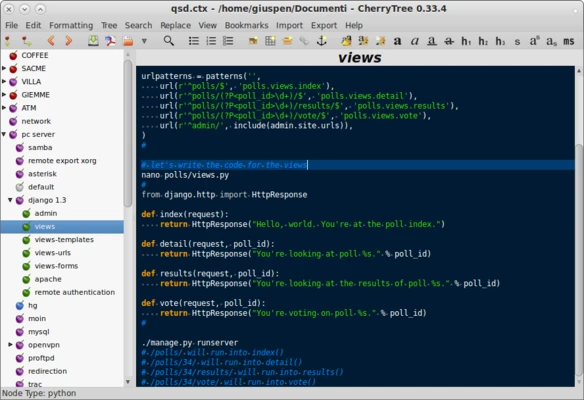
- Syntax highlighting for programming languages
- Support for images, tables, and hyperlinks
- LaTeX support for mathematical expressions
- Codeboxes with syntax highlighting
- Search and replace across notes and subnodes
- Password protection and encryption
- Auto-save and backup features
- Drag-and-drop organization
- Import and export support
- PDF, HTML, and plain text export
- Portable version available
- Cross-platform support for Windows, Linux, and macOS
User Interface
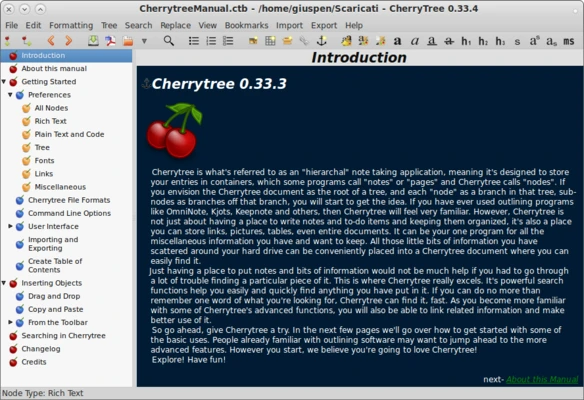
CherryTree uses a simple two-pane interface. The left pane displays the hierarchical tree of notes, while the right pane shows the content of the selected node.
The interface focuses on functionality rather than modern visual design, providing quick access to formatting, search, editing, and organizational tools.
How to Use
Download and install CherryTree, then launch the application to create a new notebook.
Create nodes and subnodes to organize your information into categories. You can format text, insert images and tables, add code snippets, and create hyperlinks within your notes.
Use the search function to quickly find information across your notes. When needed, individual notes or entire trees can be exported to PDF, HTML, or plain text.
FAQ
Is CherryTree free to use?
Yes. CherryTree is free and open-source software released under the GPL license.
Does CherryTree support cloud synchronization?
CherryTree does not include built-in cloud synchronization. Users can synchronize the database file through compatible cloud storage services.
Does CherryTree have a mobile version?
There is currently no official mobile version of CherryTree.
Can I protect my notes with a password?
Yes. CherryTree provides password protection and encryption for securing notes and databases.
Can I import notes from other applications?
Yes. CherryTree supports importing data from several note-taking applications and formats.
Alternatives
Microsoft OneNote is a feature-rich note-taking application with cloud synchronization and collaboration features.
Evernote provides extensive note organization, web clipping, and synchronization capabilities.
Joplin is an open-source alternative with Markdown support, synchronization options, and end-to-end encryption.
System Requirements
- Operating System: Windows 7, 8, 10, or 11
- Processor: 1 GHz or faster
- RAM: 2 GB or more
- Storage: 100 MB or more
PROS
- Free and open-source
- Hierarchical note organization
- Rich text and code support
- Extensive import and export options
- Password protection and encryption
- Portable version available
- Supports multiple operating systems
CONS
- No official mobile application
- No built-in cloud synchronization
- Interface looks dated compared with newer note-taking applications
- May take some time for new users to learn
Conclusion
CherryTree is a powerful free and open-source note-taking application designed for users who need structured information management. Its hierarchical organization, rich text editing, code highlighting, encryption, and extensive import and export options make it suitable for developers, students, researchers, and other users who work with large collections of notes.
While it lacks built-in cloud synchronization and a modern interface, CherryTree remains a capable choice for users who prioritize organization, flexibility, and local control over their data.