


EmEditor Professional is a fast, lightweight, and powerful text editor for Windows designed for programmers, writers, database administrators, and users who need to work with large files.
It supports Unicode, powerful macros, advanced search, CSV editing, and extremely large files up to 16 TB. With native 64-bit and 32-bit versions, EmEditor delivers high performance while remaining easy to use.
Whether you are editing code, analyzing logs, managing CSV files, or working with large text documents, EmEditor provides a flexible and efficient editing environment.
Features
Large File Support
- Open and edit extremely large files up to 16 TB.
- Fast processing with optimized memory usage.
- Large File Controller allows partial loading of huge files.
- Split and combine large documents easily.
Powerful Editing Tools
- Multiple selection editing.
- Compare documents.
- Regular expression search and replace.
- Batch replace across files.
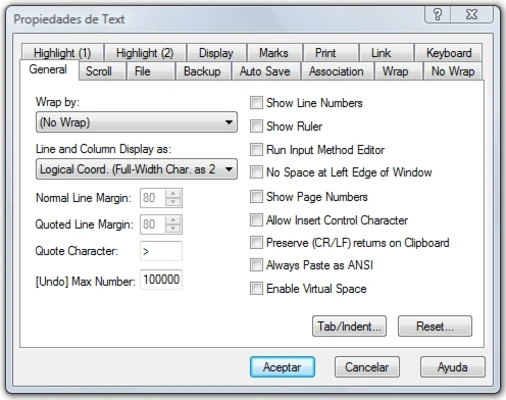
- Customizable keyboard shortcuts.
Advanced CSV Tools
- Open and edit CSV, TSV, and DSV files.
- Sort data by columns.
- Freeze header rows.
- CSV conversion tools.
- Pivot table support.
- Join and analyze CSV data.
Programmer Features
- Syntax highlighting for programming languages.
- Powerful macro system with scripting support.
- Project management tools.
- Code navigation and outline view.
- External tool integration.
- Spell checking support.
Customization and Plugins
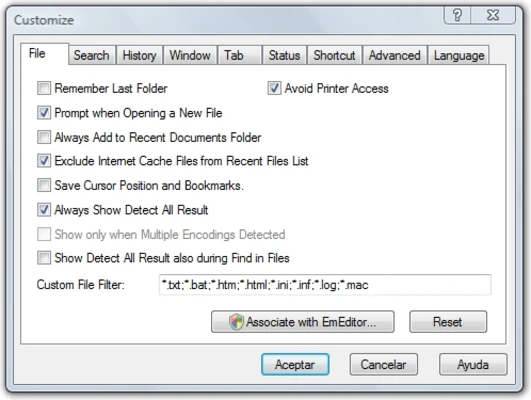
- Flexible interface customization.
- Tabbed document management.
- Plugin support.
- Workspace memory.
- Snippets and templates.
- AI-assisted tools.
User Interface
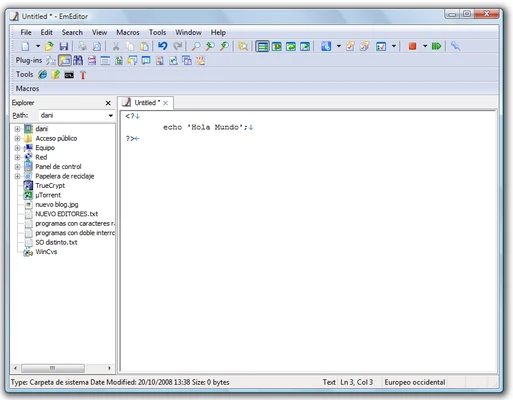
EmEditor features a clean and customizable Windows interface with support for tabs, multiple layouts, and personalized toolbars.
The lightweight design allows it to launch quickly while still providing advanced features for professional users.
How to Use
- Open EmEditor and create or load a text document.
- Use search and replace tools to modify content.
- Enable syntax highlighting for programming files.
- Use CSV mode for spreadsheet-like data editing.
- Create macros to automate repetitive tasks.
- Customize plugins and settings according to your workflow.
FAQ
Can EmEditor open very large files?
Yes. EmEditor can handle extremely large files up to 16 TB with its large file optimization technology.
Does EmEditor support programming languages?
Yes. It supports syntax highlighting, macros, plugins, and tools for developers.
Can EmEditor edit CSV files?
Yes. It includes advanced CSV editing features such as sorting, filtering, and data conversion.
Is EmEditor available for macOS or Linux?
No. EmEditor is designed specifically for Windows systems.
Does EmEditor have a free version?
Yes. A free edition is available with fewer features than the Professional version.
Alternatives
- Visual Studio Code – Free and highly customizable editor with extensive extensions.
- UltraEdit – Professional text editor with powerful large-file handling.
- Sublime Text – Lightweight editor with fast performance and plugin support.
- Notepad++ – Free and simple editor for everyday coding tasks.
- Eclipse – Full-featured development environment with plugin support.
Pricing
EmEditor Professional
Annual subscription: $48/year
A trial version is available.
System Requirements
- Operating System: Windows 11, Windows 10, Windows 8.1, Windows 7 SP1, Windows Server 2008 R2 or later
- Processor: Intel or AMD CPU
- RAM: 2 GB or more recommended
- Storage: Approx. 200 MB free disk space
PROS
- Extremely fast performance
- Supports huge text files
- Powerful search and replace tools
- Advanced CSV editing features
- Extensive customization options
- Strong macro and plugin support
CONS
- Windows only
- Subscription-based pricing
- Limited collaboration features
- No built-in version control integration