Go to Windows platform Display platforms icon
Go to Windows platform Go to Mac platform Go to Android platform
Google Antigravity 2.29.0 icon

Google Antigravity 2.29.0

2.29.0
Google LLC
5.0
161.45 MB size

Google's official advanced AI-first IDE

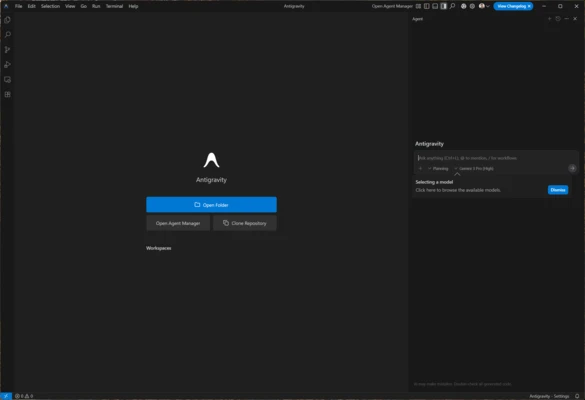
Google Antigravity is an AI-assisted development environment created by Google to automate and streamline programming. Unlike conventional code assistants, it uses autonomous agents that can collaborate with developers on planning, coding, and maintenance tasks, including code generation, refactoring, automated testing, and infrastructure management. Built on Visual Studio Code, it integrates AI models such as Gemini and Claude to support a more automated development workflow.

An intelligent and collaborative environment

Google Antigravity focuses on collaboration between developers and AI agents. Its interface includes a dedicated agent panel where you can select the model you want to use and give instructions in natural language. These agents can analyze workflows, execute programming tasks, debug errors, provide code completions, and offer real-time suggestions.

You can also delegate tasks such as writing tests, generating documentation, and refactoring complex code while supervising each step. When an agent generates content or completes a task, it can provide a checklist of actions that require your attention. For example, when creating a plugin that needs additional information, such as an account for API access, Google Antigravity can guide you through the remaining setup steps.

Multiple agents and Mission Control

Google Antigravity supports multiple agents working simultaneously through Mission Control, a centralized interface for monitoring, managing, and assigning tasks. During development, agents can generate verifiable artifacts, including task lists, execution plans, and detailed reports. These records make it easier to track progress and review the work performed during each development iteration.

Beyond code editing, the environment can help automate routine development tasks and integrate workflows involving version control, deployments, and infrastructure management.

Multimodal support and image identification

With Gemini and its multimodal capabilities, Google Antigravity can process source code, natural language, images such as application interface designs, and API responses. You can describe an idea or provide visual references, and the AI agents can help turn them into working implementations.

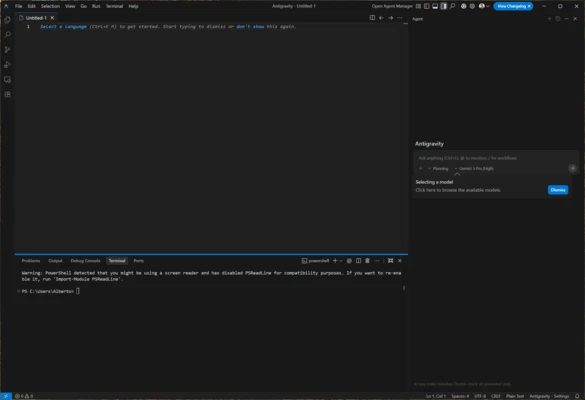
The platform also includes an integrated browser and interactive terminal. These tools allow agents to inspect applications, run tests, and work with deployed projects without requiring you to switch between separate development tools.

Information about Google Antigravity 2.29.0

License Freeware
Op. System Windows
Category Utilities
Language English + more
Author Google LLC
permission icon Permissions Not applicable
Date 2026-11-04
Size 161.45 MB
File type Official Website

Apps recommended for you

Wipe icon
Eliminate Windows garbage and speed up your system
The Dude icon
Monitor and manage your network easily with The Dude for Windows, a powerful network mapping and monitoring tool.
Notepad Light icon
Notepad Light is a simple and lightweight text editor designed for quick note-taking and basic text editing with a clean and minimal interface.
Hasleo Disk Clone 5.9.2.0 icon
Easily migrate your Windows operating system
GSA Search Engine Ranker icon
GSA Search Engine Ranker for Windows is an SEO tool that automates link building and helps improve website rankings by creating backlinks across various platforms.
Argente Uninstall Manager icon
Argente Uninstall Manager for Windows is a tool that helps users uninstall unwanted programs and remove leftover files to free up disk space.
MyRecover 5.4 icon
Quickly recover deleted or lost files from Windows PC
Grub2Win icon
Easily boot Windows or Linux on the same PC
DiskDigger 2.7.73.4643 icon
Undelete and recover photos, documents, music, videos, and more
QOwnNotes 26.11.2 icon
Take plain text notes and integrate them into Nextcloud
TeamViewer 15.83.5.0 icon
Manage devices remotely
Synchredible 9.1.2.0 icon
Synchronize folders in an easy and simple way
HashMyFiles 2.52 icon
Check the MD5 and SHA1 of any file
Proxyman 26.1.0 icon
Monitor HTTP/HTTPS traffic
Q-Dir 12.82 icon
A four-panel file manager with extra options
novaPDF 11.9.530 icon
Convert any document into PDF
Syncovery 12.0.7 (64-bit) icon
Syncovery will copy your files the way you need it!
VirtualBox Extension Pack icon
A package including all the features of VirtualBox
MiniTool Power Data Recovery Free Edition 13.1 icon
An easy-to-use and all in one free file recovery software
DiskInternals Office Recovery icon
DiskInternals Office Recovery for Windows is a data recovery tool that helps users restore lost or corrupted Microsoft Office files, including Word, Excel, and PowerPoint documents.
Secure Eraser icon
Securely delete files from your computer
Fernanda icon
Fernanda is a distraction-free plain text editor designed for fiction writers to focus on storytelling without worrying about formatting or styling.
SyncBackSE icon
SyncBackSE for Windows is a backup and synchronization tool that helps users securely copy, sync, and restore files between devices and locations.
ChrisPC CPU Booster icon
Optimize your system in seconds