Go to Windows platform Display platforms icon
Go to Windows platform Go to Mac platform Go to Android platform
HandBrake 1.11.2 icon

HandBrake 1.11.2

1.11.2
Handbrake Team
5.0
24.16 MB size
1downloads

Free tool for converting video from nearly any format

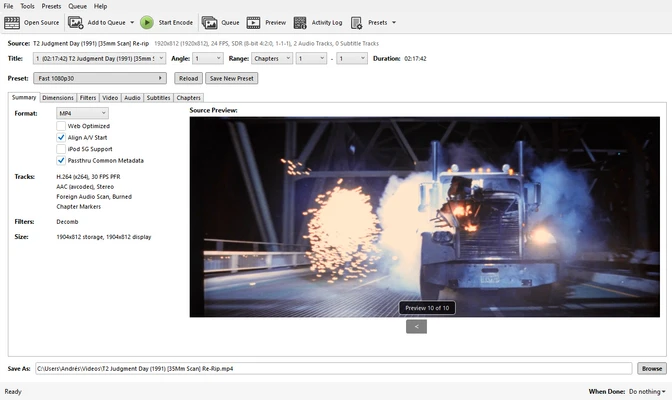
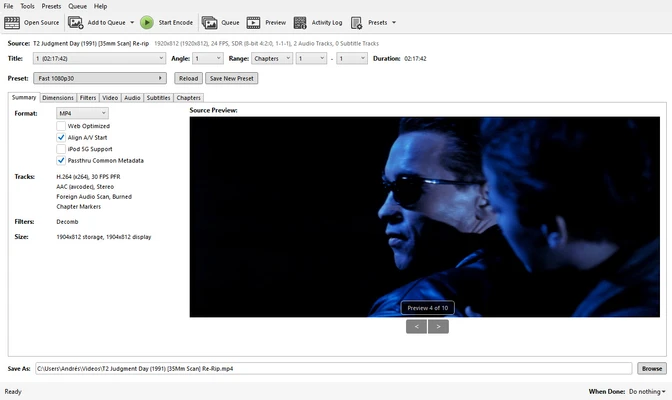
HandBrake is a free and open-source video transcoder for Windows that enables users to convert video files between a wide range of formats and codecs. It is one of the most popular video conversion tools available, offering powerful encoding features for both beginners and advanced users.

Originally created as a DVD ripping utility, HandBrake has evolved into a full-featured video conversion application capable of processing videos for playback on PCs, smartphones, tablets, streaming devices, and more.


Key Features

Video Format Conversion

Convert videos from various formats into modern, widely supported formats such as MP4, MKV, and WebM.

Device Presets

Includes optimized presets for popular devices including iPhone, Android, Apple TV, Roku, and gaming consoles.

Batch Video Encoding

Queue multiple video files and process them automatically in a single batch operation.

Hardware-Accelerated Encoding

Supports Intel Quick Sync Video (QSV), NVIDIA NVENC, and AMD hardware acceleration for faster video processing.

Advanced Video Filters

Apply filters such as deinterlacing, denoising, cropping, scaling, deblocking, and color adjustments.

Subtitle Support

Add, remove, embed, or pass through subtitle tracks including SRT, SSA, VobSub, and closed captions.

Audio Processing

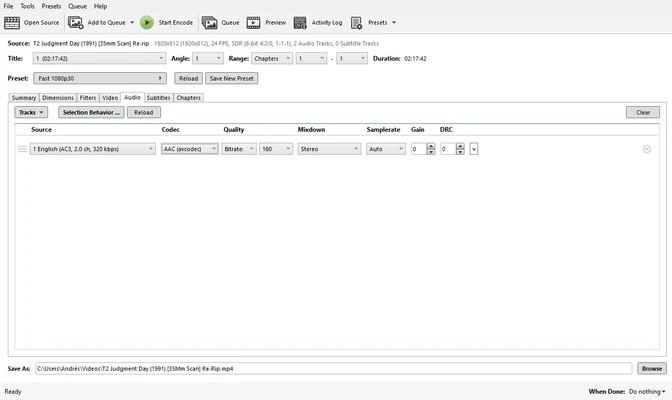
Convert audio tracks, adjust bitrate settings, and preserve original audio streams when needed.

Chapter Marker Support

Preserve or create chapter markers for improved navigation in converted videos.

HDR Video Support

Supports HDR video workflows and HDR metadata pass-through when compatible formats are used.


Main Features

  • Free and open-source video converter
  • MP4, MKV, and WebM output formats
  • H.264, H.265, AV1, VP8, and VP9 encoding support
  • Hardware-accelerated video encoding
  • Batch processing and encoding queue
  • Built-in device presets
  • Subtitle and chapter support
  • Audio conversion and pass-through
  • Video filters and image processing tools
  • Live video preview before encoding

Why Use HandBrake

HandBrake is widely trusted for video conversion because it combines professional-grade encoding capabilities with a straightforward user interface. It allows users to reduce file sizes, optimize videos for specific devices, and convert media libraries without paying for expensive software.

It is suitable for content creators, video enthusiasts, home users, and professionals who need reliable video transcoding tools.


System Requirements

Windows 10 or Windows 11 (64-bit)

Intel or AMD processor

4 GB RAM or higher recommended

Sufficient storage space for video processing


Pros

  • Completely free and open source
  • Supports modern video codecs including AV1 and H.265
  • Fast hardware-accelerated encoding
  • Extensive customization options
  • No ads, bundled software, or hidden costs

Cons

  • Advanced settings may be overwhelming for beginners
  • Limited built-in video editing capabilities
  • Does not support direct video recording

Conclusion

HandBrake is one of the best free video conversion tools available for Windows. With support for modern codecs, hardware acceleration, batch processing, and advanced encoding options, it provides an excellent solution for converting and optimizing video files for virtually any device or platform.

Information about HandBrake 1.11.2 1.11.2

License Open Source
Op. System Windows
Category Video
Language English + more
Author Handbrake Team
permission icon Permissions Not applicable
Downloads 1
Date 2026-06-09
Size 24.16 MB
File type Official Website

Apps recommended for you

VideoPad Video Editor and Movie Maker Free icon
VideoPad Video Editor and Movie Maker Free for Windows is a user-friendly video editing software for creating and editing movies quickly.
go1984 icon
logiware gmbh
WonderFox Free HD Video Converter Factory icon
Convert your videos into 200 different formats
Adobe Photoshop Express icon
Advanced photo-editing from this free program
Multiviewer icon
Watch multiple F1, Indycar and NASCAR streams at the same time
GOM Player icon
GOM Player is a versatile media player that supports a wide range of video and audio formats with built-in codec support and playback features.
PotPlayer icon
PotPlayer is a versatile media player that supports a wide range of formats and offers advanced playback features, including 3D and VR support.
YTGrabber icon
YTGrabber for Windows is a simple tool that lets users download YouTube videos and playlists quickly in various formats.
Kdenlive icon
Kdenlive for Windows is a free and open-source video editing software that offers powerful features for video production and editing.
Winxvideo AI icon
Enhance, upscale, compress, and convert videos with Winxvideo AI for Windows, the AI-powered video processing software for high-quality media editing.
WavePad Sound Editor 24.33 icon
Free software to edit music, voice, wav, mp3 or other audio files
REAPER 7.74 (64-bit) icon
Multitrack audio and MIDI recorder for your Windows PC
Movavi Video Editor Plus 2026 26.17.0 icon
Powerful yet easy-to-use video processing program for Windows
K-Lite Codec Pack Full icon
Play all your audio and video files effortlessly with K-Lite Codec Pack Full for Windows, the comprehensive codec and media playback solution.
Pianoteq 9.2.0 icon
Virtual Windows Desktop Piano and Physically Modelled Acoustic
Rclone icon
The command-line app for transferring files and synchronizing directories
Emby Server icon
The Emby Theater server
WavePad Sound Editor 24.33 icon
Free software to edit music, voice, wav, mp3 or other audio files
DispCam icon
Trial for Windows is a software tool that provides users with a temporary, limited-time version of a program to evaluate its features before purchase.
Vidyard for Chrome icon
Vidyard for Chrome is a video recording and sharing extension that allows users to create, share, and track videos directly from their browser.
OBS Studio icon
OBS Studio is a free, open-source software for video recording and live streaming, offering powerful features and customization options.
AbyssMedia BPM Counter icon
Easily detect BPM values for WAV and MP3 files for PC!
ChrisPC Screen Recorder icon
Take screenshots or record your computer screen
DVDInfo icon
DVDInfo: A FREE program for generating information about DVD Discs.