

MySQL Community Server is a free and open-source relational database management system (RDBMS) designed for storing, managing, and retrieving structured data.
Known for its speed, reliability, and scalability, MySQL is widely used by developers, startups, and enterprise organizations to build websites, applications, and data-driven software.
Originally developed by MySQL AB and now maintained by Oracle, MySQL supports multiple operating systems including Windows, macOS, and Linux.
Features
High Performance
MySQL provides optimized query processing, indexing, and storage engines to deliver fast database operations even with large datasets.
Scalability
The database server can handle applications ranging from small personal projects to large enterprise platforms with millions of records.
Strong Security
MySQL includes user authentication, access control, SSL encryption, and security management features to protect database information.
Cross-Platform Support
MySQL runs on Windows, macOS, and Linux systems and supports many programming languages including PHP, Python, Java, C++, and more.
Replication and High Availability
Built-in replication features allow users to create backup servers and improve database reliability.
SQL Support
MySQL uses standard SQL commands for creating, modifying, querying, and managing databases.
MySQL Tools
Although MySQL can be managed through the command-line interface, many graphical tools are available:
- MySQL Workbench — Official database management and development tool.
- phpMyAdmin — Web-based MySQL administration interface.
- Navicat — Professional database management software.
Installation and Setup
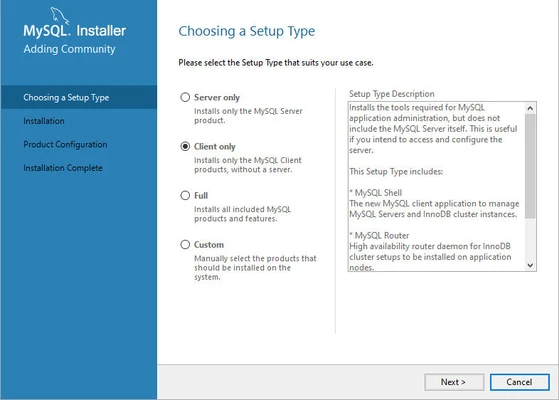
- Download the MySQL Community Server installer.
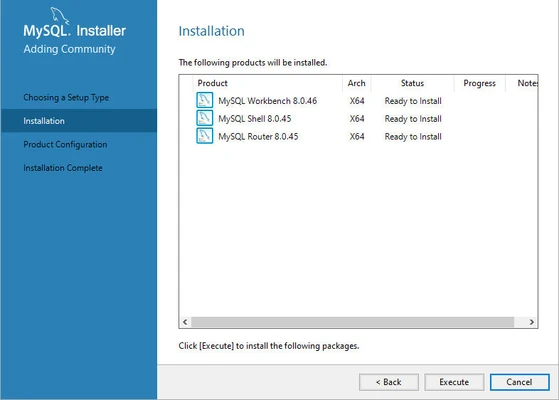
- Run the installation package.
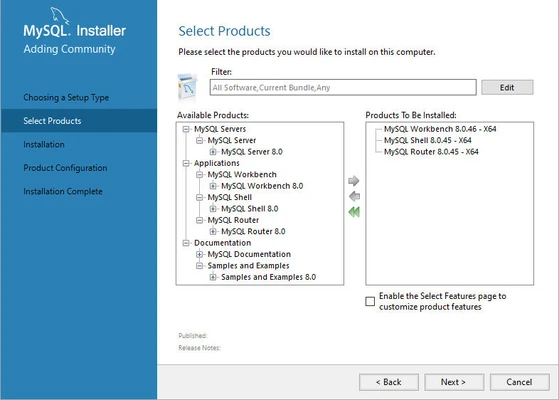
- Select required components such as MySQL Server and MySQL Workbench.
- Configure the database root password and user permissions.
- Start the MySQL service and create your databases.
MySQL can also be installed as part of development environments such as XAMPP and WAMP.
How to Use
Basic MySQL operations are performed using SQL commands:
- Create databases and tables.
- Insert and update records.
- Search and retrieve information.
- Manage users and permissions.
- Backup and restore databases.
Developers can connect MySQL with applications using official connectors for programming languages such as Python, Java, PHP, and .NET.
FAQ
Is MySQL free?
Yes. MySQL Community Server is free and open-source software released under the GPL license.
What operating systems does MySQL support?
MySQL supports Windows, macOS, and major Linux distributions.
Is MySQL suitable for large websites?
Yes. MySQL is widely used for websites, enterprise applications, and large-scale online services.
What is the difference between MySQL Community and Enterprise Edition?
Community Edition is free and open-source, while Enterprise Edition provides additional commercial features, tools, and official support.
Can beginners use MySQL?
Yes. Beginners can manage MySQL using graphical tools like MySQL Workbench or phpMyAdmin without relying only on command-line commands.
Alternatives
- PostgreSQL — Advanced open-source database system with strong SQL compliance.
- Microsoft SQL Server — Enterprise database platform from Microsoft.
- Oracle Database — Commercial database solution for large organizations.
- SQLite — Lightweight embedded database for small applications.
System Requirements
- Operating System: Windows 10/11, macOS, Linux
- Processor: Modern x64 CPU recommended
- RAM: 2 GB or more recommended
- Storage: At least 1 GB free disk space
- Network: Required for downloading packages and updates
PROS
- Free and open-source
- Fast and reliable performance
- Large developer community
- Supports multiple programming languages
- Works across Windows, macOS, and Linux
CONS
- Advanced enterprise features require paid editions
- Database administration requires technical knowledge
- Large deployments need proper optimization
Conclusion
MySQL Community Server remains one of the most popular relational database systems worldwide. Its combination of performance, reliability, scalability, and open-source availability makes it an excellent choice for developers building websites, applications, and enterprise software.
With extensive documentation, strong community support, and compatibility with many development platforms, MySQL continues to be a core technology in modern software development.