Go to Windows platform Display platforms icon
Go to Windows platform Go to Mac platform Go to Android platform
Synchredible 9.1.2.0 icon

Synchredible 9.1.2.0

9.1.2.0
Ascomp Software
5.0
16.13 MB size

Synchronize folders in an easy and simple way

Synchredible is a free application that lets you synchronize multiple folders using a range of customizable options.

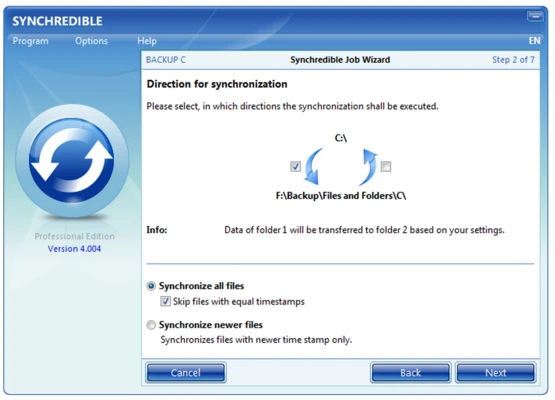
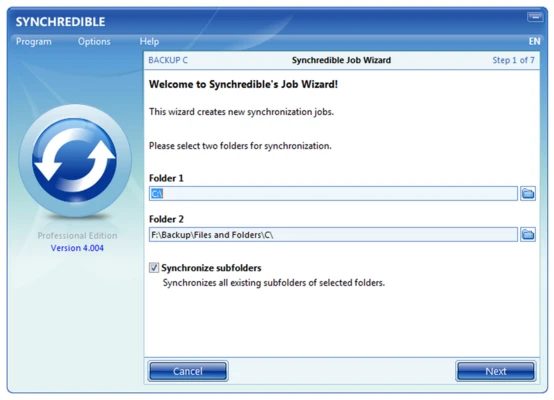
One of its main advantages is its setup wizard, which guides you through the configuration process and helps you choose the appropriate synchronization settings. You can select between unidirectional and bidirectional synchronization, as well as full or incremental synchronization. The program also supports inclusion and exclusion filters to control which files are synchronized.

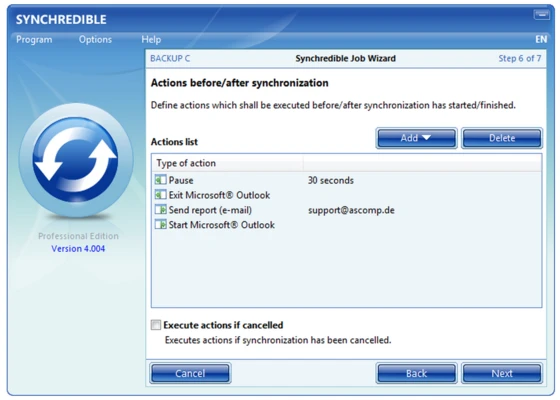
You can create multiple synchronization profiles, each with its own settings, to manage different folders and devices. Synchronization tasks can run automatically at scheduled times or when specific events occur. You can also start them manually whenever needed.

With its flexible configuration options and guided setup process, Synchredible is a practical synchronization tool for both beginners and experienced users.

Information about Synchredible 9.1.2.0

License Open Source
Op. System Windows
Category Utilities
Language English + more
Author Ascomp Software
permission icon Permissions Not applicable
Date 2026-10-31
Size 16.13 MB
File type Official Website

Apps recommended for you

Free Download Manager icon
Free Download Manager for Windows is a fast and versatile download manager that accelerates downloads, supports batch processing, and organizes files efficiently.
ExpanDrive icon
Access and manage cloud storage like local drives with ExpanDrive for Windows, the powerful cloud file management and remote storage software.
Duet Display icon
Duet Display for Windows is a tool that turns tablets or other devices into a high-performance second display for your PC.
Text Editor Pro icon
Text Editor Pro is a powerful and feature-rich text editing tool that supports syntax highlighting, advanced search, and multiple file formats for efficient editing and coding.
Microsoft OneDrive icon
Store, sync, and access your files anywhere with Microsoft OneDrive for Windows, the secure cloud storage and file backup solution.
TGMacro icon
Automate repetitive tasks
Smallpdf icon
Read, convert, compress and combine PDF documents
Duplicati icon
Back up and protect your data with Duplicati for Windows, the free open-source backup software featuring encrypted cloud backups and automated file recovery.
HashMyFiles 2.52 icon
Check the MD5 and SHA1 of any file
Proxyman 26.1.0 icon
Monitor HTTP/HTTPS traffic
Q-Dir 12.82 icon
A four-panel file manager with extra options
novaPDF 11.9.530 icon
Convert any document into PDF
PC Fresh 1.0.0.0 icon
Optimize your computer in seconds
Windows Terminal 3001.24.12741.0 icon
Run any application from the command line
Fixyfier 9.4.0.0 icon
Fix common Windows problems with just one click
WinScript 2.26.0 icon
Automation and advanced customization for Windows
DVDFab Passkey icon
Unlock any DVD or Blu-ray protections
Evernote 11.36.3 icon
Notes organize your life, Evernote organizes your notes
vim icon
vim
Vim is a highly configurable, command-line-based text editor designed for fast and efficient text editing, especially popular among developers and power users.
PrusaSlicer icon
Export files to print on your 3D printer
Smallpdf icon
Read, convert, compress and combine PDF documents
novaPDF 11.9.530 icon
Convert any document into PDF
CCleaner Free 7.11.1504 icon
Registry and junk-clearing utility for keeping your system clean and optimized
MobiKin Backup Manager icon
Back up, restore, and manage your Android data with MobiKin Backup Manager for Android on Windows, the reliable backup software for contacts, messages, photos, videos, and more.