Go to Windows platform Display platforms icon
Go to Windows platform Go to Mac platform Go to Android platform
Tor Browser 15.0.23 icon

Tor Browser 15.0.23

15.0.23
The Tor Project
5.0
108.35 MB size

Defend yourself against network surveillance and traffic analysis

Tor Browser is a privacy-focused web browser based on Mozilla Firefox. It routes internet traffic through the Tor network, helping hide your IP address and making online activity more difficult to trace. It is designed for users who want stronger privacy and anonymity while browsing the web.


Key Features

  • Private Browsing: Routes traffic through the Tor network to help protect your IP address and online identity.

  • Anti-Tracking Protection: Includes protections against cookies, trackers, and browser fingerprinting.

  • Security Levels: Provides adjustable security settings for different browsing situations.

  • Onion Services: Supports websites and services available through the Tor network.

  • Built-in Privacy Tools: Includes features such as NoScript and other protections designed to reduce unwanted tracking.

  • Cross-Platform: Available for Windows, macOS, Linux, and Android.

  • Open Source: Based on open-source browser technology and developed as part of the Tor Project.


User Interface

The interface is based on Mozilla Firefox, so users familiar with Firefox can navigate it easily. It includes standard browser features such as tabs, bookmarks, history, and extensions, along with Tor-specific controls for managing connections and security settings.


Installation and Setup

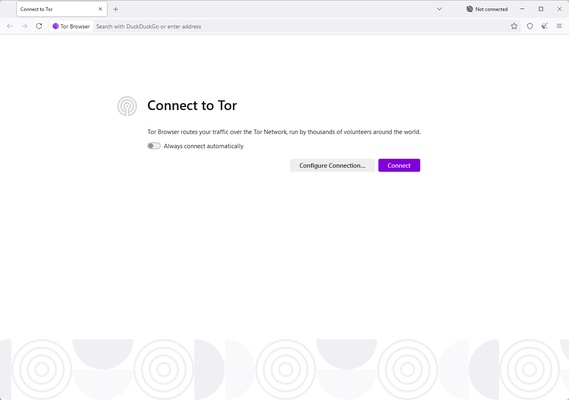
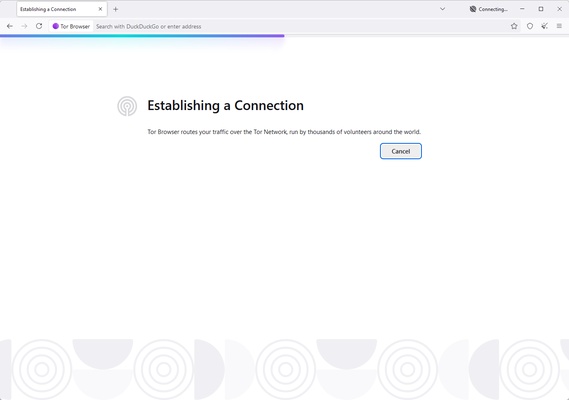
Download and install Tor Browser for your operating system, then launch it and connect to the Tor network. In most cases, the default settings are suitable for normal private browsing. Users can also adjust the security level or configure connection settings when necessary.


How to Use

  1. Launch Tor Browser.

  2. Connect to the Tor network.

  3. Adjust the security level if required.

  4. Enter a website address or search for content.

  5. Use the browser normally while connected through Tor.

For better privacy, avoid installing unnecessary extensions or using the browser in ways that could reveal your real identity.


Pros

  • Strong privacy and anti-tracking features

  • Access to the Tor network and onion services

  • Open-source technology

  • Available on multiple platforms

  • Adjustable security settings

  • Free to use


Cons

  • Browsing can be slower than conventional browsers

  • Some websites may restrict access from Tor connections

  • Certain websites may not work correctly with higher security settings


Conclusion

Tor Browser provides a practical way to browse the web through the Tor network while reducing exposure to tracking and IP-based identification. Its Firefox-based interface is familiar to most users, while built-in privacy and security controls provide additional protection. It is particularly useful for users who place a higher priority on online privacy than browsing speed.

Information about Tor Browser 15.0.23

License Open Source
Op. System Windows
Category Internet
Language English + more
Author The Tor Project
permission icon Permissions Not applicable
Date 2026-09-16
Size 108.35 MB
File type Official Website

Apps recommended for you

WhatsApp for Windows 2.2628.101.0 (64-bit) icon
Quickly send and receive WhatsApp messages right from your Windows PC
Microsoft Edge Beta icon
Get a sneak preview of what's new in Edge with the Beta version
ChrisPC Free VideoTube Downloader icon
Enjoy your favorite YouTube videos, from anywhere
Mailbird icon
A powerful email client for Windows
Vivaldi 8.1.4087.68 (64-bit) icon
An advanced browser made with the power user in mind
JDownloader icon
Multiple file downloads from any hosting service
UltraVNC 1.8.2.9 icon
Remote administration and monitoring software for Windows
Thunderbird 153.0.1 (64-bit) icon
A free email application from Mozilla that's easy to set up and customize
NxFilter 4.7.5.5 icon
NxFilter is a DNS filter for blocking harmful or unwanted websites
OkayFreedom VPN 1.9.7.0 icon
Securely surf the web and unlock restricted content
TunnelBear 4.20.0.0 icon
A friendly, secure and private VPN
DataVare NSF to PST Converter Expert 2.0 icon
Smart Way to Export NSF files to PST format on Windows
Maxthon 7.5.3.2400 icon
A suite of state-of-art, cloud-powered web browsers
CloudMounter 3.8.2156 icon
Mount cloud storage as local drive on Windows computers!
PS5 Remote Play 9.5.0.8040 icon
Control your PlayStation 5 console from a Windows PC!
KakaoTalk for Windows 26.8.1.5315 icon
Offers a convenient sync between your Windows PC and mobile device
Firefox Developer Edition 153.0b8 (64-bit) icon
Get the latest features, fast performance, and the development tools!
LogMeIn Hamachi icon
LogMeIn Hamachi for Windows is a virtual private network (VPN) service that allows users to create secure networks for remote access and gaming.
Easy Gamer Utility icon
Easy Gamer Utility for Windows is a performance optimization tool designed to enhance gaming experience by boosting system performance and managing resources.
SoftEther VPN Gate Client Plugin 2026.08.29 build 9807 icon
Create a high-performance Virtual Private Network and hide your IP address!
DataVare TGZ to MBOX Converter icon
The expert solution for converting TGZ to MBOX format.
TightVNC 2.8.88 (64-bit) icon
Lightweight, Fast and Reliable Remote Control Software
LibreWolf icon
A powerful browser with a focus on privacy and security
Cisdem PDFMaster icon
Easily edit, annotate, fill out, convert, and manage PDF files.