

iDealshare VideoGo for Mac is a powerful video and audio conversion software that allows users to convert, edit, compress, and optimize multimedia files for playback on virtually any device or platform. It supports a wide range of video and audio formats, including MP4, MOV, AVI, MKV, WMV, FLV, MTS, MXF, ProRes, MP3, FLAC, WAV, AAC, and many more.
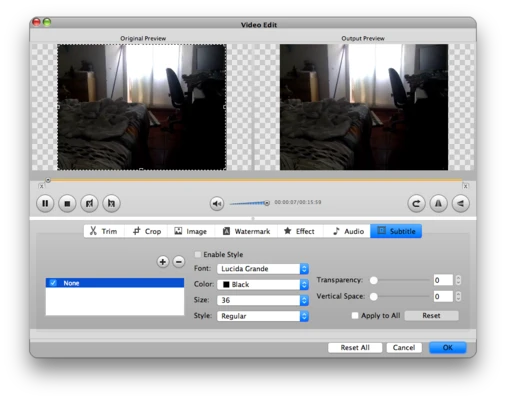
In addition to format conversion, the software includes built-in video editing tools for trimming, cropping, merging, rotating, adding subtitles, applying effects, and adjusting video and audio parameters. Whether you're preparing media files for editing, playback, sharing, or archiving, iDealshare VideoGo provides a complete all-in-one solution.
Key Features
Video Format Conversion
Convert between popular video formats, including:
- MP4
- MOV
- AVI
- MKV
- WMV
- FLV
- MPEG
- VOB
- WebM
- Apple ProRes
- AVCHD (MTS, M2TS)
The software supports both SD and HD video conversion, including 720p, 1080p, and higher-resolution formats.
Audio Conversion
Convert audio files between various formats such as:
- MP3
- AAC
- FLAC
- WAV
- WMA
- OGG
- APE
- AIFF
- DTS
- AC3
It can also extract audio tracks directly from video files.
Camcorder Video Support
Import and convert footage from camcorders and professional recording devices, including AVCHD, MXF, MOD, TOD, and ProRes video formats.
Built-in Video Editor
Perform basic editing tasks before conversion:
- Trim unwanted segments
- Crop video frames
- Merge multiple videos
- Split videos by chapters
- Rotate and flip videos
- Add subtitles
- Add watermarks
- Apply visual effects
- Adjust brightness, contrast, and saturation
Batch Conversion
Process multiple video or audio files simultaneously, making it ideal for large media collections.
GPU Acceleration
Supports NVIDIA CUDA acceleration for faster video processing and conversion performance on compatible hardware.
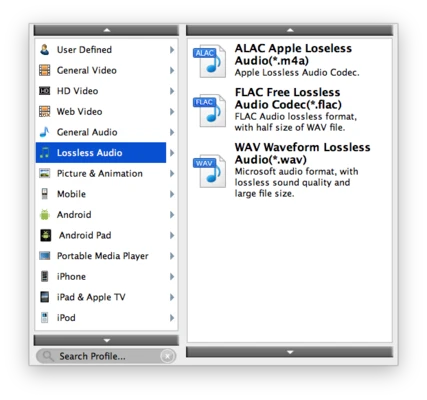
Output Device Presets
Includes optimized profiles for:
- iPhone
- iPad
- Apple TV
- Android devices
- Smart TVs
- Gaming consoles
- Media players
- Video editing applications
Why Choose iDealshare VideoGo?
Unlike many basic converters, iDealshare VideoGo combines video conversion, audio conversion, editing tools, and device optimization into a single application. Its broad format compatibility and batch processing capabilities make it a practical solution for everyday multimedia tasks.
Best For
- Video format conversion
- Audio extraction
- Media file compression
- Device compatibility conversion
- Camcorder footage processing
- Basic video editing
- Batch media processing
Pros
- Extensive video and audio format support
- Fast conversion performance
- Batch processing capabilities
- Built-in video editing tools
- Audio extraction from video files
- Easy-to-use interface
Cons
- Limited advanced editing features
- Trial version restrictions
- Interface design feels outdated
- Performance may slow with extremely large files
- Not intended for professional video production
How to Use
- Launch iDealshare VideoGo.
- Import video or audio files.
- Select the desired output format or device profile.
- Apply optional editing adjustments.
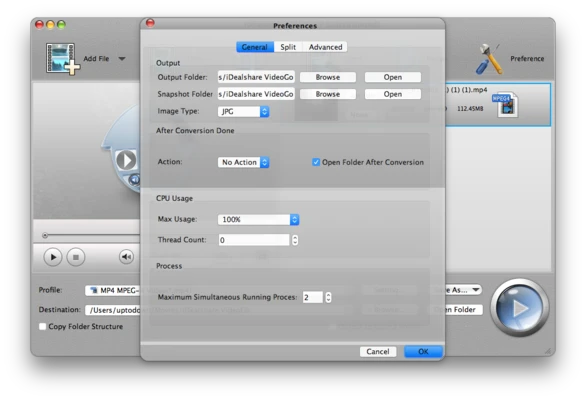
- Choose output settings and destination folder.
- Click Convert to start processing.
- Access the converted files once the process is complete.
System Requirements
Minimum Requirements
- Mac OS X 10.4 Tiger or later
- PowerPC G5 or Intel processor
- 512 MB RAM or higher
- 50 MB available disk space
- 800×600 display resolution or higher
Conclusion
iDealshare VideoGo for Mac is a versatile multimedia conversion tool that combines broad format compatibility, batch processing, GPU acceleration, and basic video editing features in a single package. Whether you need to convert videos for playback, extract audio, edit recordings, or process large media libraries, it offers a convenient solution for everyday video and audio conversion tasks.
Note: The trial version only converts the first 5 minutes of a video. For videos shorter than 5 minutes, only 50% of the content can be converted.