


FastReport.Net is a reporting tool for .NET applications that allows developers to create, design, preview, and export reports. It includes a visual report designer, support for multiple data sources, scripting capabilities, and components for integrating reports into Windows and web applications.
The software supports common .NET development environments and can generate reports in formats such as PDF, Excel, HTML, CSV, RTF, and images.
Key Features
-
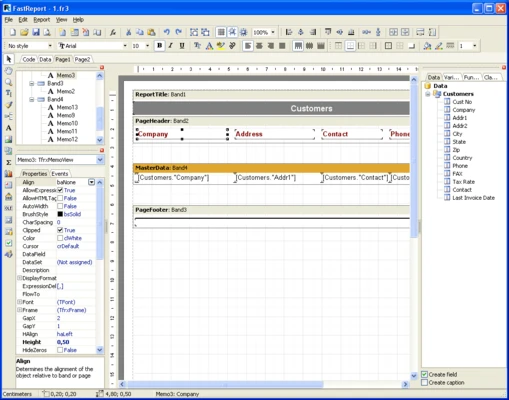
Report Designer: Create and customize report templates using a visual drag-and-drop editor.
-
Multiple Data Sources: Connect reports to databases and other supported data sources, including MySQL, PostgreSQL, SQL Server, and SQLite.
-
Report Export: Export reports to PDF, Excel, HTML, CSV, RTF, and image formats.
-
Scripting: Use C# or VB.NET scripts to customize report behavior and processing.
-
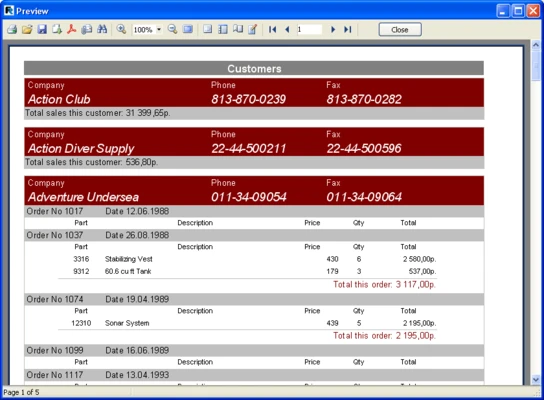
Report Preview: Preview reports before printing or exporting them.
-
.NET Integration: Embed reporting functionality into .NET applications and supported frameworks.
-
Interactive Reports: Create reports with parameters, filters, and drill-down functionality.
-
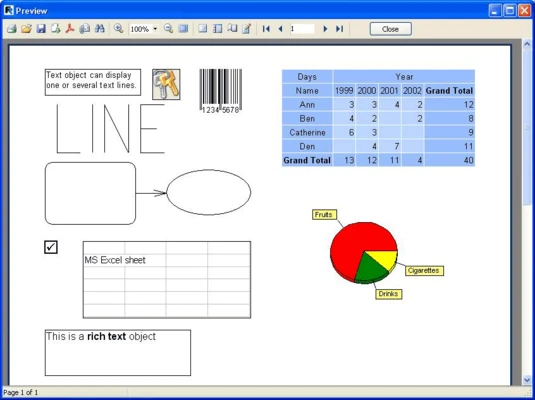
Charts and Tables: Add tables, charts, graphics, and other report elements to templates.
-
Multi-Threaded Processing: Supports parallel report processing for handling larger datasets and workloads.
User Interface
FastReport.Net provides a professional report-design environment with a ribbon-style toolbar, drag-and-drop editing, and a WYSIWYG designer. A properties panel provides detailed control over report components, while the preview window allows developers to check the final layout before exporting or printing.
Installation and Setup
-
Run the FastReport.Net installation package.
-
Follow the on-screen installation instructions.
-
Install the required .NET components for your development environment.
-
Launch the Report Designer or add FastReport.Net to your .NET project.
-
Integrate the required components through NuGet packages or project references.
How to Use
Create a Report: Open the Report Designer and create a new report template.
Connect Data: Select a database or other supported data source and configure the connection.
Design the Layout: Add tables, text, charts, images, and other elements using the visual designer.
Customize the Report: Configure formatting, filters, parameters, and other report properties. C# or VB.NET scripting can be used for more advanced customization.
Preview the Report: Check the report layout and data using the built-in preview.
Export or Integrate: Export the finished report to a supported format or embed it into your .NET application.
Pros
-
Powerful visual report designer
-
Supports multiple data sources
-
Wide range of export formats
-
C# and VB.NET scripting support
-
Interactive reporting capabilities
-
Integrates with .NET applications
Cons
-
Advanced features can have a learning curve
-
Full customization may require programming knowledge
-
Commercial licensing can be expensive for some users
Conclusion
FastReport.Net is a comprehensive reporting solution for .NET developers who need to create and integrate customized reports into applications. Its visual designer, database connectivity, scripting support, interactive reports, and extensive export options make it suitable for business and enterprise reporting tasks.