

Slack for Windows is a powerful team communication and collaboration application that brings messaging, file sharing, notifications, and workplace tools together in one place.
It provides a centralized workspace where teams can communicate through channels and direct messages, share files, organize discussions, and connect with third-party applications. Slack is suitable for businesses, development teams, remote workers, project groups, and organizations of all sizes.
Messages, files, links, and other shared information can be searched from a single interface, making it easier to find previous conversations and important documents.
What's New
- Improved performance with faster channel loading and message search.
- Enhanced Slack AI features for smarter summaries and replies.
- Redesigned navigation with a simpler sidebar.
- Improved Huddles with better audio quality and screen-sharing stability.
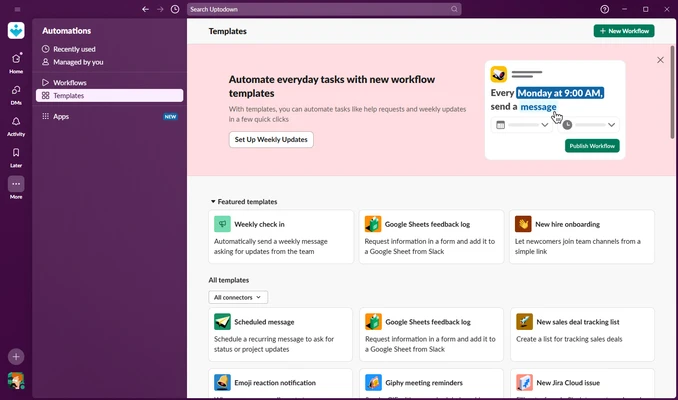
- Expanded Workflow Builder automation capabilities.
- Enhanced security and enterprise compliance features.
- Faster file uploads and improved file previews.
- More flexible notification controls.
- Improved thread management.
- General bug fixes and stability improvements.
Key Features
Channels – Organize conversations around projects, departments, teams, or specific topics.
Private Channels – Create restricted spaces for sensitive conversations and information.
Direct Messages – Communicate privately with individual colleagues or small groups.
Threads – Keep replies attached to specific messages, helping prevent conversations from becoming cluttered.
File Sharing – Upload and share documents, images, videos, PDFs, and other files directly in conversations.
Advanced Search – Search messages, files, links, and other workspace content using keywords and filters.
App Integrations – Connect Slack with productivity, development, storage, project management, and business applications.
Workflow Builder – Automate repetitive tasks and routine communication without manually performing every step.
Notifications – Customize alerts for channels, mentions, keywords, and direct messages.
Huddles – Quickly start audio conversations and screen-sharing sessions with team members.
Slack AI – Use AI-powered tools to find information, summarize conversations, and catch up on important discussions.
Messaging and Collaboration
Slack organizes workplace communication into dedicated channels. Teams can create channels for individual projects, departments, customers, or general discussions.
Private channels can be used when conversations should only be accessible to selected members.
Direct messages provide a convenient way to communicate privately, while threads allow users to discuss individual messages without interrupting the main conversation.
Emoji reactions and mentions also make it easy to acknowledge messages or get someone's attention without creating unnecessary replies.
File Sharing
Users can drag and drop files directly into conversations.
Slack supports sharing documents, images, PDFs, spreadsheets, videos, and other common file types. Cloud storage services can also be connected so that shared documents and files can be accessed more easily.
Files and messages are indexed, making it possible to locate previously shared information through Slack's search system.
Integrations
One of Slack's biggest advantages is its integration ecosystem.
Teams can connect Slack with applications used for project management, cloud storage, software development, customer support, productivity, and other business processes.
Connected services can send notifications directly into Slack, reducing the need to constantly switch between different applications.
Custom integrations and automated workflows can also be created for specialized business requirements.
Slack AI
Slack includes AI-powered features designed to reduce the time spent searching through large amounts of workplace communication.
Depending on the available plan, AI tools can help users:
- Find information faster.
- Summarize conversations.
- Catch up on recent discussions.
- Generate useful recaps.
- Retrieve relevant information from workplace conversations.
These features can be particularly useful for users returning from a long absence or joining an existing project with a large amount of historical communication.
Security
Slack provides security features designed for both small teams and large organizations.
Key security capabilities include:
- Encryption for data in transit and at rest.
- Single sign-on support.
- Enterprise security controls.
- Audit and compliance features.
- Data loss prevention capabilities.
- Enterprise key management.
- Administrative access controls.
Advanced security and compliance capabilities are primarily aimed at business and enterprise customers.
User Interface
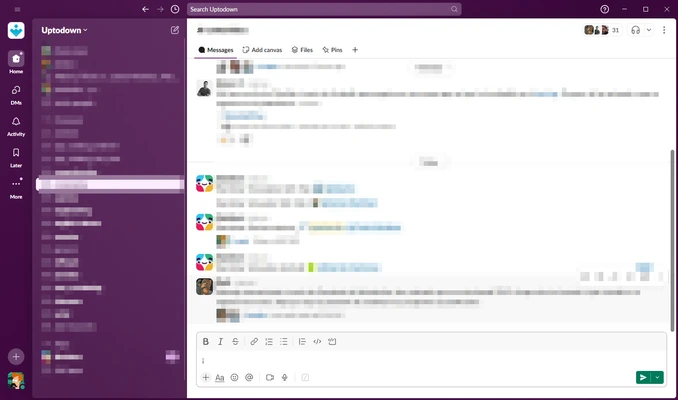
The Slack interface is divided into several main areas.
Sidebar – Provides access to channels, direct messages, applications, and other workspace sections.
Main Conversation Area – Displays messages, files, threads, and other content from the selected conversation.
Information Panel – Provides additional information about channels, members, pinned content, and other workspace details.
Search – Allows users to search through messages, files, and shared information.
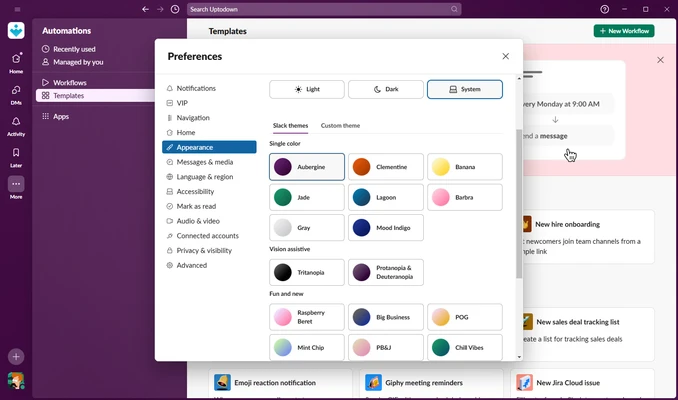
Slack also supports customizable themes and dark mode.
Installation and Setup
Installation
- Download the Windows installer.
- Run the installation file.
- Follow the on-screen instructions.
- Launch Slack after installation.
Setup
- Create a Slack account or sign in.
- Join an existing workspace or create a new one.
- Invite team members.
- Create channels for projects or departments.
- Connect the applications and services your team uses.
No complicated technical configuration is required for basic use.
How to Use
Join or Create Channels
Use the sidebar to browse existing channels or create new ones for specific projects and topics.
Send Messages
Open a channel or direct message and enter your message in the message field.
Mention Team Members
Use @mentions to notify specific people when their attention is required.
Share Files
Drag files into a conversation or use the attachment option.
Use Threads
Reply directly to a message to keep related discussions organized.
Search Conversations
Use the search function to locate previous messages, files, links, or other information.
Start a Huddle
Open a conversation and start a quick audio or screen-sharing session when text communication isn't enough.
Customize Notifications
Adjust notifications for individual channels, keywords, mentions, and direct messages.
FAQ
Can I use Slack for free?
Yes. Slack provides a free plan with limitations on message history, integrations, and certain collaboration features.
Is Slack secure?
Yes. Slack provides encryption and various security controls. Business and enterprise plans offer additional security and compliance features.
Can Slack integrate with other applications?
Yes. Slack supports a large ecosystem of third-party applications and services.
Can I share files through Slack?
Yes. Users can upload and share documents, images, videos, PDFs, and other files within conversations.
Does Slack support voice and video communication?
Yes. Slack provides Huddles and other communication features for audio conversations and screen sharing.
What is Slack Connect?
Slack Connect allows organizations to communicate and collaborate with people outside their own organization.
Can I customize Slack notifications?
Yes. Notifications can be configured for channels, mentions, keywords, and other types of activity.
Alternatives
Microsoft Teams – A strong choice for organizations already using Microsoft 365, with extensive communication and collaboration features.
Discord – Focuses heavily on voice communication, communities, and real-time group conversations.
Zoom – Primarily designed for video meetings, online conferences, and remote collaboration.
Google Chat – Integrates closely with Google Workspace and provides straightforward workplace messaging.
Asana – Focuses more heavily on project management, task tracking, and team workflows.
Pricing
Free
The free plan provides basic communication and collaboration features with certain limitations.
- 90 days of message history
- Limited application integrations and published workflows
- One-to-one audio and video meetings
- One-to-one communication with external users
- One workspace
Pro – $6.67 per user per month
- Unlimited message history
- Unlimited application integrations and workflows
- Group audio and video meetings
- Group communication with external users
- One workspace
- Collaboration on lists and documents
Business+ – $12.50 per user per month
- Unlimited message history
- Unlimited integrations and workflows
- Group audio and video meetings
- External collaboration
- User provisioning and deprovisioning
- SAML-based single sign-on
- Data exports
- Additional security and administrative features
Enterprise Grid
Enterprise Grid uses custom pricing and is designed for large organizations that need multiple workspaces, advanced administration, security, and compliance capabilities.
Pricing and plan features may change over time.
System Requirements
- Operating System: Windows 10 or Windows 11
- RAM: 4 GB or more
- Storage: At least 100 MB of available space
- Internet: Required for online communication and workspace access
PROS
- Excellent team communication features
- Large ecosystem of integrations
- Powerful search capabilities
- Channels and threads keep conversations organized
- File sharing is convenient
- Flexible notification controls
- Supports audio and screen sharing
- Useful AI-powered features
- Suitable for teams of different sizes
CONS
- Can become expensive for larger organizations
- Large workspaces may feel overwhelming to new users
- Desktop application can consume significant system resources
- Many advanced features are restricted to paid plans
Conclusion
Slack is a comprehensive communication and collaboration platform designed to centralize workplace conversations, files, applications, and workflows.
Its combination of channels, direct messaging, threads, file sharing, powerful search, integrations, automation, and AI features makes it suitable for businesses and teams that need more than a traditional messaging application.
The free plan is sufficient for basic team communication, while larger organizations can take advantage of the additional collaboration, security, and administrative features offered by paid plans.
Overall, Slack remains a strong choice for teams looking for a centralized platform for workplace communication and collaboration.