Tor Browser is a privacy-focused web browser developed by the Tor Project. Based on Mozilla Firefox, it routes Internet traffic through the Tor network to help protect users from tracking and hide their IP addresses.
It is designed for users who want greater privacy while browsing the web. Tor Browser also includes anti-tracking and anti-fingerprinting features to reduce the amount of information websites can collect about the user.
What’s New
-
Updated Firefox ESR base with improved compatibility and performance.
-
Enhanced anti-fingerprinting and privacy protections.
-
Updated security patches and browser components.
-
Improved bridge configuration and connection settings.
-
Better reliability for onion services.
-
Updated NoScript integration.
-
Various performance, stability, and security improvements.
Key Features
Tor Network: Routes traffic through the Tor network to help conceal your IP address and location.
Anti-Tracking: Includes privacy protections designed to limit tracking, cookies, and other forms of online identification.
Anti-Fingerprinting: Helps make users' browser configurations more difficult to distinguish from one another.
Security Levels: Choose different security levels to balance website compatibility and protection.
Onion Services: Provides access to websites and services available through the Tor network.
Cross-Platform: Available for Windows, macOS, Linux, and Android.
Open Source: Based on open-source software and developed by the Tor Project and its community.
User Interface
Tor Browser uses a Firefox-based interface, so users familiar with Mozilla Firefox should find it relatively easy to navigate. It includes standard browser features such as tabs, bookmarks, history, and private browsing controls.
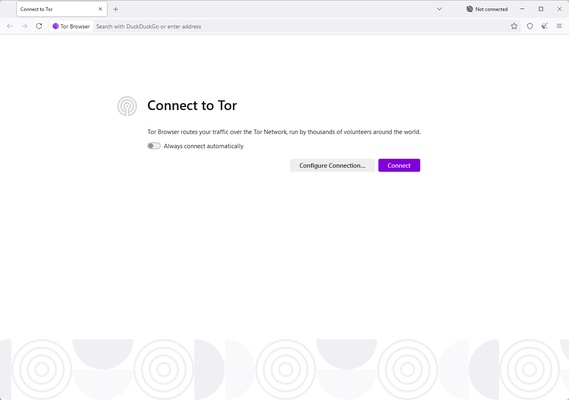
Tor-specific settings and connection options are accessible directly from the browser interface.
Installation and Setup
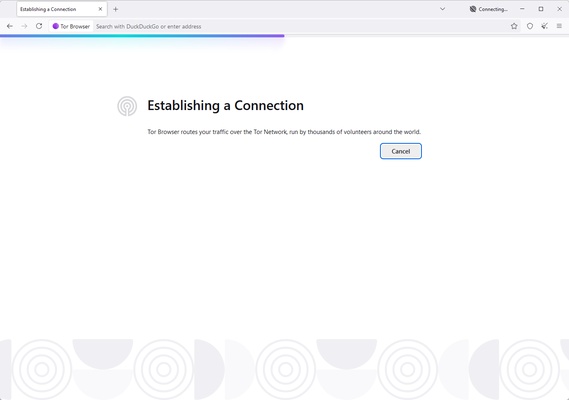
Download the version for your operating system and run the installation package. After launching Tor Browser, follow the instructions to connect to the Tor network.
In most cases, no additional configuration is required. Users who cannot connect directly can configure a Tor bridge from the connection settings.
How to Use
-
Launch Tor Browser.
-
Connect to the Tor network.
-
Adjust the security level if necessary.
-
Browse the web normally.
-
Avoid installing unnecessary extensions or changing privacy-related settings unless you understand their effects.
FAQ
Is Tor Browser free?
Yes. Tor Browser is free and open-source.
Is Tor Browser legal?
Tor Browser is legal in most countries, although laws and restrictions regarding Tor use vary by region.
Why is Tor Browser slower than regular browsers?
Tor routes traffic through multiple nodes before reaching its destination. This additional routing improves privacy but can result in slower browsing speeds.
Can I use Tor Browser for streaming or torrenting?
Tor Browser is not designed for high-bandwidth activities such as streaming or torrenting. Using Tor for these activities can result in poor performance and may affect the network for other users.
Can I access normal websites with Tor Browser?
Yes. Most regular websites can be accessed through Tor, although some websites may block or restrict connections from Tor exit nodes.
Does Tor Browser make me completely anonymous?
No. Tor can significantly improve online privacy, but it does not guarantee complete anonymity. User behavior, account logins, browser configuration, and other factors can still reveal information.
Alternatives
Firefox – A flexible open-source browser with extensive privacy and customization options.
Brave – A privacy-focused browser with built-in tracker and advertisement blocking.
DuckDuckGo Browser – A simple browser focused on privacy and tracking protection.
Pricing
Tor Browser is completely free to download and use.
System Requirements
OS: Windows 10 or later, macOS, Linux, and Android
Storage: Additional space is required for installation and browser data
Internet: Required to connect to the Tor network
PROS
-
Free and open source
-
Strong privacy protections
-
Helps hide the user's IP address
-
Anti-tracking and anti-fingerprinting features
-
Access to Tor and onion services
-
Available on multiple platforms
CONS
-
Slower than conventional browsers
-
Some websites may block Tor connections
-
Some websites may not work correctly with higher security settings
-
Not designed for high-bandwidth activities
Conclusion
Tor Browser is a practical choice for users who want to improve their online privacy and reduce tracking while browsing the web. Its integration with the Tor network, combined with anti-tracking and anti-fingerprinting protections, provides stronger privacy than a conventional browser.
However, Tor Browser is not a guarantee of complete anonymity and can be slower than standard browsers. For users who prioritize privacy over browsing speed and website compatibility, it remains one of the most useful free privacy-focused browsers available.