Go to Windows platform Display platforms icon
Go to Windows platform Go to Mac platform Go to Android platform
XMedia Recode 3.6.3.8 (64-bit) icon

XMedia Recode 3.6.3.8 (64-bit)

3.6.3.8
Sebastian Dorfler
5.0
21.8 MB size

Easy-to-use software that helps you convert audio and video files

XMedia Recode is a free and versatile media conversion software for Windows that supports a wide range of video and audio formats. It allows users to convert, edit, and optimize media files with detailed control over video, audio, subtitles, and encoding settings.

The software supports popular formats such as MP4, MKV, AVI, MOV, and more. It also includes basic editing tools for cutting, cropping, rotating, and adjusting video parameters.

Features

  • Wide Format Support – Convert video and audio files between a large number of formats.
  • Batch Processing – Process multiple files at the same time.
  • Video Editing – Cut, crop, rotate, and adjust brightness, contrast, and saturation.
  • Audio and Subtitle Support – Manage multiple audio tracks and external subtitles.
  • DVD and Blu-ray Support – Extract and convert content from discs that are not copy-protected.
  • Hardware Acceleration – Supports hardware-accelerated encoding with compatible NVIDIA and Intel hardware.
  • Custom Encoding Settings – Adjust resolution, bitrate, frame rate, codecs, and other parameters.
  • 4K Support – Process and convert high-resolution 4K video.

How to Use

  1. Launch XMedia Recode and click Open File to add a video or audio file.
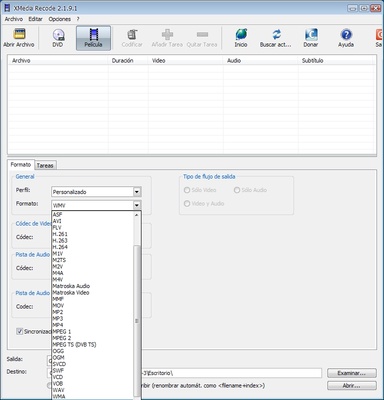
  2. Select the desired output format.
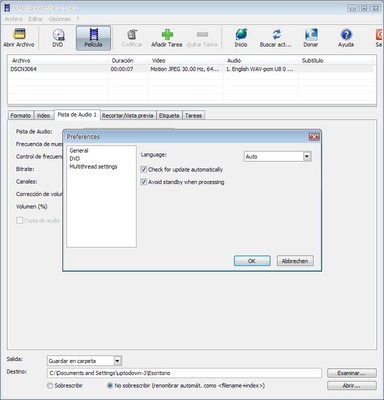
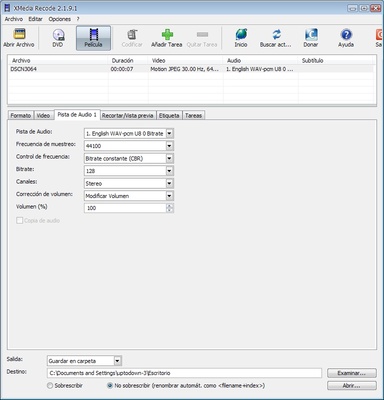
  3. Adjust video, audio, subtitle, or encoding settings if needed.
  4. Choose the destination folder.
  5. Click Encode to start the conversion.

FAQ

Is XMedia Recode free?
Yes. XMedia Recode is free to use.

Does XMedia Recode support 4K video?
Yes. It can process and convert 4K video with customizable encoding settings.

Does it support hardware acceleration?
Yes. Compatible NVIDIA and Intel hardware can be used to accelerate encoding and decoding.

Can it convert multiple files at once?
Yes. XMedia Recode supports batch processing.

Can it decrypt copy-protected DVDs or Blu-rays?
No. It does not provide decryption for copy-protected media.

Is there a portable version?
Yes. A portable version is available for users who prefer to run the software without a traditional installation.

Alternatives

HandBrake – A free and open-source video transcoder with a simple interface.

Any Video Converter – A versatile converter supporting many popular formats.

Freemake Video Converter – A user-friendly video conversion tool with additional features.

System Requirements

  • OS: Windows 7, 8, 10, or 11
  • CPU: Intel or AMD processor
  • RAM: 2 GB or more
  • Storage: At least 100 MB free space
  • GPU: Optional hardware acceleration support

PROS

  • Free to use
  • Supports many video and audio formats
  • Batch processing
  • Extensive encoding options
  • Supports 4K video
  • Hardware acceleration

CONS

  • Outdated interface
  • Advanced settings may be confusing for beginners
  • No support for copy-protected discs

Information about XMedia Recode 3.6.3.8 (64-bit)

License Freeware
Op. System Windows
Category Video
Language English + more
Author Sebastian Dorfler
permission icon Permissions Not applicable
Date 2026-08-17
Size 21.8 MB
File type Official Website

Apps recommended for you

Streamlabs OBS icon
Stream, record, and broadcast high-quality content with Streamlabs OBS for Windows, the powerful live streaming and recording software for gamers and creators.
iQIYI icon
Chinese streaming platform with movies, series and more
UniFab All-In-One 4.1.5.1 icon
AI-powered 8-in-1 comprehensive video processing PC tool
Free Video Cutter Joiner icon
The easiest way to cut and join videos
KMPlayer icon
KMPlayer for Windows is a versatile media player that supports a wide range of video and audio formats with advanced playback features.
MX_FFmpeg (Codecs for MX Player) icon
Codecs for playing AC3, E-AC3, and DTS on MX Player
myFFmpeg icon
OSBytes
SameMovie DisneyPlus Video Downloader icon
SameMovie DisneyPlus Video Downloader for Windows allows users to download Disney+ videos in high quality and save them for offline viewing.
Plex Media Server 1.43.3.10861 icon
Upload media content to a media center to stream movies, music, photos
MP4 Player 6.4.11 icon
Play MP4, FLV, and WebM video files that downloaded from video sites!
Shotcut 26.8.1 icon
A free, open source, cross-platform video editor for Windows
Subtitle Edit 5.1.0 icon
Edit and create subtitles or simply synchronize existing ones with your movies
GoldWave 7.05 icon
Audio Editor, Recorder, Converter, Restoration and Analysis Software!
CapCut Desktop 9.1.0 icon
A free AI all-in-one video editing app that helps you create incredible videos!
Iriun Webcam 2.9.7 icon
Use your mobile phone camera as a wireless webcam in PC
Ocenaudio 3.20.1 icon
Easy, fast and free powerful audio editor for your Windows OS
EaseUS Video Downloader icon
EaseUS Video Downloader for Windows allows users to download videos, playlists, and channels from popular websites like YouTube in high quality.
Movavi Video Editor icon
Movavi Video Editor for Windows is an easy-to-use video editing software that lets users create and enhance videos quickly.
PotPlayer Portable icon
A portable version of this excellent media player
Shotcut 26.8.1 icon
A free, open source, cross-platform video editor for Windows
Zerene Stacker icon
Zerene Stacker for Windows is a focus stacking software that combines multiple images to create sharp, high-depth-of-field photographs.
WonderFox DVD Video Converter icon
A fine option for converting your DVDs into video files
HandBrake icon
Modify formatting and features for any DVD