
Go to Windows platform Display platforms icon
Go to Windows platform Go to Mac platform Go to Android platform
Codex 26.1103.4239.0 icon

Codex 26.1103.4239.0

26.1103.4239.0
OpenAI
5.0
1012.35 MB size

OpenAI's official companion for programming with ChatGPT

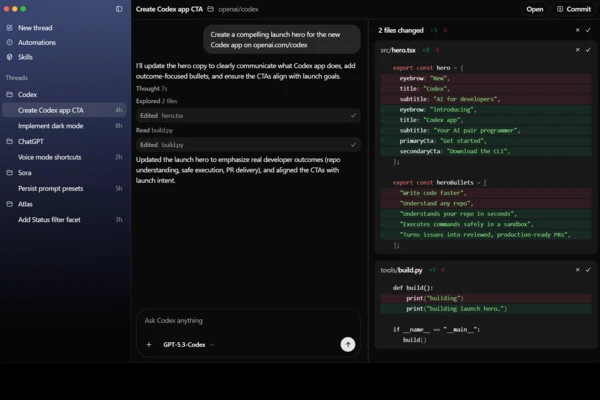
Codex is OpenAI's coding agent that helps automate software development tasks, including writing and editing code, running tests, fixing bugs, and proposing changes to repositories. It uses AI to understand your project and handle tasks based on natural-language instructions, making it useful for both routine programming work and more complex development tasks.

How Codex Works with Your Code

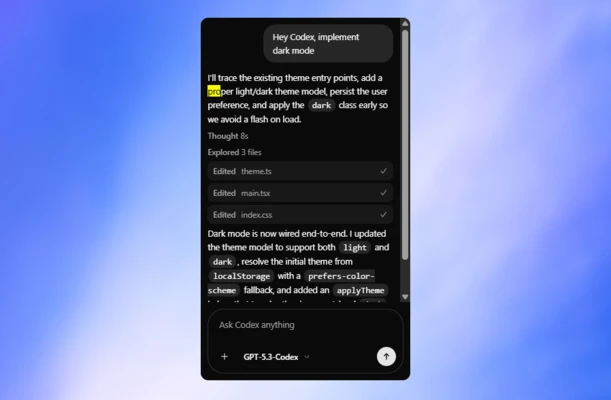
Codex understands natural-language requests, allowing you to describe a task and let the agent work on the relevant code. It can inspect project files, make changes, add tests, run commands, and analyze the results. Each task can run in an isolated environment with your repository loaded, keeping its changes separate from your local working environment.

When working with an existing codebase, Codex examines relevant files and follows project instructions, such as formatting rules and testing requirements. This helps ensure that generated changes fit the structure and conventions of the project. Depending on the task, it can also prepare changes for review rather than simply returning code suggestions.

Tasks You Can Delegate to Codex

Codex can assist with different stages of software development. You can ask it to write new functions, refactor existing code, investigate errors, fix bugs, generate automated tests, and review dependencies. It can also help identify potential performance and security improvements.

Repetitive tasks, such as updating dependencies or applying changes across multiple files, can be delegated to the agent instead of handled manually. Codex can also work with development workflows involving GitHub, including preparing changes and pull requests for review.

Integration with ChatGPT and Other Environments

Codex is available through ChatGPT and can also be used in other development environments. You can describe a task in ChatGPT, provide access to a repository, and let the agent modify code, run tests, and summarize its work.

For terminal-based workflows, Codex CLI provides a command-line interface for working with code through an AI agent. There are also integrations for Visual Studio Code and other supported development environments, allowing Codex to fit into existing programming workflows.

Information about Codex 26.1103.4239.0

License Open Source
Op. System Windows
Category Development
Language English + more
Author OpenAI
permission icon Permissions Not applicable
Date 2026-11-07
Size 1012.35 MB
File type Official Website

Apps recommended for you

EditPlus icon
EditPlus for Windows is a powerful text editor that supports multiple programming languages, with features like syntax highlighting and code folding for efficient coding.
Rust 1.98.0 icon
A language empowering everyone to build reliable and efficient software
Vim 9.2.1152.0 icon
Text editor that makes things easier for programmers
dotConnect for PostgreSQL Professional 9.2.192 icon
High performance connectivity to the PostgreSQL database
Qt Creator icon
Qt Creator for Windows is an integrated development environment (IDE) for developing cross-platform applications with C++ and Qt on Windows.
MySQL Workbench icon
MySQL Workbench is a powerful database management tool that provides an intuitive interface for designing, querying, and administering MySQL databases.
TablePlus 26.10.0 Build 388 icon
Modern, native, and friendly GUI tool for relational databases!
RStudio 2026.07.1 icon
Take control of your R for Windows code!
Beekeeper Studio 6.2.1 icon
A modern, elegant, and open source SQL client
InnoExtractor 12.2.0.187 icon
Complete GUI for Inno Setup.
Orca 1.4.246 icon
An environment for coordinating multiple AI agents
cc-switch 4.0.4 icon
Manage multiple AI models from one place
Twine 2.12.1 icon
A tool to create non-linear interactive stories
Codex 26.930.3930.0 icon
OpenAI's official companion for programming with ChatGPT
Python 3.14.8150.0 icon
Accessible multi-paradigmatic programming language
Valentina Studio 18.2.1 icon
Powerful DB/Reports Manager for many SQL RDBMS and MongoDB!
GitKraken 12.5.0 icon
After GitHub, the most popular Git GUI for Windows PC
Postman 12.30.0 icon
A comprehensive platform for API development, testing and management
Beyond Compare 5.2.5 Build 32528 icon
Windows utility that combines directory compare and file compare
PHP 8.5.9 (64-bit) icon
Hypertext Preprocessor is a general-purpose programming language!
RStudio icon
Develop, analyze, and visualize data efficiently with RStudio for Windows, the powerful IDE for R programming and statistical computing.
Visual Paradigm Community Edition 18.1 icon
Create diagrams for Windows PC in order to analyze the data flow
MySQL Workbench icon
MySQL Workbench is a powerful database management tool that provides an intuitive interface for designing, querying, and administering MySQL databases.
Protocol Buffers 36.0 icon
Open-source cross-platform data format used to serialize structured data