

ExtraMAME for Windows – Arcade Emulator & Classic Retro Gaming Software
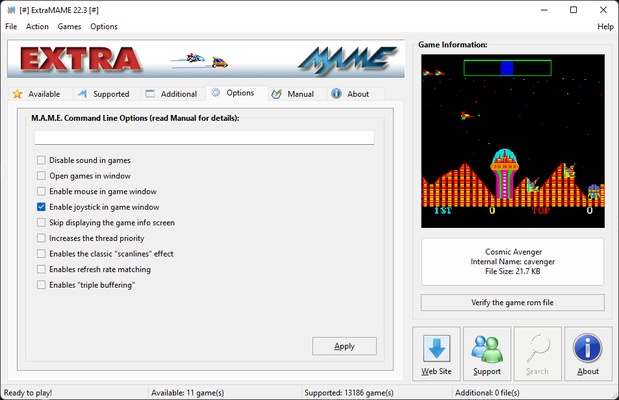
ExtraMAME is a powerful arcade emulator for Windows that allows users to play thousands of classic arcade games directly on their PC. Built on the popular MAME (Multiple Arcade Machine Emulator) technology, ExtraMAME provides a simplified and user-friendly interface, making retro gaming accessible to both beginners and experienced arcade enthusiasts.
With support for thousands of arcade titles, including legendary games from the golden age of gaming, ExtraMAME delivers an authentic arcade experience with enhanced graphics, customizable controls, and reliable game compatibility.
Whether you're revisiting childhood favorites or discovering retro classics for the first time, ExtraMAME offers one of the easiest ways to enjoy arcade gaming on modern Windows computers.
Key Features
Play Thousands of Arcade Games
Access and launch a massive collection of classic arcade titles from multiple generations of arcade machines.
Easy-to-Use Interface
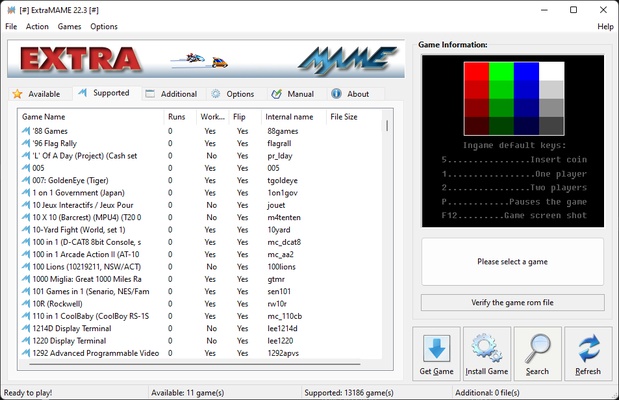
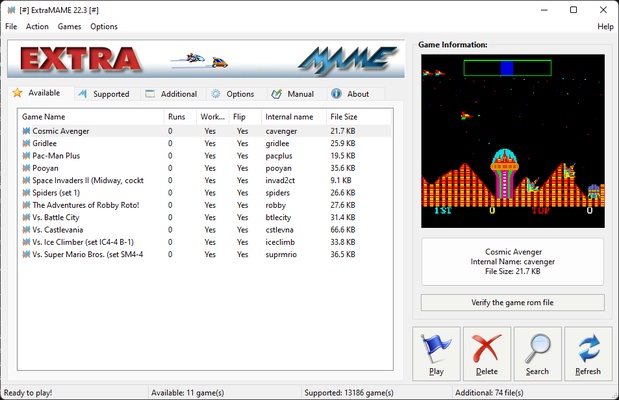
Unlike traditional MAME setups, ExtraMAME features a clean graphical interface that simplifies game management and launching.
High Compatibility
Built using MAME technology, ExtraMAME supports a wide variety of arcade systems and game ROMs.
Customizable Controls
Configure keyboard, joystick, arcade sticks, and game controllers for a personalized gaming experience.
Enhanced Audio & Video Emulation
Enjoy classic arcade games with improved sound emulation, smoother graphics rendering, and optimized performance.
Save & Load Game States
Save progress at any time and continue your game later without starting from the beginning.
Full-Screen Gaming Support
Play retro games in windowed mode or immersive full-screen mode for a true arcade experience.
Arcade Collection Management
Browse, organize, search, and manage your arcade game library quickly and efficiently.
Lightweight Performance
Optimized for Windows systems and capable of running smoothly on both older and modern computers.
Regular Updates
Frequent updates improve compatibility, emulator performance, and support for additional arcade hardware.
Why Choose ExtraMAME?
ExtraMAME is designed for users who want the power of MAME without dealing with complex configurations. It offers a streamlined gaming experience while maintaining excellent compatibility with thousands of arcade games.
The software is ideal for retro gaming fans, arcade collectors, gaming enthusiasts, and anyone looking to enjoy classic arcade entertainment on Windows.
How to Use ExtraMAME
- Download and install ExtraMAME on your Windows PC.
- Launch the application after installation.
- Add your legally owned arcade game ROMs.
- Allow ExtraMAME to scan and detect available games.
- Select a game from the library.
- Configure keyboard, joystick, or gamepad controls.
- Launch the game and start playing.
- Save and load game states whenever needed.
Best Use Cases
- Arcade Game Emulation
- Retro Gaming
- Classic Arcade Collections
- Home Arcade Systems
- Gaming Cabinets
- Vintage Game Preservation
- Offline Gaming
- PC Gaming Entertainment
- Retro Game Streaming
- Gaming Enthusiast Setups
System Requirements
Operating System: Windows 11, Windows 10, Windows 8, Windows 7
Processor: 2 GHz or faster
RAM: 512 MB minimum (2 GB recommended)
Storage: 700 MB available disk space
Graphics: DirectX-compatible graphics card
Input Devices: Keyboard, Joystick, Gamepad, Arcade Controller
Pros
✔ Supports thousands of classic arcade games
✔ Easy-to-use graphical interface
✔ Built on reliable MAME technology
✔ Customizable controls and controller support
✔ Save and load game progress anytime
✔ Lightweight and fast performance
✔ Excellent compatibility with arcade ROMs
Cons
✖ Requires arcade ROM files separately
✖ Some advanced emulator settings may require experience
✖ Windows-only software
✖ Trial version limitations
Conclusion
ExtraMAME is an excellent arcade emulator for Windows users who want a simple yet powerful way to enjoy classic arcade games. Combining MAME compatibility with an easy-to-use interface, it removes much of the complexity associated with traditional arcade emulation.
Whether you're a retro gaming enthusiast, arcade collector, or casual player, ExtraMAME provides a reliable platform for reliving the golden age of arcade gaming. Its extensive game support, customizable controls, and smooth performance make it one of the best arcade emulator solutions available for Windows PCs.