

HeidiSQL is a free and open-source database management tool for Windows that allows developers and database administrators to manage MySQL, MariaDB, PostgreSQL, and Microsoft SQL Server databases.
With a lightweight design and easy-to-use interface, HeidiSQL makes it simple to browse database structures, edit data, create SQL queries, and manage remote database connections.
Originally developed by Ansgar Becker, HeidiSQL has become a popular choice for users who need a fast and efficient alternative to larger database administration tools.
Key Features
Multi-Database Support
HeidiSQL supports multiple database systems, including:
- MySQL
- MariaDB
- PostgreSQL
- Microsoft SQL Server
Users can manage different database types from a single application.
SQL Query Editor
The built-in SQL editor provides:
- Syntax highlighting
- Query history
- Multiple query tabs
- SQL script execution
It helps developers write and test database commands more efficiently.
Database Import and Export
HeidiSQL allows users to export and import data in common formats, including:
- SQL files
- CSV files
- XML files
This makes database migration and backup tasks easier.
Table Management
Users can create, modify, and delete:
- Tables
- Columns
- Indexes
- Views
- Stored procedures
All operations can be performed through the graphical interface.
Remote Database Access
Supports remote database connections through:
- TCP/IP connections
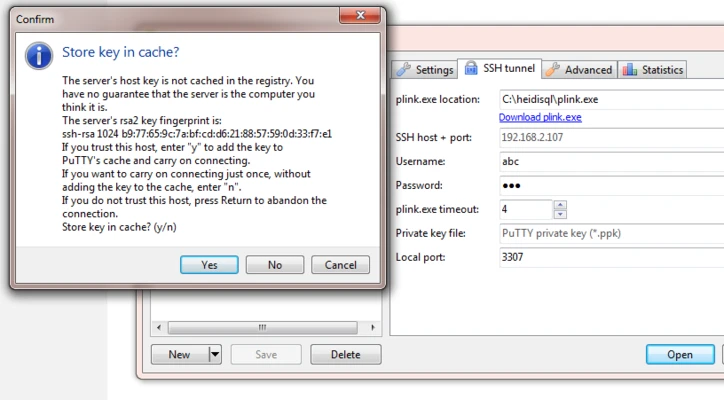
- SSH tunneling
Users can securely manage databases hosted on remote servers.
User and Permission Management
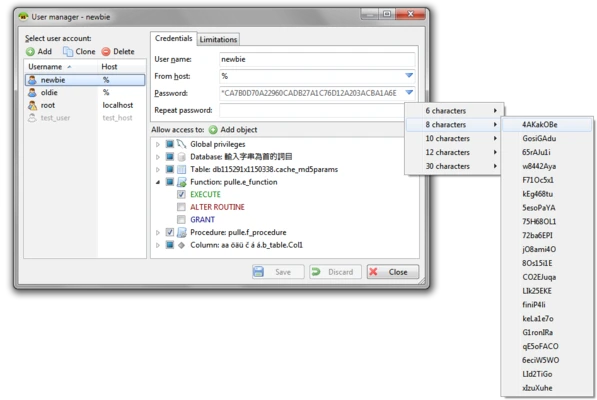
Provides tools for managing database users, passwords, and access privileges.
User Interface
HeidiSQL features a simple and practical interface optimized for productivity.
The left panel displays databases, tables, and server objects, while the main workspace provides data browsing and SQL editing tools.
The tab-based layout allows users to work with multiple queries and database sessions at the same time.
Installation and Setup
- Download HeidiSQL installer.
- Run the setup file and complete installation.
- Create a new database session.
- Enter connection information:
- Hostname
- Username
- Password
- Database name
- Test the connection and start managing your database.
How to Use
Connect to a Database
Open HeidiSQL and create a new session with your database credentials.
Browse Database Content
Use the navigation panel to view databases, tables, and stored objects.
Run SQL Queries
Write SQL commands in the query editor and execute them directly.
Edit Data
Modify table records using the built-in data editor.
Import and Export Data
Use the export and import functions to transfer or backup database information.
FAQ
Is HeidiSQL free?
Yes. HeidiSQL is completely free and open-source software.
Does HeidiSQL support MySQL?
Yes. HeidiSQL provides full support for MySQL and MariaDB databases.
Can HeidiSQL connect to remote databases?
Yes. It supports remote connections using TCP/IP and SSH tunneling.
Is HeidiSQL available for macOS?
No. HeidiSQL is officially designed for Windows. macOS and Linux users can run it through compatibility tools such as Wine.
HeidiSQL vs MySQL Workbench, which is better?
HeidiSQL focuses on speed and simplicity, while MySQL Workbench provides more advanced modeling and visualization features.
Alternatives
MySQL Workbench
A professional database tool from Oracle with advanced modeling and administration features.
DBeaver
A cross-platform database management application supporting many database systems.
Navicat
A commercial database management solution with advanced enterprise features.
SQLyog
A Windows-based MySQL administration tool with powerful database management functions.
Pricing
HeidiSQL is 100% free and open-source.
There are no subscription fees or paid editions.
System Requirements
- Operating System: Windows 7/8/10/11
- Processor: 1 GHz or faster Intel or AMD CPU
- RAM: 2GB minimum
- Storage: About 50MB free disk space
- Database Support: MySQL, MariaDB, PostgreSQL, Microsoft SQL Server
PROS
- Free and open-source
- Lightweight and fast
- Supports multiple database systems
- Easy-to-use graphical interface
- SSH tunneling support
- Powerful SQL editor
CONS
- Windows only
- Limited database visualization features
- No Oracle database support
- Interface design is relatively traditional
Conclusion
HeidiSQL is a powerful yet lightweight database management tool for Windows users.
With support for multiple database platforms, an efficient SQL editor, remote connection features, and simple data management tools, it is an excellent choice for developers and database administrators who need a fast and free alternative to heavier database applications.