
Go to Windows platform Display platforms icon
Go to Windows platform Go to Mac platform Go to Android platform
Bulk Crap Uninstaller 6.3.0 icon

Bulk Crap Uninstaller 6.3.0

6.3.0
Marcin Szeniak
5.0
9 MB size

Remove large amounts of unwanted Windows applications quickly

Bulk Crap Uninstaller (BCUninstaller) is a free and open-source Windows utility designed to remove multiple programs quickly and efficiently. It can detect regular, hidden, broken, and portable applications and automate much of the uninstallation process.


Key Features

  • Bulk Uninstallation: Select and remove multiple applications with minimal user interaction.

  • Application Detection: Finds installed, hidden, damaged, portable, and Windows Store applications.

  • Leftover Cleanup: Helps remove files, folders, and other leftovers after uninstalling programs.

  • Forced Uninstallation: Can remove applications when their normal uninstallers are broken or unavailable.

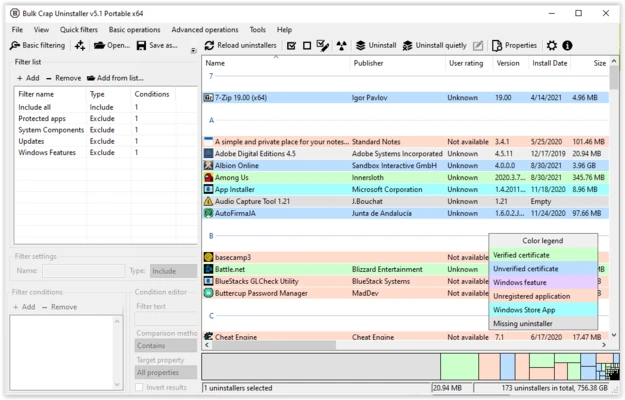
  • Filtering and Search: Provides tools for finding specific applications in large software lists.

  • Automation: Supports advanced uninstall options and command automation.

  • Portable Version: Can run without a traditional installation.

  • Open Source: Released under the Apache 2.0 license and free for personal and commercial use.


User Interface

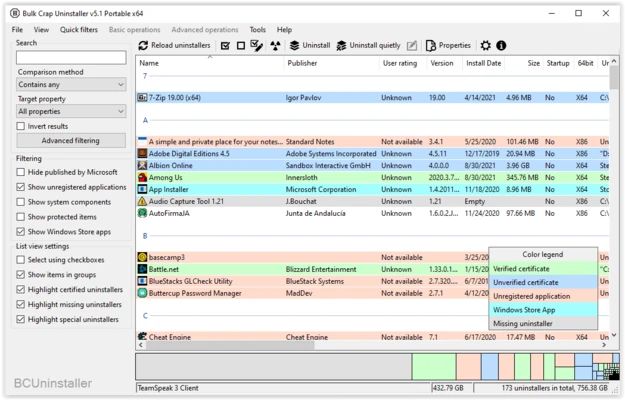
The interface displays installed applications in a detailed list with filtering, sorting, and search options. While the large number of available controls can feel overwhelming to beginners, it provides useful flexibility for advanced users.


Installation and Setup

Download and launch Bulk Crap Uninstaller, then allow it to scan the system for installed applications. No complicated configuration is required for basic use.


How to Use

  1. Launch Bulk Crap Uninstaller and scan for installed programs.

  2. Select one or multiple applications.

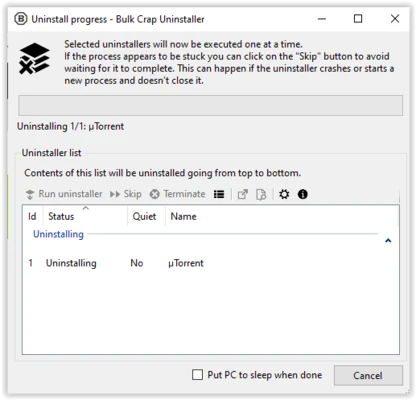
  3. Choose the standard, forced, or automated uninstall option.

  4. Follow the uninstall prompts.

  5. Scan for and remove remaining files or folders when available.


System Requirements

  • Operating System: Windows 7 or later

  • Framework: .NET Framework required

  • Processor: 1 GHz or faster

  • RAM: 512 MB minimum

  • Storage: Approximately 50 MB


Pros

  • Free and open source

  • Supports bulk uninstallation

  • Detects hidden and broken applications

  • Can remove leftover files

  • Portable version available

  • Extensive automation options


Cons

  • Interface can be overwhelming

  • Some advanced operations require user experience

  • Uninstallation results can vary between applications


Conclusion

Bulk Crap Uninstaller is a powerful and flexible Windows uninstaller for users who need to remove multiple applications efficiently. Its bulk removal, forced uninstall, leftover cleanup, application detection, and automation features make it particularly useful for power users and system administrators.

Information about Bulk Crap Uninstaller 6.3.0

License Freeware
Op. System Windows
Category Utilities
Language English + more
Author Marcin Szeniak
permission icon Permissions Not applicable
Date 2026-09-09
Size 9 MB
File type Official Website

Apps recommended for you

OneDrive 26.129.0706 icon
Store Photos and Docs Online. Access them from any PC, Mac or Phone
Hasleo Backup Suite icon
Hasleo Backup Suite for Windows is a comprehensive backup solution that enables users to easily back up, restore, and clone their system and files.
OCCT 17.0.13 icon
Let you benchmark and overclock your PC system components
CPU-Z 2.21.0 icon
Utility that gathers information of the main devices of your system
AOMEI Partition Assistant icon
Manage, resize, and optimize your Windows disk partitions easily with AOMEI Partition Assistant, the reliable all-in-one partition management software.
pdfFactory icon
Create PDF files easily, as if you were printing
Rclone icon
Rclone for Windows is a command-line tool that allows users to manage and synchronize files across cloud storage services and local storage.
Notion icon
Notion is an all-in-one workspace for notes, tasks, databases, and team collaboration.
HERI Editor 3.26.2 icon
Herisoft Writer - Simple and Convenient Document Editing
Readest 0.12.10 icon
A lightweight, powerful and elegant e-book reader
DocuFreezer 7.0 icon
Convert Office documents into PDF and image formats
Fixyfier 9.1.0.0 icon
Fix common Windows problems with just one click
NovaBench 6.2.0 icon
A modern benchmark suite that quickly and accurately tests your entire system
balenaEtcher 2.1.7 icon
Burn images to SD cards & USB drives, safe & easy for PC
OCCT 17.1.3 icon
Let you benchmark and overclock your PC system components
BurnAware Free 19.4 icon
Free burning software and various CD, DVD, Blu-ray tools
Argente Disk Cleaner icon
Safely eliminate files and folders
Hyena icon
Hyena for Windows is a powerful system management tool that helps IT administrators manage and troubleshoot Windows networks and Active Directory environments.
BleachBit 6.0.2 icon
BleachBit quickly frees disk space and tirelessly guards your privacy
Rclone icon
Rclone for Windows is a command-line tool that allows users to manage and synchronize files across cloud storage services and local storage.
Driver Easy 7.1.3 icon
Driver Updater for all Windows PC. Update All Drivers in one click!
BleachBit 6.0.4 icon
BleachBit quickly frees disk space and tirelessly guards your privacy
TeraBox icon
TeraBox for Windows is a cloud storage service that allows users to securely store, sync, and share large files easily.
Portable PDF Split and Merge Basic Edition icon
Portable PDF Split and Merge Basic Edition for Windows is a lightweight tool that allows users to split, merge, and organize PDF documents with ease.