Opera is a fast and feature-rich web browser for Windows. It provides a clean interface, customizable browsing tools, built-in privacy features, and support for extensions.
The browser includes features such as an integrated AI assistant, ad and tracker blocking, VPN functionality, Workspaces, Tab Islands, sidebar integrations, and synchronization across devices.
What's New
The latest versions of Opera focus on improving performance, privacy, tab management, AI features, and the overall browsing experience.
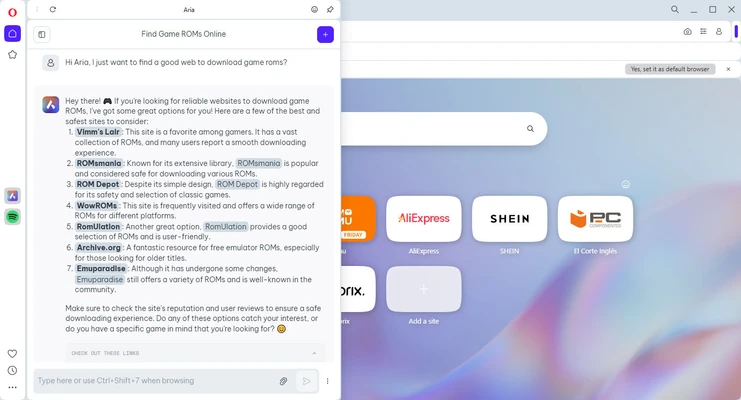
• Integrated Aria AI assistant for AI-powered chat and content generation.
• Improved Tab Islands for organizing related tabs.
• Enhanced Workspaces for managing separate browsing sessions.
• Performance and startup improvements.
• Improved ad and tracker blocking.
• Updated sidebar integrations.
• Improved battery efficiency for laptops.
• General interface and stability improvements.
Key Features
• Built-in Aria AI assistant.
• Free built-in VPN for supported browsing activities.
• Built-in ad and tracker blocker.
• Tab Islands for organizing related tabs.
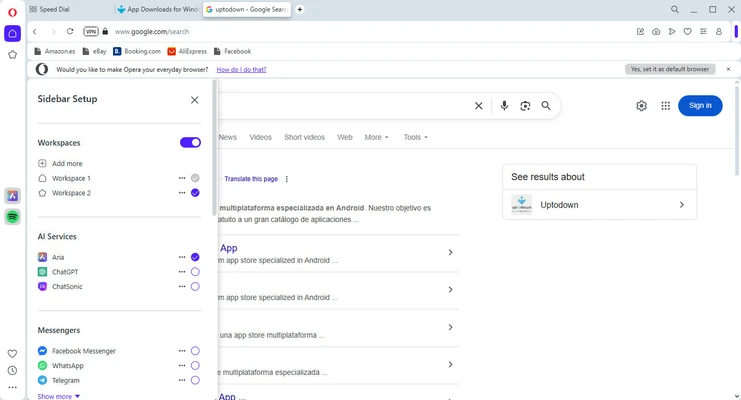
• Workspaces for separating browsing sessions.
• Sidebar access to selected messaging and other services.
• Flow for sharing links and files between devices.
• Support for Chrome extensions and Opera add-ons.
• Customizable start page, themes, and shortcuts.
• Built-in battery saver features.
• Bookmark and tab synchronization across devices.
• Support for multiple search engines.
• Private browsing mode.
• Integrated cryptocurrency wallet features in supported versions.
User Interface
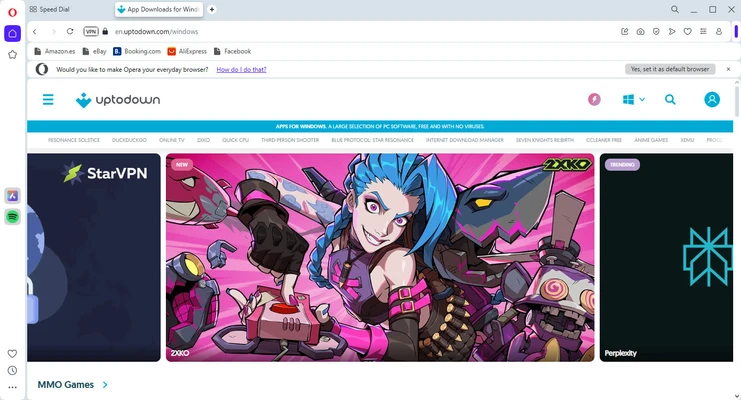
Opera uses a modern interface with a combined address and search bar, tab management tools, sidebar integrations, and customizable start-page elements.
Workspaces and Tab Islands make it easier to organize multiple browsing sessions and prevent large numbers of open tabs from becoming difficult to manage.
Installation and Setup
Download the Opera installer and run it on a compatible Windows computer. Follow the on-screen instructions to complete the installation.
After installation, you can customize the browser, select a default search engine, enable privacy features, sign in to synchronize data, and import bookmarks from another browser.
How to Use
-
Launch Opera after installation.
-
Enter a website address or search term in the address bar.
-
Open additional websites using tabs.
-
Organize related tabs with Tab Islands or Workspaces.
-
Save frequently visited websites as bookmarks.
-
Enable the built-in ad blocker and other privacy features when needed.
-
Use the sidebar for supported services and tools.
-
Sign in to synchronize bookmarks, settings, and other supported data across devices.
-
Install compatible Opera add-ons or Chrome extensions to add functionality.
FAQ
Is Opera free?
Yes. Opera is available as a free web browser.
Does Opera have a built-in VPN?
Yes. Opera includes a built-in VPN feature. Its availability and functionality may vary depending on the version and region.
Does Opera block ads?
Yes. Opera includes a built-in ad blocker and tracker blocking features.
Can Opera use Chrome extensions?
Yes. Opera supports compatible Chrome extensions in addition to its own add-ons.
Does Opera have an AI assistant?
Yes. Opera includes Aria, its integrated AI assistant, in supported versions.
Can I synchronize Opera across devices?
Yes. Signing in to an Opera account allows supported browsing data, such as bookmarks and tabs, to be synchronized across devices.
Does Opera support tab organization?
Yes. Tab Islands and Workspaces provide tools for organizing tabs and separating different browsing sessions.
Alternatives
Opera GX – A browser designed for gamers with features focused on gaming and resource management.
Google Chrome – A widely used browser with extensive extension support and broad website compatibility.
Mozilla Firefox – An open-source browser with strong customization and privacy features.
Microsoft Edge – A Chromium-based browser with integration with Microsoft services and Windows.
Brave – A privacy-focused browser with built-in ad and tracker blocking.
Pricing
Opera is free to download and use. Some additional services or features may have separate requirements or limitations.
System Requirements
• Operating System: Windows 10 or Windows 11
• Architecture: 64-bit
• Processor: 1 GHz or faster
• RAM: 512 MB or more
• Graphics: DirectX 9.0c compatible graphics hardware or equivalent
Pros
• Free to use.
• Built-in ad and tracker blocking.
• Built-in VPN feature.
• Integrated AI assistant.
• Advanced tab organization.
• Support for Chrome extensions.
• Customizable interface.
• Cross-device synchronization.
Cons
• Some features and services may vary by region.
• Built-in features can make the browser feel more complex than basic browsers.
• Some users may prefer the simpler interface of competing browsers.
Conclusion
Opera is a versatile Windows web browser that combines everyday browsing with built-in privacy tools, AI features, tab management, synchronization, and customization options.
Its Tab Islands, Workspaces, built-in ad blocker, VPN, Aria AI assistant, and extension support make it a suitable choice for users who want more functionality than a basic web browser.
For users who prefer a feature-rich and customizable browsing experience, Opera is a solid alternative to Chrome, Edge, Firefox, and other popular browsers.