


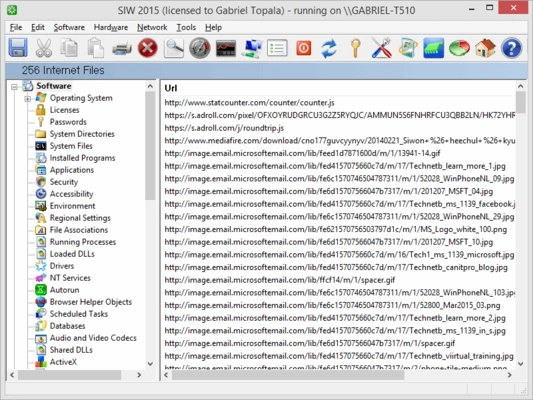
SIW (System Information for Windows) is a comprehensive system information and diagnostic tool that analyzes a Windows PC and displays detailed information about its hardware, software, network configuration, and system settings. It can also generate reports in several formats, making it useful for troubleshooting, system auditing, hardware and software inventory, and IT administration.
Key Features
-
Software Information: View details about the operating system, installed applications, software licenses, processes, services, codecs, and system uptime.
-
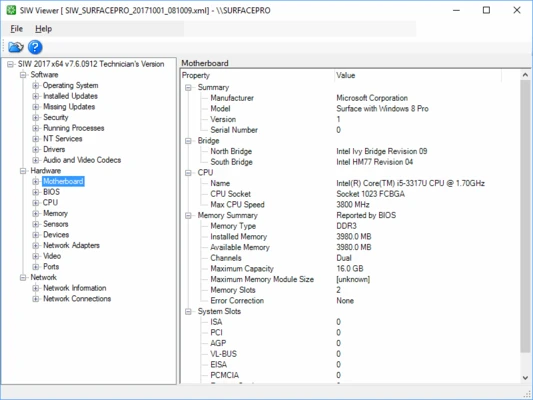
Hardware Information: Analyze the CPU, motherboard, memory, BIOS, chipset, graphics card, monitors, storage devices, USB devices, network adapters, printers, and other hardware.
-
Network Information: Display network configuration, connections, shares, open ports, statistics, and Active Directory information.
-
Network Tools: Includes utilities for ping, trace, network scanning, MAC address management, and other network diagnostics.
-
Real-Time Monitoring: Monitor CPU usage, memory, page file activity, and network traffic.
-
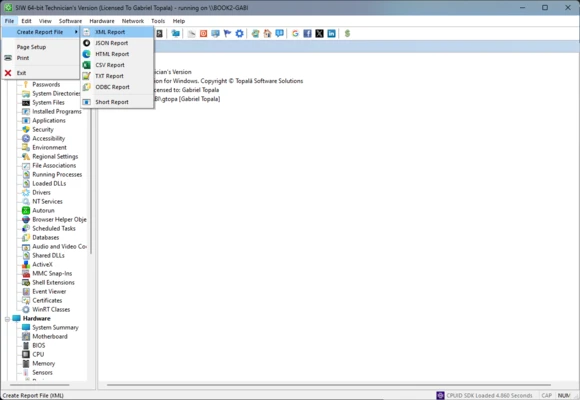
System Reports: Generate detailed reports in HTML, JSON, CSV, TXT, or XML formats.
-
Batch Mode: Run automated hardware and software inventory tasks for multiple systems.
-
Software License Information: Retrieve available license and product-key information from supported software.
-
Portable Version: Run SIW without a traditional installation, which is useful for technicians working on multiple computers.
-
Additional Utilities: Includes tools for Wake-on-LAN, monitor testing, URL exploration, and system shutdown or restart.
User Interface
SIW uses a category-based interface that organizes system information into software, hardware, network, and diagnostic sections. The straightforward layout makes it easy to navigate from general system information to detailed hardware and configuration data.
Installation and Setup
SIW is available as an installable application and in portable form. After launching the program, it automatically analyzes the computer and populates the available system information. Users can then select individual categories or configure report options for further analysis.
How to Use
-
Launch SIW on your Windows computer.
-
Browse the software, hardware, or network categories.
-
Select an individual component to view detailed information.
-
Use the built-in network and diagnostic tools when troubleshooting.
-
Monitor system activity using the real-time monitoring section.
-
Generate and export a report when you need to document the system configuration.
Pros
-
Provides extensive hardware and software information
-
Includes network diagnostics and monitoring tools
-
Supports multiple report formats
-
Portable version available
-
Useful for system inventory and troubleshooting
Cons
-
Interface looks dated compared with newer diagnostic tools
-
Large amount of information can be overwhelming for beginners
-
Some advanced features are restricted to paid editions
-
Designed exclusively for Windows
Conclusion
SIW is a versatile Windows system information and diagnostic utility for users who need detailed information about their computer. Its combination of hardware analysis, software inventory, network tools, real-time monitoring, and report generation makes it particularly useful for technicians, administrators, and advanced PC users.