

SteelSeries GG is an all-in-one software suite for Windows designed to manage and customize SteelSeries gaming peripherals. It provides tools for configuring keyboards, mice, headsets, and other compatible devices, while also offering audio enhancement, gameplay recording, and profile management features.
The software combines several utilities in one application, including Engine for device customization, Sonar for audio controls, and Moments for capturing gameplay clips. It is designed to give SteelSeries users greater control over their hardware and gaming setup.
What's New
-
Improved device detection and compatibility.
-
Updated Engine customization features.
-
Enhanced Sonar audio controls and presets.
-
Improved AI-powered audio and noise cancellation features.
-
Updated Moments gameplay capture tools.
-
Improved GameSense integration for supported games.
-
Better profile management and synchronization.
-
Various performance, stability, and bug fixes.
Key Features
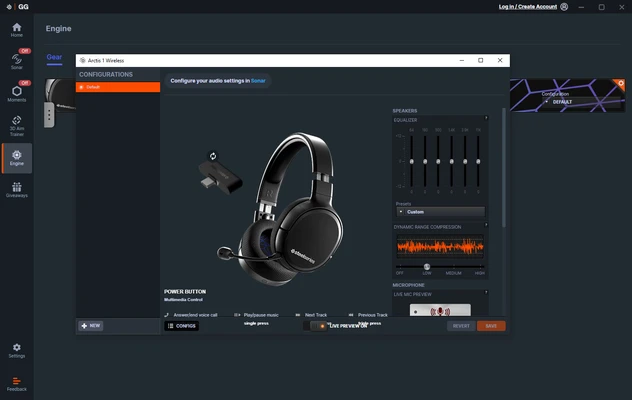
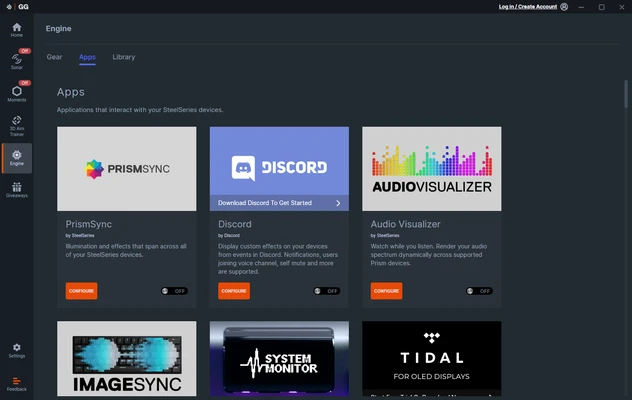
SteelSeries Engine: Customize supported keyboards, mice, headsets, and other peripherals with settings for RGB lighting, key bindings, macros, sensitivity, and device profiles.
Sonar Audio: Provides equalizer presets, spatial audio controls, microphone enhancements, and AI-powered noise cancellation for supported configurations.
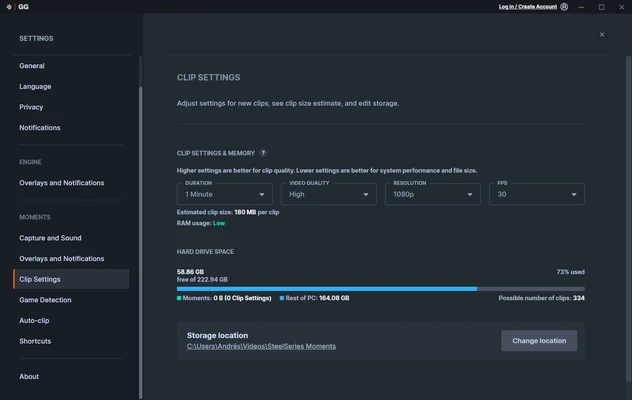
Moments: Captures gameplay clips and provides basic tools for editing and sharing recorded content.
GameSense Integration: Enables supported games to interact with compatible SteelSeries devices, including dynamic RGB lighting and other in-game effects.
Device Profiles: Create customized profiles for different games and applications and switch between configurations when needed.
Cloud Sync: Synchronize supported settings and profiles across devices when cloud features are available.
Peripheral Management: Provides a centralized location for configuring compatible SteelSeries gaming hardware.
User Interface
SteelSeries GG uses a modern interface with separate sections for its major features. The Engine section focuses on peripheral customization, while Sonar provides audio controls and Moments handles gameplay capture.
The dashboard and navigation are designed to make common settings easy to access, although the number of available options can vary depending on the connected SteelSeries devices.
Installation and Setup
Download the latest SteelSeries GG installer and run it on a compatible Windows computer. Follow the on-screen instructions to complete the installation.
After installation, connect your SteelSeries peripherals and launch GG. Compatible devices should be detected automatically. Sign in or create a SteelSeries account if you want to use supported cloud and synchronization features.
You can then configure your devices through Engine, adjust audio settings through Sonar, and enable Moments if you want to record gameplay.
How to Use
-
Download and install SteelSeries GG.
-
Connect your compatible SteelSeries devices.
-
Launch the GG application.
-
Open Engine to configure your peripherals.
-
Adjust lighting, macros, sensitivity, and other device settings.
-
Use Sonar to configure equalizer, spatial audio, and microphone options.
-
Enable Moments if you want to capture gameplay.
-
Create separate profiles for different games when needed.
-
Save and synchronize supported settings.
FAQ
Does SteelSeries GG work without a SteelSeries device?
Some features, including certain Moments and Sonar functions, may work without SteelSeries hardware, but many device customization features require compatible SteelSeries products.
Is SteelSeries GG free?
Yes. SteelSeries GG is free to download and use. Some features are designed specifically for compatible SteelSeries hardware.
Can I disable Moments?
Yes. Moments can be disabled if you do not need gameplay recording or want to reduce background resource usage.
Does Sonar work with other headsets?
Sonar can work with many audio devices, although certain features and integrations may be optimized for SteelSeries hardware.
How do I update SteelSeries GG?
GG can notify you when new updates are available. You can also check for updates through the application's settings or download the latest version from the official SteelSeries website.
Can I customize RGB lighting with SteelSeries GG?
Yes. Engine provides RGB lighting controls for compatible SteelSeries keyboards, mice, headsets, and other supported devices.
Alternatives
Razer Synapse – A device management application for Razer gaming peripherals with lighting, performance, macro, and profile customization.
Logitech G HUB – Logitech's gaming software for configuring compatible keyboards, mice, headsets, and other gaming hardware.
Corsair iCUE – A comprehensive peripheral management application with extensive RGB lighting, device configuration, and system monitoring features.
NZXT CAM – A hardware management utility that provides system monitoring, lighting controls, and configuration features for compatible NZXT products.
Pricing
SteelSeries GG is completely free to download and use. Some features require compatible SteelSeries hardware, which is sold separately.
System Requirements
-
Operating System: Windows 10 and Windows 11
-
Processor: Intel Core i5 or equivalent recommended
-
Memory: 4 GB RAM minimum
-
Storage: At least 500 MB of available space
-
Internet Connection: Required for updates, cloud synchronization, and some online features
Pros
-
Free to download and use
-
Comprehensive SteelSeries peripheral management
-
Extensive customization options
-
Powerful audio controls through Sonar
-
Gameplay recording with Moments
-
Supports game-specific profiles
-
GameSense integration for supported games
-
Modern and easy-to-navigate interface
Cons
-
Primarily focused on SteelSeries hardware
-
Can use significant system resources when Moments is active
-
Some features require compatible devices
-
Occasional software bugs or compatibility issues
-
Internet connection required for some features
Conclusion
SteelSeries GG is a comprehensive software suite for users who own SteelSeries gaming peripherals. It combines device customization, RGB lighting, audio controls, gameplay recording, and game-specific features in a single application.
Its Engine, Sonar, and Moments modules provide useful tools for configuring hardware, improving audio, and capturing gameplay. Although the software can consume additional system resources and many features depend on SteelSeries hardware, it remains a useful companion for gamers invested in the SteelSeries ecosystem.