Vivaldi is a highly customizable web browser for Windows designed for users who want greater control over their browsing environment. Built on Chromium, it supports Chrome extensions while providing extensive customization options, advanced tab management, privacy tools, and integrated productivity features.
What's New
-
Improved Workspaces for better tab organization and multitasking
-
Enhanced Mail, Calendar, and Feeds features
-
Updated tracker and ad-blocking filter lists
-
Performance improvements for startup and tab switching
-
Additional theme, icon, and toolbar customization options
-
Improved Tab Stacks and split-screen browsing
-
More accurate address bar search suggestions
-
Improved synchronization between desktop and mobile devices
-
Updated Chromium engine with security and compatibility improvements
-
Refined privacy and site permission controls
Key Features
-
Highly customizable interface, layouts, themes, toolbars, and shortcuts
-
Advanced tab management with Tab Stacks, tab tiling, and Workspaces
-
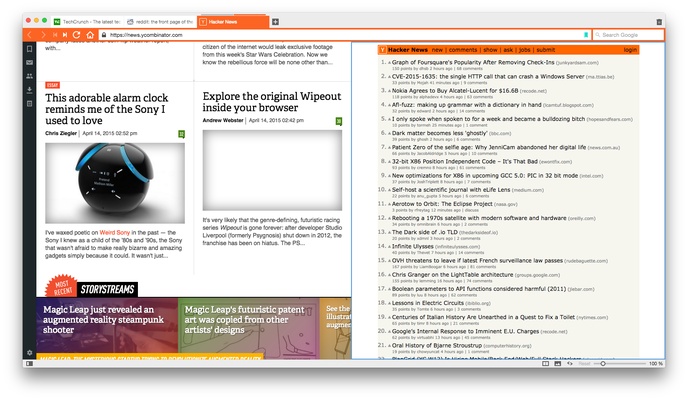
Split-screen browsing for viewing multiple pages simultaneously
-
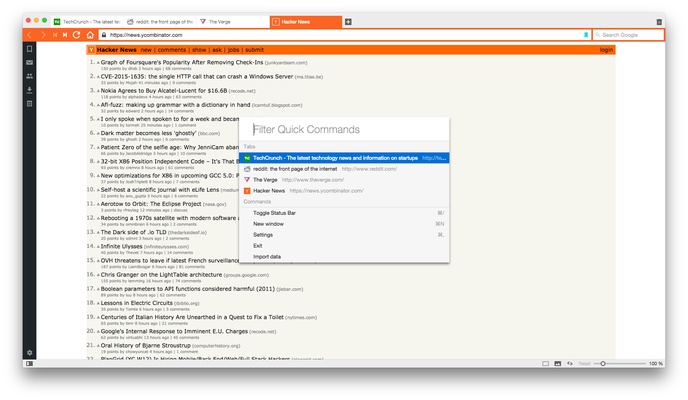
Quick Commands for searching tabs, bookmarks, history, settings, and more
-
Custom keyboard shortcuts and mouse gestures
-
Built-in ad and tracker blocking
-
Reader View for distraction-free reading
-
Web Panels for accessing websites from the sidebar
-
Built-in notes with attachments and tags
-
Built-in mail, calendar, and feed management
-
Built-in webpage translation
-
Full-page and area screenshot capture
-
Pop-out video for watching videos in a floating window
-
Sync for bookmarks, passwords, history, settings, and other browser data
-
Command Chains for creating custom browser workflows
-
Speed Dial for quick access to frequently visited websites
-
Support for Chrome extensions
User Interface
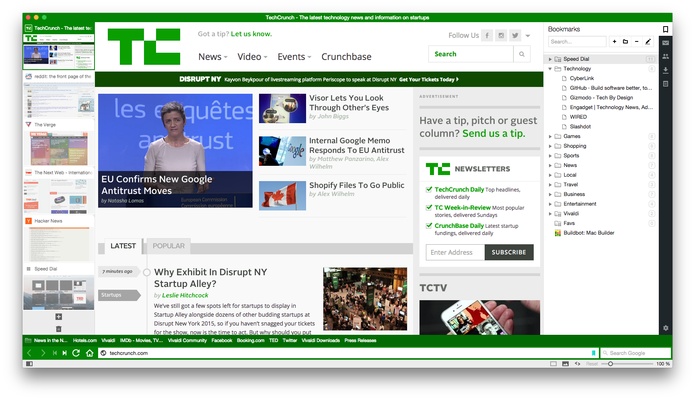
The interface is designed around customization. Users can change the position of tabs and toolbars, adjust the browser layout, select different themes, and customize the Start Page.
A sidebar provides access to bookmarks, downloads, notes, history, and Web Panels. Users can also choose between more compact or spacious interface layouts.
Tab Stacks and tiling make it easier to organize large numbers of open pages, while Workspaces can separate different browsing activities.
Installation and Setup
-
Download the Vivaldi installer for Windows.
-
Run the installer and follow the on-screen instructions.
-
Launch the browser after installation.
-
Use the initial setup options to select a theme, layout, and other preferences.
-
Import bookmarks and other browser data if required.
-
Sign in or configure Sync if you want to synchronize data between devices.
How to Use
Customize the Browser: Open Settings to configure themes, layouts, toolbars, keyboard shortcuts, and other interface options.
Manage Tabs: Drag tabs together to create Tab Stacks, tile tabs for side-by-side browsing, or use Workspaces to separate different tasks.
Use Web Panels: Add frequently accessed websites to the sidebar for quick access without opening additional tabs.
Take Notes: Use the built-in Notes feature to save text, links, screenshots, and other information while browsing.
Use Quick Commands: Open Quick Commands with a keyboard shortcut to quickly search browser functions, tabs, bookmarks, history, and settings.
Improve Privacy: Configure the built-in tracker and ad blocker and adjust individual website permissions.
Watch Videos: Use Pop-out Video to keep supported video content in a floating window while working in other tabs.
FAQ
Is Vivaldi compatible with Chrome extensions?
Yes. Because Vivaldi is based on Chromium, it supports extensions available through the Chrome Web Store.
Is Vivaldi free?
Yes. The browser is available free of charge.
Does Vivaldi have built-in privacy features?
Yes. It includes tracker and ad blocking, privacy controls, and configurable website permissions.
Can Vivaldi sync data between devices?
Yes. Vivaldi Sync can synchronize supported browser data such as bookmarks, passwords, history, and settings across compatible devices.
Is Vivaldi available on mobile devices?
Yes. Vivaldi also offers mobile versions for Android and iOS.
Can I customize the position of browser tabs?
Yes. The browser allows users to customize the placement and appearance of tabs and other interface elements.
Does Vivaldi include an email client?
Yes. Vivaldi includes integrated Mail, Calendar, and Feed features.
Alternatives
Google Chrome is a simpler Chromium-based browser with broad extension compatibility and a streamlined interface.
Mozilla Firefox offers strong privacy controls and extensive extension support with a different browser engine.
Opera provides a feature-rich Chromium-based browsing experience with integrated tools and services.
Brave focuses heavily on privacy, tracker blocking, and ad blocking while maintaining Chromium compatibility.
Pricing
Vivaldi is free to use. There is no paid browser license required for the core desktop browsing experience.
System Requirements
-
Windows 11
-
Windows 10
-
Windows 8
-
Windows 7
-
Sufficient storage for the browser and user data
-
Internet connection for browsing, synchronization, updates, and online services
Actual resource usage depends on the number of open tabs, extensions, and enabled features.
Pros
-
Extensive customization options
-
Advanced tab and workspace management
-
Built-in privacy and tracker blocking tools
-
Chrome extension compatibility
-
Integrated mail, calendar, notes, and feeds
-
Custom keyboard shortcuts and mouse gestures
-
Built-in screenshot, translation, and pop-out video tools
-
Cross-device synchronization
Cons
-
Feature-rich interface may feel complicated to users who prefer simplicity
-
Can use more system resources than minimalist browsers
-
Large numbers of tabs and built-in features can increase overall resource usage
Conclusion
Vivaldi is a powerful Chromium-based browser aimed at users who want extensive customization and control. Its combination of advanced tab management, Workspaces, Web Panels, privacy tools, built-in productivity features, and Chrome extension compatibility makes it particularly suitable for power users and multitaskers.
It may be more complex than minimalist browsers, but users who value flexibility and customization will find Vivaldi a capable free alternative to more conventional browsers.