PDFelement is a comprehensive PDF editor that lets users create, edit, organize, convert, annotate, sign, and protect PDF documents. It combines traditional PDF editing tools with OCR, form management, batch processing, and AI-powered features in a user-friendly interface.
Key Features
-
PDF Editing: Edit text, images, links, watermarks, backgrounds, headers, and footers while preserving document formatting.
-
PDF Creation and Organization: Create PDFs, combine multiple files, split documents, extract pages, and rearrange page order.
-
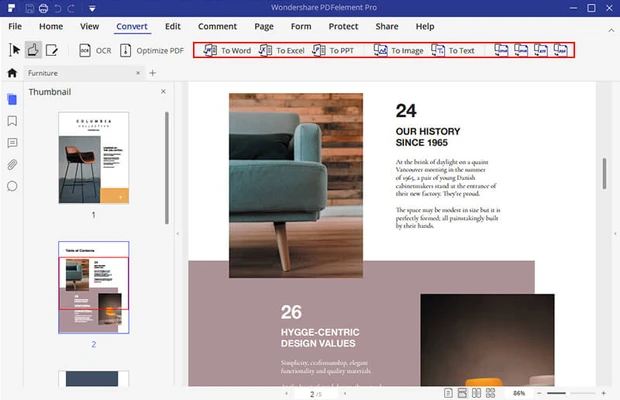
PDF Conversion: Convert PDFs to and from formats such as Word, Excel, PowerPoint, images, HTML, and plain text.
-
OCR: Recognize text in scanned and image-based PDFs, making documents searchable and editable.
-
Annotations: Highlight, underline, comment, draw, add shapes, stamps, and notes.
-
Digital Signatures: Create electronic signatures and sign PDF documents.
-
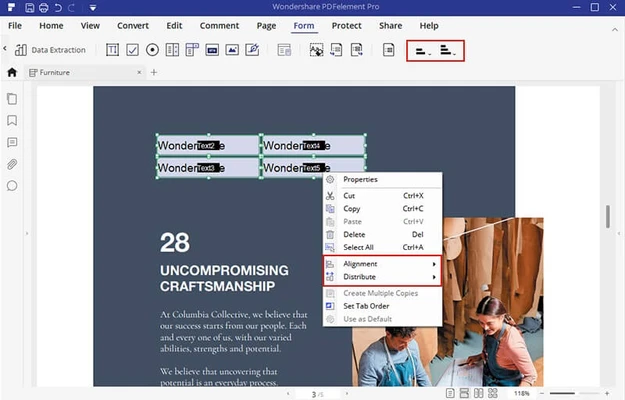
PDF Forms: Create, fill, and edit interactive forms with text fields, checkboxes, and other form elements.
-
Form Data Extraction: Extract information from PDF forms and export the data for further processing.
-
Document Security: Protect PDFs with passwords, encryption, permissions, and redaction tools.
-
Batch Processing: Process multiple PDF files for tasks such as conversion, optimization, extraction, and watermarking.
-
AI PDF Tools: AI features can assist with summarizing documents, checking grammar, rewriting content, translating text, and extracting key information.
-
Cloud Storage: Includes cloud storage for managing documents across supported devices.
User Interface
PDFelement uses a modern, organized interface with editing and document-management tools grouped into clearly defined sections. The layout is familiar to users of other office and PDF applications, making it relatively easy to locate editing, conversion, annotation, form, and security tools.
Installation and Setup
Download the appropriate version of PDFelement for your operating system and complete the installation process. After launching the application, you can open an existing PDF or create a new document and access the available editing and document-management tools.
Some advanced features may require an account, subscription, or paid license depending on the edition.
How to Use
-
Launch PDFelement and open an existing PDF or create a new document.
-
Select the required tool for editing, annotation, conversion, forms, or document management.
-
Make the necessary changes to the document.
-
Review the PDF and apply security or signature options if required.
-
Save or export the finished document in the desired format.
Pros
-
Comprehensive PDF editing features
-
Supports OCR for scanned documents
-
Extensive annotation and form tools
-
PDF conversion and page management
-
Digital signature and security features
-
Batch processing capabilities
-
AI-powered PDF tools
Cons
-
Some advanced features require a paid plan
-
Large or complex documents may require more system resources
-
The large feature set can take time to learn
Conclusion
PDFelement is a full-featured PDF editor suitable for users who need more than basic PDF viewing and annotation. Its combination of editing, conversion, OCR, forms, signatures, security, batch processing, and AI tools makes it useful for both individual document workflows and professional PDF management.