RPCS3 is a free and open-source PlayStation 3 emulator and debugger for Windows that allows users to play PS3 games on a PC with enhanced resolution, improved performance, and extensive customization options.
Developed by an active community of developers, RPCS3 has grown into one of the most advanced PS3 emulators, with support for a large library of PlayStation 3 games. It provides configurable graphics, audio, controls, and performance settings for both casual players and advanced users.
Key Features
-
Extensive Game Compatibility – Supports a large library of PlayStation 3 games, with compatibility continuing to improve through regular updates.
-
High-Resolution Rendering – Render games at resolutions higher than the original PS3 hardware, including 4K on supported systems.
-
Customizable Controls – Supports keyboard, mouse, and game controllers, including DualShock and Xbox controllers.
-
Multiple Graphics Backends – Supports Vulkan and OpenGL, with configuration options to optimize performance.
-
Game Patches – Apply compatible patches to improve performance, fix issues, or enable additional features.
-
Save Management – Supports standard game saves and emulator-specific configuration options.
-
Debugging Tools – Provides advanced tools for developers and experienced users who want to analyze or modify game behavior.
User Interface
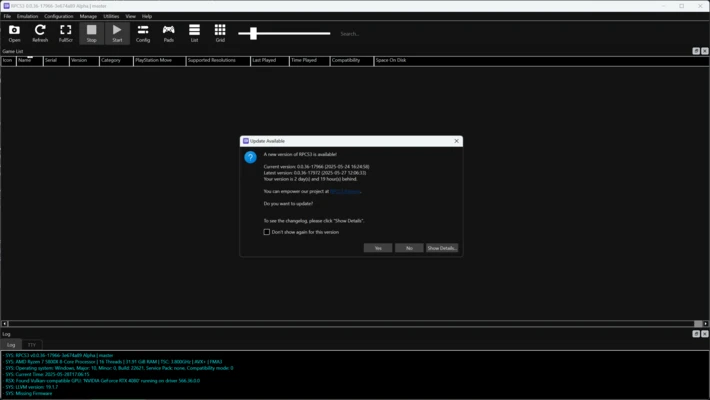
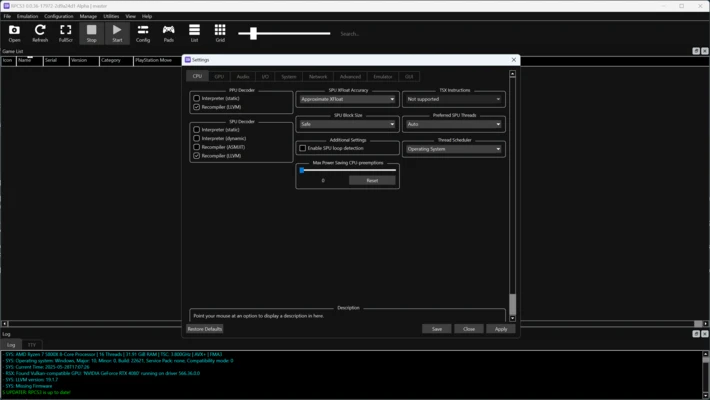
RPCS3 features a clean desktop interface with a game library, configuration menus, and system settings. Users can configure graphics, audio, input devices, CPU options, and other emulator settings from the main application.
The extensive configuration options allow experienced users to fine-tune individual games for better compatibility and performance.
Installation and Setup
-
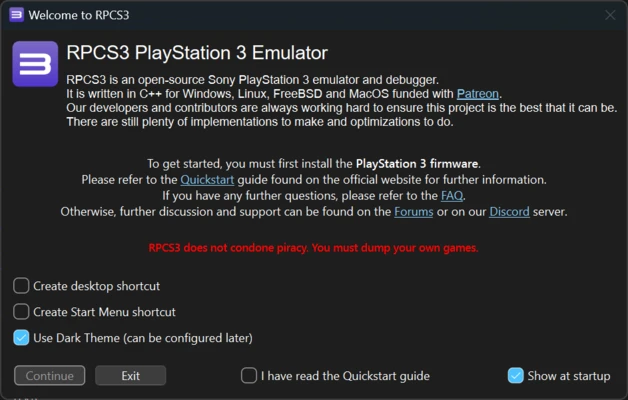
Download and install RPCS3 for Windows.
-
Install the official PlayStation 3 firmware required by the emulator.
-
Configure your graphics, audio, CPU, and controller settings.
-
Add your legally obtained PS3 game files to the RPCS3 game library.
-
Select a game and launch it from the main interface.
-
Adjust individual game settings when necessary to improve compatibility or performance.
How to Use
Add Games – Add your legally obtained PS3 game files to the RPCS3 game directory or use the built-in game management options.
Configure Graphics – Select the appropriate graphics backend and adjust resolution and other rendering settings according to your hardware.
Configure Controllers – Open the controller settings to configure a keyboard, mouse, DualShock controller, or compatible gamepad.
Apply Game Patches – Use available game patches when needed to improve performance or address specific compatibility issues.
Manage Saves – Use the game's normal save system to save and continue your progress.
FAQ
Is RPCS3 free?
Yes. RPCS3 is free and open-source.
Is RPCS3 legal?
The emulator itself is legal. Users should obtain PlayStation 3 firmware and game files through legal means and comply with applicable laws.
Can RPCS3 play every PS3 game?
No. Compatibility varies between games. Many titles are playable, while some may have graphical problems, performance issues, or may not yet be fully playable.
Can I use a controller with RPCS3?
Yes. RPCS3 supports a wide range of controllers, including DualShock and Xbox controllers.
Why does a game run slowly?
PS3 emulation is demanding. Performance depends on the CPU, GPU, game, emulator settings, and compatibility level. Updating RPCS3 and graphics drivers and adjusting game-specific settings may help.
Alternatives
PCSX2 – A popular PlayStation 2 emulator for Windows and other platforms.
Xenia – An open-source Xbox 360 emulator focused on playing Xbox 360 games on PC.
PPSSPP – A widely used emulator for PlayStation Portable games.
Pricing
RPCS3 is completely free and open-source. The project is supported by its community and contributors.
System Requirements
-
Operating System: Windows 10 or Windows 11 64-bit
-
Processor: A modern CPU with AVX2 support is recommended
-
Memory: 8GB RAM minimum; 16GB or more recommended
-
Graphics: A Vulkan-compatible GPU is recommended
-
Storage: SSD recommended for better loading performance
-
Additional Requirements: Official PlayStation 3 system software is required
PROS
-
Free and open-source
-
Excellent PS3 emulation capabilities
-
Supports high-resolution rendering
-
Extensive graphics and performance settings
-
Wide controller support
-
Active development and community support
CONS
-
Requires relatively powerful PC hardware
-
Some games still have compatibility or performance issues
-
Advanced configuration can be complicated for beginners
-
Performance varies significantly between games
Conclusion
RPCS3 is a powerful and feature-rich PlayStation 3 emulator for Windows. Its combination of high-resolution rendering, extensive configuration options, controller support, and active development makes it an excellent choice for users who want to play compatible PS3 games on a PC.
While PS3 emulation requires more powerful hardware than many older console emulators, RPCS3 provides one of the most capable ways to experience PlayStation 3 games on Windows.
Note: Game compatibility varies, and users should use legally obtained PlayStation 3 firmware and game files.