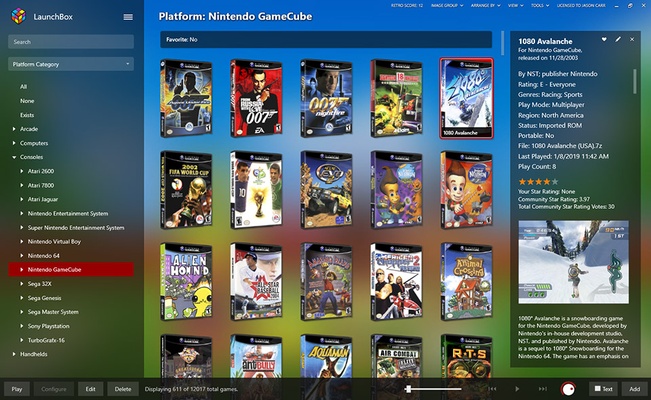
LaunchBox is a Windows game library manager and launcher designed to organize PC games, DOS games, arcade titles, and games running through emulators in one place.
Originally created as a frontend for DOSBox, LaunchBox has expanded into a comprehensive game management tool for both modern and classic gaming. It can import games from platforms such as Steam, GOG, and Epic Games, as well as ROMs and other supported game files. The software can also download artwork and metadata to create a detailed and visually appealing game library.
What's New
-
Improved game library management and importing.
-
Updated emulator and platform integrations.
-
Improvements to metadata and media downloading.
-
Performance and stability improvements.
-
Bug fixes and general user interface enhancements.
Key Features
-
Game Library Management: Organize PC games, DOS games, arcade titles, and emulated games in a single library.
-
Game Importing: Import games from supported PC gaming platforms and local collections.
-
Emulator Support: Configure and launch games through supported emulators.
-
Metadata and Artwork: Automatically download game descriptions, cover art, screenshots, logos, and other media.
-
Advanced Organization: Sort and filter games by platform, genre, developer, publisher, rating, and other categories.
-
Custom Playlists: Create playlists and custom collections to organize games according to your preferences.
-
Themes and Customization: Customize the appearance of the library with themes, artwork, and other visual settings.
-
Portable Mode: Run LaunchBox from an external drive without requiring a traditional installation.
-
Controller Support: Navigate the interface with compatible game controllers.
-
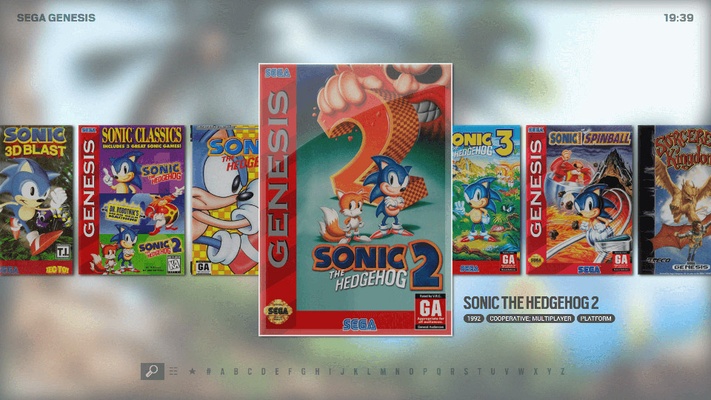
Big Box Mode: Provides a full-screen, controller-friendly interface designed for living-room and arcade-style gaming setups.
User Interface
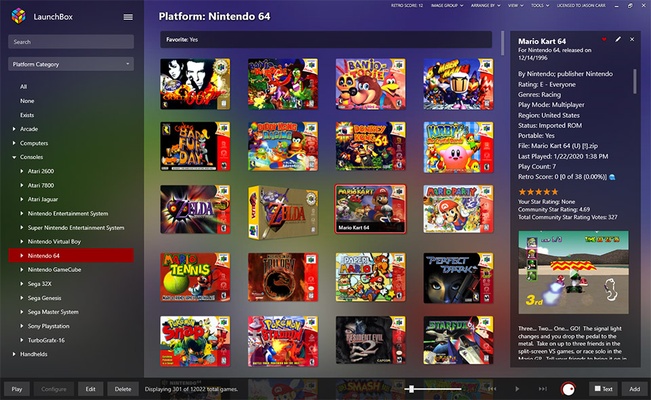
LaunchBox uses a library-focused interface built around game artwork and metadata. Users can browse their collection, search for titles, and filter games by different attributes.
The optional Big Box interface provides a full-screen experience that is better suited to televisions, arcade cabinets, and controller-based navigation.
Installation and Setup
-
Download and run the LaunchBox installer.
-
Follow the installation wizard to complete the setup.
-
Choose the installation location or configure portable mode if required.
-
Launch the application.
-
Use the import tools to add PC games, ROMs, or supported game libraries.
-
Configure emulators for platforms that require them.
-
Download or customize game metadata, artwork, and themes.
How to Use
-
Launch LaunchBox and create or open your game library.
-
Import games using the available import tools.
-
Configure an emulator if you are adding games that require emulation.
-
Review and organize your game information, artwork, and metadata.
-
Create playlists or custom categories as needed.
-
Select a game from the library to launch it.
FAQ
Is LaunchBox free?
Yes. LaunchBox offers a free version for managing and launching games. Some advanced features, including Big Box, require a paid license.
What games can LaunchBox manage?
It can manage PC games, DOS games, arcade games, and games associated with supported emulators and gaming platforms.
Can LaunchBox import Steam and GOG games?
Yes. LaunchBox provides import tools for supported PC gaming platforms, including Steam and GOG.
Does LaunchBox include emulators?
LaunchBox works with many popular emulators, but it primarily acts as a frontend and game manager rather than an emulator itself. Emulator configuration may be required depending on the platform.
Can I use LaunchBox with a controller?
Yes. Controller support is available, particularly in Big Box mode, which is designed for television and couch gaming setups.
Can LaunchBox run from an external drive?
Yes. Portable mode allows the application and its library configuration to be stored on an external drive.
Alternatives
Playnite – A free and open-source game launcher that combines games from multiple PC platforms and supports emulators.
RetroArch – A multi-system emulation platform with its own frontend and extensive support for classic gaming systems.
Pricing
Free Version
-
Game library management
-
Game importing
-
Metadata and artwork management
-
Emulator integration
Premium License
-
Big Box full-screen interface
-
Additional customization features
-
Premium features and functionality
LaunchBox pricing and license options may change, so users should check the current plans before purchasing.
System Requirements
-
Operating System: Windows 10 and Windows 11
-
Processor: Modern Intel or AMD processor
-
RAM: 4 GB minimum; more memory recommended for large libraries
-
Storage: Depends on the size of the game collection and downloaded media
-
Graphics: DirectX-compatible graphics hardware
Actual requirements can vary depending on the games, emulators, and media used with LaunchBox.
Pros
-
Easy-to-use game library manager
-
Supports modern and classic games
-
Extensive emulator integration
-
Automatic metadata and artwork
-
Powerful sorting and filtering
-
Custom playlists and themes
-
Portable mode
-
Big Box provides a console-style interface
Cons
-
Some advanced features require a paid license
-
Large libraries can require significant storage and system resources
-
Emulator configuration may require additional setup
-
The application itself does not replace the emulators or games it manages
Conclusion
LaunchBox is a versatile Windows game library manager for users who want to organize PC, DOS, arcade, and emulated games in one interface. Its metadata tools, artwork support, emulator integration, customization options, and portable mode make it particularly useful for large and diverse game collections.
The free version provides solid library management features, while Big Box adds a full-screen, controller-friendly experience for users building a living-room gaming or arcade setup.