


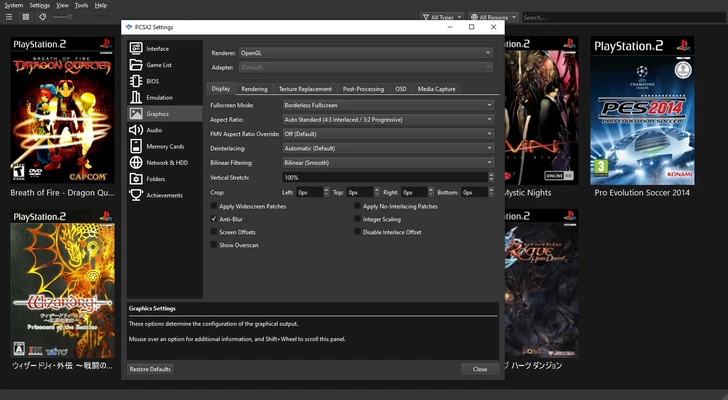
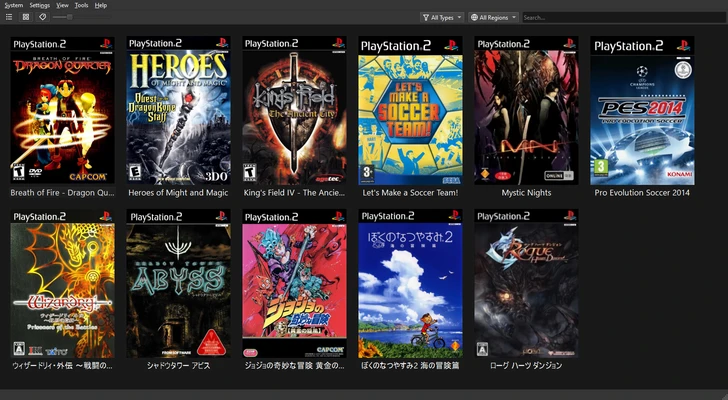
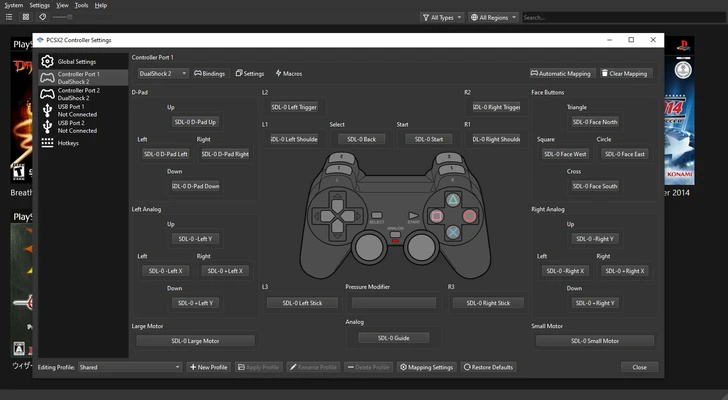
PCSX2 is a free and open-source PlayStation 2 emulator that allows users to run compatible PS2 games on Windows, Linux, and other supported platforms. First released in 2002, PCSX2 has evolved into a mature emulation project with extensive game compatibility and a wide range of graphics, controller, and performance options.
PCSX2 can improve the original PS2 experience with higher internal resolutions, texture filtering, widescreen support, save states, customizable controls, and other enhancements. It is designed for users who want to play their legally owned PlayStation 2 games on modern computers.
What's New
Recent versions of PCSX2 focus on improving game compatibility, emulation accuracy, graphics rendering, performance, controller support, and overall stability.
Updates may include improvements to the Vulkan, Direct3D, and OpenGL graphics backends, game-specific fixes, enhanced input support, memory card management, save-state reliability, and user interface improvements.
PCSX2 is actively developed, so compatibility and available features can change between releases.
Key Features
PlayStation 2 Emulation: Emulates the PlayStation 2 hardware environment and allows compatible PS2 games to run on a PC.
High-Resolution Rendering: Render games at resolutions higher than the original PS2 output for sharper visuals on modern displays.
Graphics Enhancements: Provides options such as texture filtering, anti-aliasing, widescreen rendering, and other visual improvements.
Save States: Create and load quick save states without relying solely on the original game's save system.
Virtual Memory Cards: Create and manage virtual PS2 memory cards for storing game progress.
Controller Support: Configure keyboards, gamepads, and compatible PlayStation or Xbox controllers.
Game Patches: Apply supported patches and game-specific configuration changes to improve compatibility or enable additional features.
Widescreen Support: Play compatible games in widescreen formats and adjust the display for modern monitors.
Customizable Controls: Map buttons and adjust controller settings to match your preferred configuration.
Internal Recording: Supported versions and configurations provide tools for recording gameplay.
Multiple Rendering Backends: Depending on the platform and hardware, PCSX2 supports modern graphics APIs such as Vulkan and Direct3D.
Game-Specific Configuration: Create customized settings for individual games when certain titles require different graphics or emulation options.
User Interface
PCSX2 uses a modern desktop interface that provides access to game management, emulator settings, controller configuration, memory cards, graphics options, and other features.
The main interface allows users to select and launch games while providing quick access to frequently used settings. Advanced configuration menus provide detailed controls for graphics rendering, emulation, audio, input devices, memory cards, and system behavior.
Although PCSX2 offers many advanced settings, default configurations are designed to provide a relatively straightforward starting point for new users.
Installation and Setup
Download the appropriate PCSX2 package for your operating system and extract or install it according to the distribution format.
During the initial setup, PCSX2 guides users through basic configuration options such as language, graphics backend, controller settings, and other emulator preferences.
PCSX2 requires a PlayStation 2 BIOS to emulate the console. Users should obtain the BIOS from their own PlayStation 2 console rather than downloading copyrighted BIOS files from unauthorized sources.
You will also need legally obtained game files or discs. PCSX2 does not provide commercial PS2 games.
How to Use
Configure the Emulator: Launch PCSX2 and complete the initial setup wizard. Select the appropriate graphics and controller settings for your computer.
Set Up the BIOS: Provide a legally obtained PS2 BIOS file from your own console.
Add Your Games: Use compatible game discs or legally created game images and configure the appropriate game location.
Configure Graphics: Adjust internal resolution, rendering backend, texture filtering, widescreen options, and other graphics settings according to your hardware.
Configure Controls: Connect a compatible controller and map the buttons through the controller settings.
Launch a Game: Select a compatible PS2 game and start the emulation process.
Use Save States: Create quick save states when you want to save progress at a specific point.
Adjust Game-Specific Settings: If a particular title has graphical glitches or performance problems, configure individual settings for that game instead of changing global settings.
FAQ
Can PCSX2 play PlayStation 1 games?
No. PCSX2 is designed specifically for PlayStation 2 emulation. Although some PS2 consoles can play PS1 games through backward compatibility, PCSX2 is not a general-purpose PS1 emulator.
Is PCSX2 free?
Yes. PCSX2 is free and open-source software.
Is PCSX2 legal?
The PCSX2 emulator itself is legal software. However, copyright laws apply to BIOS files and commercial games. Users should obtain BIOS files from their own console and use game copies they are legally entitled to use.
Do I need a PS2 BIOS to use PCSX2?
Yes. PCSX2 requires a compatible PlayStation 2 BIOS to emulate the console. The BIOS should be obtained from a PS2 console that you own.
Can PCSX2 run games from ISO files?
Yes. PCSX2 can load compatible game image files, including ISO files, when properly configured.
Can I use a PS5 or Xbox controller with PCSX2?
PCSX2 supports compatible controllers recognized by the operating system. Button mappings can be customized within the emulator.
Can PCSX2 improve PS2 graphics?
Yes. PCSX2 can render games at higher internal resolutions and provides additional graphics options that can make supported games look considerably sharper than on original PS2 hardware.
Does PCSX2 support save states?
Yes. Save states allow users to save and restore the emulator's current state independently of the game's normal memory-card save system.
Can PCSX2 run every PS2 game?
No. PCSX2 has broad compatibility, but individual games can still have graphical glitches, performance problems, or other emulation issues. Compatibility can also vary depending on the emulator version and configuration.
Alternatives
RetroArch: A multi-system emulation platform that supports numerous console and computer systems through individual emulator cores.
RPCS3: An open-source PlayStation 3 emulator for users who want to emulate a newer generation of PlayStation hardware.
PPSSPP: A popular open-source emulator designed specifically for PlayStation Portable games.
Xenia: An open-source Xbox 360 emulator that provides an alternative for users interested in emulating Xbox 360 titles.
Pricing
PCSX2 is completely free and open-source software. There is no subscription or commercial license required to use the emulator.
Users may still need compatible hardware, storage, and legally obtained PlayStation 2 game and BIOS files.
System Requirements
PCSX2 performance requirements vary considerably depending on the game, graphics settings, and desired resolution.
For modern Windows versions, a reasonably recent multi-core processor and a compatible graphics processor are recommended.
-
OS: Windows 10 or Windows 11
-
Processor: Modern multi-core CPU recommended
-
Graphics: Direct3D 11/12, Vulkan, or other supported graphics hardware
-
RAM: 4 GB minimum recommended
-
Storage: Approximately 100 MB for the emulator, plus additional space for games and save data
-
Controller: Compatible gamepad recommended
Higher resolutions and advanced graphics settings require more powerful hardware.
Pros
-
Free and open-source
-
Extensive PS2 game compatibility
-
High-resolution rendering
-
Numerous graphics enhancements
-
Save states and virtual memory cards
-
Flexible controller configuration
-
Game-specific settings and patches
-
Active development and community support
-
Supports modern graphics APIs
Cons
-
Initial setup can be confusing for beginners
-
Performance varies significantly between games
-
Some titles still have compatibility or graphical issues
-
Higher resolutions require more powerful hardware
-
Users must provide their own legally obtained BIOS and game files
Conclusion
PCSX2 is one of the most established PlayStation 2 emulators available for PC. It provides broad game compatibility while allowing users to improve the original PS2 experience with higher resolutions, enhanced graphics, customizable controls, save states, virtual memory cards, and other modern features.
The emulator may require some configuration to achieve the best results, particularly for demanding games or high-resolution rendering. Once properly configured, PCSX2 provides a powerful way to experience compatible PlayStation 2 games on modern hardware while preserving many of the features that made the original console popular.