

LDPlayer for Windows is a powerful Android emulator designed primarily for running mobile games and apps on Windows PCs. It uses hardware acceleration and virtualization technology to deliver smooth performance, high frame rates, and responsive controls.
The emulator supports keyboard, mouse, and gamepad controls, while features such as multi-instance management, macro recording, custom key mapping, and screen recording make it particularly suitable for mobile gaming.
What's New
Recent versions of LDPlayer focus on improved Android compatibility, gaming performance, stability, graphics rendering, and multi-instance functionality. Updates also improve support for newer games and provide better resource management when running multiple emulator instances.
Key Features
High-Performance Android Emulation – Uses CPU virtualization and hardware acceleration to provide smooth Android gaming and app performance on Windows.
Custom Controls – Map keyboard and mouse controls to touchscreen actions, making mobile games easier to play with traditional PC controls.
Multi-Instance Manager – Run multiple Android instances simultaneously and use different accounts or applications at the same time.
Multi-Instance Sync – Synchronize actions across multiple emulator instances for supported games and applications.
Macro Recorder – Record repetitive actions and replay them automatically.
High FPS and Graphics – Supports configurable frame rates, resolutions, and graphics settings for compatible games.
Gamepad Support – Connect compatible controllers and configure buttons for a more console-like gaming experience.
Screen Recording and Screenshots – Capture gameplay or record emulator activity directly from the application.
Google Play Support – Sign in with a Google account to access and install compatible apps and games from Google Play.
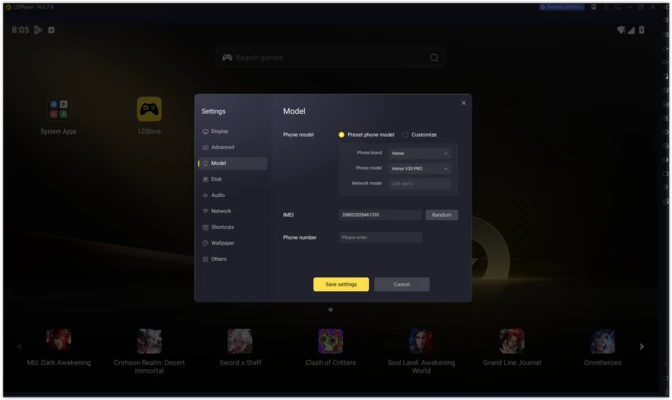
Custom Device Settings – Configure CPU cores, RAM allocation, resolution, device model, and other emulator parameters.
User Interface
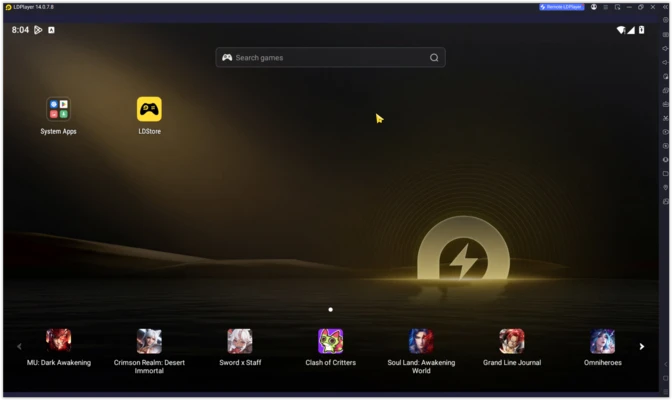
LDPlayer uses a straightforward interface designed around gaming and application management. The main screen provides access to installed apps and games, while a sidebar provides shortcuts to settings, key mapping, screenshots, recording, multi-instance management, and other tools.
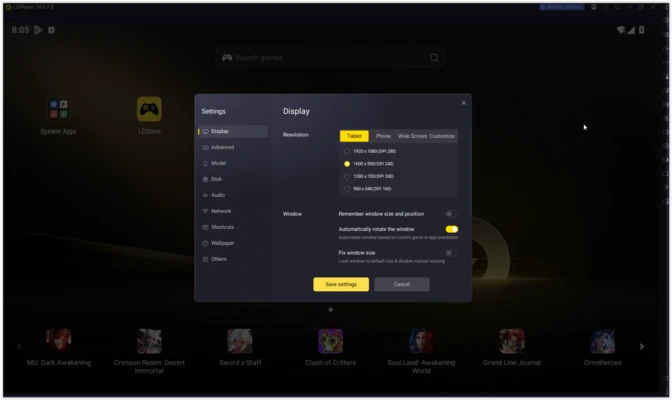
The settings panel provides separate configuration options for performance, display, network, device properties, and shortcuts. Advanced users can fine-tune CPU and RAM allocation, rendering settings, resolution, and other parameters.
Installation and Setup
Download the LDPlayer installer and run it on a compatible Windows PC.
Follow the installation wizard to complete the setup. After launching the emulator, sign in with a Google account if you want to use Google Play.
For better performance, enable CPU virtualization such as Intel VT-x or AMD-V in your computer's BIOS/UEFI if it is not already enabled.
You can then configure the emulator's CPU, RAM, resolution, graphics renderer, and frame-rate settings according to your hardware.
How to Use
- Launch LDPlayer after installation.
- Sign in with your Google account if required.
- Open Google Play and install your preferred Android apps or games.
- Configure keyboard, mouse, or gamepad controls.
- Adjust the resolution, CPU, RAM, and graphics settings if necessary.
- Start an installed game or application from the home screen.
- Use Multi-Instance Manager if you need to run multiple Android environments.
- Create macros or custom key mappings for supported games and repetitive tasks.
For demanding 3D games, allocate sufficient RAM and CPU resources while avoiding excessive allocation that could affect Windows performance.
FAQ
Is LDPlayer free?
Yes. LDPlayer is free to download and use. Individual games and applications may contain their own optional purchases.
Can LDPlayer run on macOS or Linux?
LDPlayer is designed for Windows. It does not provide a native macOS or Linux version.
Does LDPlayer support gamepads?
Yes. Compatible gamepads can be connected and configured through the emulator's control settings.
Can I run multiple instances of LDPlayer?
Yes. Multi-Instance Manager allows you to create and run multiple Android environments simultaneously, provided your PC has sufficient CPU and RAM resources.
Does LDPlayer support Google Play?
Yes. Compatible versions provide access to Google Play after signing in with a Google account.
Does LDPlayer require virtualization?
Hardware virtualization is strongly recommended for better performance, particularly when running demanding games or multiple instances.
Can I customize keyboard controls?
Yes. LDPlayer provides key mapping tools that allow touchscreen actions to be assigned to keyboard and mouse controls.
Alternatives
BlueStacks – A widely used Android emulator with extensive gaming features and broad application compatibility.
NoxPlayer – A gaming-focused Android emulator with customizable controls, multi-instance support, and macro functionality.
MuMu Player – An Android emulator aimed at gaming, with support for high-performance rendering and multiple instances.
GameLoop – An Android emulator particularly focused on mobile games and PC gaming controls.
Genymotion – An Android virtualization platform primarily aimed at developers and application testing.
Pricing
LDPlayer is available as a free Android emulator. There is no purchase required to install and use the core emulator, although individual Android games and applications may offer in-app purchases.
System Requirements
- OS: Windows 11, 10, 8, or 7
- CPU: Intel or AMD processor with virtualization support recommended
- RAM: 8 GB recommended; 16 GB or more for multiple instances
- GPU: Dedicated graphics card recommended for demanding games
- Graphics: DirectX 11 or later recommended
- Storage: At least 10 GB of available space
Actual requirements vary depending on the Android version, game, graphics settings, and number of emulator instances running simultaneously.
PROS
- High-performance Android emulation
- Customizable keyboard and mouse controls
- Multi-instance support
- Multi-instance synchronization
- Built-in macro recording
- Gamepad support
- High-FPS gaming options
- Free to use
CONS
- Windows-only
- Can consume significant CPU and RAM
- Multiple instances require substantially more system resources
- Performance varies between different games
- Some games may have compatibility or anti-cheat restrictions
Conclusion
LDPlayer is a capable Android emulator for Windows users who primarily want to play mobile games on a PC. Its combination of customizable controls, high-FPS support, multi-instance management, macros, and gamepad support makes it particularly well suited to gaming.
It is less focused on general Android development than developer-oriented emulators, but for everyday Android gaming and running mobile applications on Windows, LDPlayer provides a strong combination of performance and useful gaming features.