

Nexus Mod Manager (NMM) is a free mod management tool for Windows that makes it easier to download, install, organize, enable, disable, and remove mods for supported PC games.
Originally developed for Nexus Mods, Nexus Mod Manager provided a simple way for gamers to manage their game modifications without manually copying files into game directories. It supported popular games such as The Elder Scrolls V: Skyrim, Fallout, Dark Souls, and The Witcher 3.
Nexus Mod Manager was later replaced by Vortex, the modern mod manager developed by Nexus Mods. However, NMM remains an important part of the history of Nexus Mods and is still useful for users looking for the classic mod management experience.
Key Features
- Easy Mod Installation: Install supported mods without manually moving files into game folders.
- Nexus Mods Integration: Download and manage mods directly from Nexus Mods.
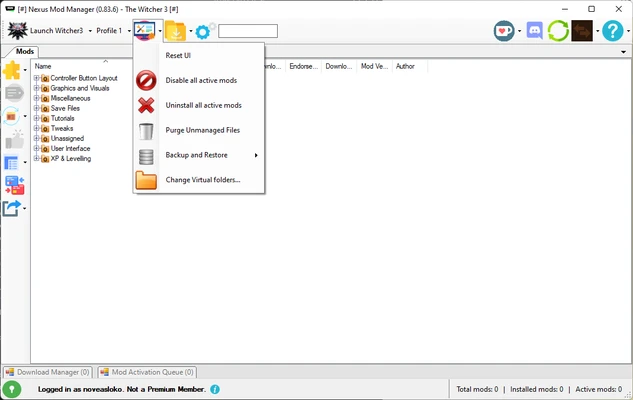
- Mod Management: Install, uninstall, enable, and disable mods from a central interface.
- Load Order Management: Organize plugins and mod priorities to help reduce compatibility problems.
- Automatic Mod Sorting: Helps arrange installed mods according to their load order requirements.
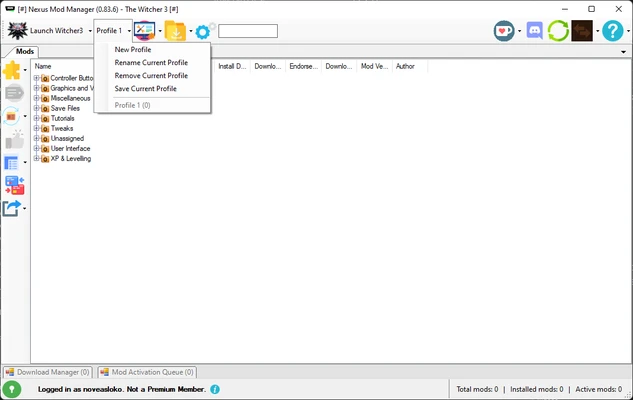
- Mod Profiles: Maintain different mod configurations for supported games.
- Conflict Management: Identify potential conflicts between installed mods.
- Game Detection: Automatically detect supported games installed on your computer.
- Simple Interface: Provides an easier alternative to manually installing and managing mods.
User Interface
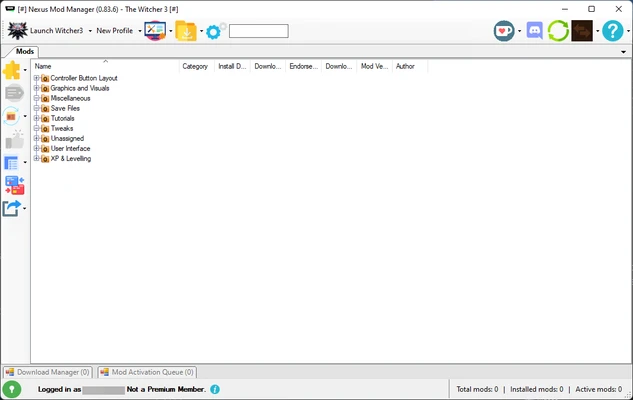
Nexus Mod Manager features a simple and straightforward interface designed around game and mod management.
The main window provides access to installed games, downloaded mods, installed mods, and plugin information. Users can enable or disable modifications, check installation status, and manage their game files from the same application.
Compared with modern mod managers such as Vortex, the interface is more basic, but this can make it easier for users who prefer a simple mod management workflow.
Installation and Setup
- Download Nexus Mod Manager and run the installer.
- Follow the on-screen installation instructions.
- Launch the application after installation.
- Allow the program to scan your PC for supported games.
- Select the game you want to manage.
- Configure the mod download and installation directories.
- Sign in to your Nexus Mods account if required.
- Start downloading and installing compatible mods.
How to Use
Install a Mod: Download a compatible mod and add it to Nexus Mod Manager. The application will install the mod into the appropriate game directory.
Enable or Disable Mods: Use the mod list to activate or deactivate individual modifications.
Manage Load Order: Adjust the order of plugins when necessary to improve compatibility between different mods.
Remove Mods: Select an installed modification and use the uninstall option to remove it from the game.
Check Mod Status: Review installed mods and their current status from the main interface.
Launch the Game: Start the supported game after configuring your desired mods.
FAQ
What is Nexus Mod Manager?
Nexus Mod Manager (NMM) is a Windows application designed to simplify the installation and management of mods for supported PC games.
Is Nexus Mod Manager still supported?
Nexus Mod Manager has been superseded by Vortex, which is the modern mod manager developed by Nexus Mods. NMM is therefore considered a legacy application.
Is Nexus Mod Manager the same as Vortex?
No. Nexus Mod Manager and Vortex are separate applications. Vortex replaced NMM and provides a newer interface and more advanced mod management features.
Can Nexus Mod Manager install mods automatically?
Yes. For supported games and compatible mods, NMM can automate the installation process instead of requiring users to manually copy mod files.
Which games does Nexus Mod Manager support?
Support includes a number of popular PC games, particularly titles from Bethesda and other major publishers. Compatibility depends on the specific version of NMM and the game.
Is Nexus Mod Manager free?
Yes. Nexus Mod Manager was released as a free mod management application.
Alternatives
Vortex – The modern successor to Nexus Mod Manager, offering improved mod deployment, conflict management, profiles, and broader game support.
Mod Organizer 2 – An advanced mod manager that provides detailed control over mod files, profiles, and load orders.
Wrye Bash – A specialized mod management tool particularly popular with Bethesda games.
Pricing
Nexus Mod Manager is FREE.
Nexus Mods may offer optional premium memberships for additional website features, but membership is separate from the NMM application.
System Requirements
- Operating System: Windows 7, 8, 10, or 11
- Processor: Intel or AMD processor
- Memory: 2 GB RAM or more
- Storage: Approximately 200 MB for the application, plus additional space for mods
- Internet Connection: Required for downloading mods from Nexus Mods
Actual requirements may vary depending on the games and number of mods being managed.
PROS
- Free to use
- Simple and straightforward interface
- Easy mod installation
- Nexus Mods integration
- Supports popular PC games
- Simplifies mod organization
CONS
- Legacy software
- Superseded by Vortex
- Limited support for newer games
- Less advanced than modern mod managers
- Large mod collections may require more manual management
Conclusion
Nexus Mod Manager (NMM) is a classic mod management tool for Windows PC gamers. It simplified the process of downloading, installing, organizing, and removing mods for many popular PC games.
Although Vortex has replaced Nexus Mod Manager as the modern Nexus Mods mod manager, NMM remains notable for its simple interface and its role in making PC game mod management more accessible.
For users working with older supported games or looking for the classic Nexus Mods mod management experience, Nexus Mod Manager remains a straightforward option.