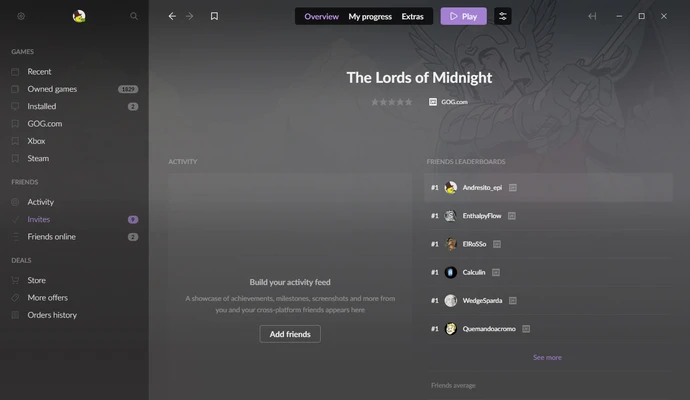
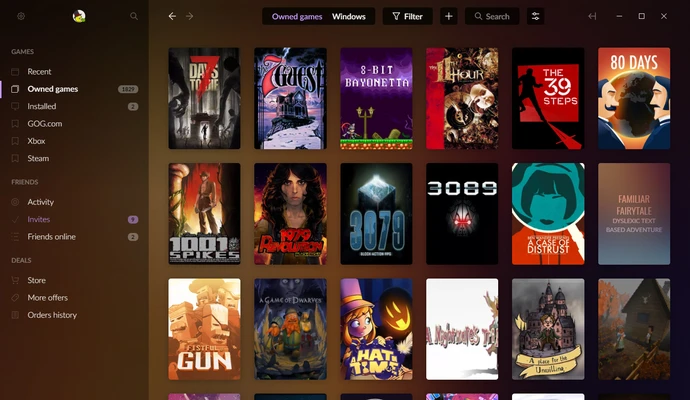
GOG Galaxy is a free gaming client for Windows that lets users purchase, install, launch, and update games from GOG. It can also connect with other gaming platforms to combine game libraries, achievements, playtime, and friends in one interface.
The client focuses on convenient game management while supporting features such as cloud saves, automatic updates, multiplayer services, and library customization.
Key Features
-
Unified Game Library
-
Multi-Platform Integration
-
Game Installation and Launching
-
Automatic Game Updates
-
Cloud Saves
-
Game Rollbacks
-
Achievement and Playtime Tracking
-
Friends List and Cross-Platform Chat
-
Multiplayer and Matchmaking
-
Custom Library Views
-
Sorting, Filtering, and Custom Tags
-
Activity Feed
-
Community Integrations
-
Cross-Device Library Synchronization
User Interface
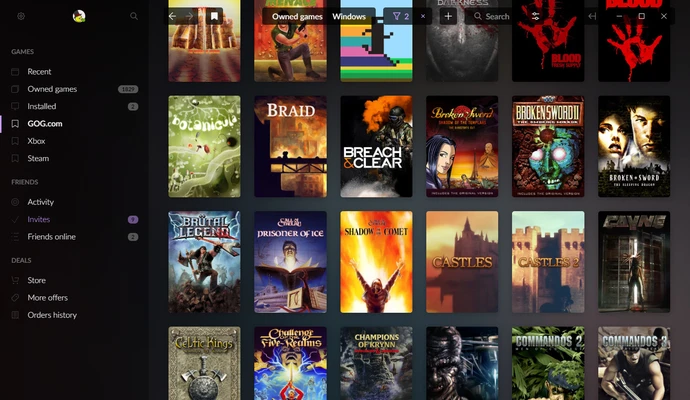
GOG Galaxy uses a modern interface centered around the game library. Games can be organized using filters, sorting options, tags, covers, and different library views.
A sidebar provides access to friends, notifications, settings, and other management features, while individual game pages provide access to installation, launching, updates, achievements, and related information.
Installation and Setup
Download and install GOG Galaxy on a compatible Windows PC, then sign in with a GOG account or create one.
To combine libraries from other supported platforms, open the settings and configure the available integrations. Once connected, supported games and gaming information can be imported into the Galaxy library.
How to Use
Open GOG Galaxy and browse your game library. Select a game to install or launch it, depending on whether it is already installed.
Use filters, tags, and custom views to organize your collection. The client can manage updates automatically, while supported games can use cloud saves to synchronize progress between computers.
The Friends section can be used to view contacts, track activity, chat, and access supported multiplayer features.
Pros
-
Combines games from multiple platforms
-
Supports cloud saves and automatic updates
-
Useful library organization tools
-
Cross-platform social features
-
Supports game rollback for compatible titles
-
Free to use
Cons
-
Some games still require their original launcher
-
Platform integrations may have limitations
-
Cloud saves are not available for every game
-
Smaller overall game selection than some competing platforms
Conclusion
GOG Galaxy provides a convenient way to organize and manage games from GOG and supported third-party platforms in one application. Its unified library, cloud saves, automatic updates, social features, and customizable organization tools make it useful for PC gamers who use multiple gaming services.