

Secure Eraser is a Windows data deletion utility designed to permanently remove sensitive files, folders, and storage data. It goes beyond standard deletion by overwriting data multiple times, making recovery through conventional tools virtually impossible.
The software is aimed at both casual users and professionals who need a reliable way to ensure that deleted data cannot be restored.
Overview
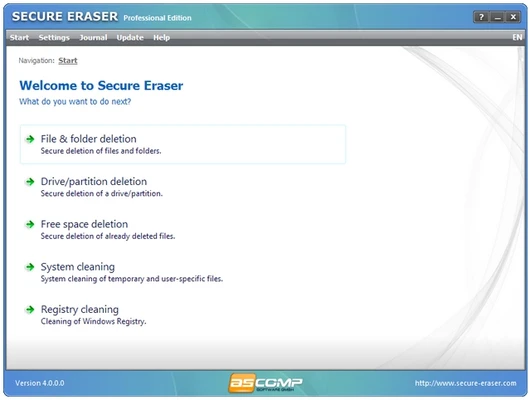
Secure Eraser provides a set of tools for secure file removal and system cleanup. It supports deleting individual files, entire folders, partitions, and even full drives.
In addition to secure deletion, the application also includes system maintenance features such as registry cleaning and temporary file removal, helping users free up disk space while improving overall system organization.
Secure Data Removal
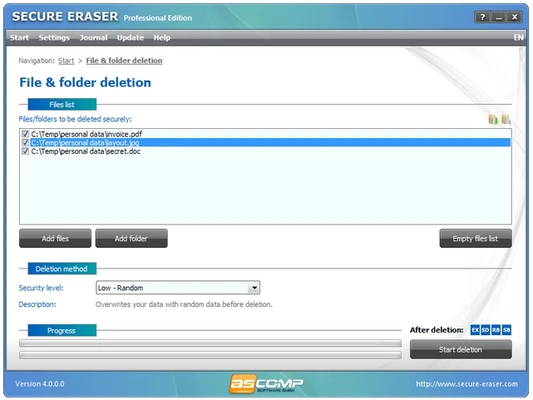
The core function of Secure Eraser is permanent data destruction. When files are deleted through the program, they are overwritten using specialized algorithms designed to eliminate any recoverable traces.
This makes it suitable for handling confidential documents, personal files, and business data that must not be recovered under any circumstances.
Drive and Partition Erasure
Beyond single-file deletion, Secure Eraser can wipe entire partitions or storage drives. This is particularly useful when:
- Reusing or selling a hard drive
- Decommissioning old systems
- Removing large amounts of sensitive data at once
Once completed, the erased data cannot be restored using standard recovery tools.
System Cleaning Tools
The software also includes basic system optimization features:
- Removal of temporary files
- Cleaning of browser history and cache
- Registry cleanup to remove invalid entries
- Free space wiping to eliminate remnants of previously deleted files
These tools help maintain a cleaner and more efficient system environment.
Free Space Wiping
One of the more advanced features is free space deletion. Instead of deleting active files, this function targets previously removed data that may still exist in unused disk space.
By overwriting this space, Secure Eraser ensures that deleted files remain unrecoverable.
User Interface
The interface is straightforward and functional. Users can select the type of operation they want—file, folder, drive, or free space wiping—and follow a simple step-by-step process.
While not heavily modernized in design, the layout is clear and suitable for users of all experience levels.
Key Features
- Secure file and folder deletion
- Drive and partition wiping
- Multi-pass data overwriting
- Registry and system cleaning tools
- Free space erasure for deleted file remnants
- Lightweight and easy to use
- Multilingual interface support
Pros
- Strong data destruction capability
- Simple and accessible interface
- Supports full drive wiping
- Includes system cleanup tools
- Suitable for all user levels
Cons
- Interface feels basic compared to modern utilities
- Advanced options may be limited for power users
- Overwriting process can take time on large drives
Conclusion
Secure Eraser is a practical tool for users who need reliable and irreversible data deletion on Windows systems. With support for file-level wiping, full drive erasure, and system cleanup, it provides a solid all-in-one solution for privacy-focused users.
While not overly complex or feature-heavy, it performs its core task effectively and remains a dependable choice for secure data removal.