Vivaldi is a powerful and highly customizable web browser for Windows designed for users who want more control, flexibility, and privacy while browsing the internet.
Developed by Vivaldi Technologies, the browser is based on the Chromium engine, providing compatibility with Chrome extensions while adding advanced customization features and built-in productivity tools.
Unlike traditional browsers that focus on simplicity, Vivaldi gives users extensive control over the interface, tabs, shortcuts, and browsing workflow, making it an excellent choice for power users.
Features
Advanced Customization
Vivaldi allows users to personalize almost every part of the browser, including:
- Themes
- Toolbar layouts
- Tab positions
- Keyboard shortcuts
- Mouse gestures
- Interface appearance
Users can create a browsing environment that matches their workflow.
Powerful Tab Management
Vivaldi provides advanced tools for managing multiple tabs:
- Tab Stacks for grouping tabs
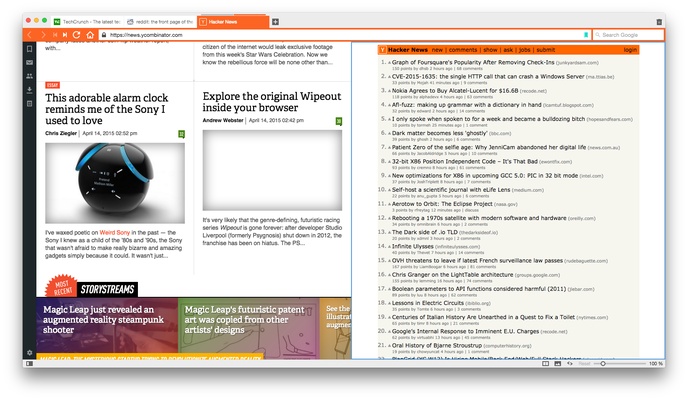
- Tab Tiling for split-screen browsing
- Workspaces for organizing different tasks
- Custom tab layouts
These features make it easier to handle large numbers of open pages.
Built-In Productivity Tools
The browser includes several integrated tools:
- Notes
- Screenshot capture
- Calendar
- Mail client
- Feed reader
- Translation tools
Users can complete common tasks without installing additional extensions.
Privacy and Security
Vivaldi focuses on protecting user privacy with:
- Built-in tracker blocking
- Ad blocking
- Private browsing options
- Detailed website permission controls
- Secure synchronization
The browser is designed to minimize unnecessary data collection.
Chrome Extension Support
Because Vivaldi is based on Chromium, it supports extensions from the Chrome Web Store, allowing users to expand browser functionality easily.
Web Panels
Web Panels allow users to access websites and online services from a sidebar without opening separate tabs.
This is useful for messaging apps, social networks, email, and frequently used websites.
Keyboard Shortcuts and Mouse Gestures
Vivaldi includes advanced navigation controls for experienced users:
- Custom keyboard shortcuts
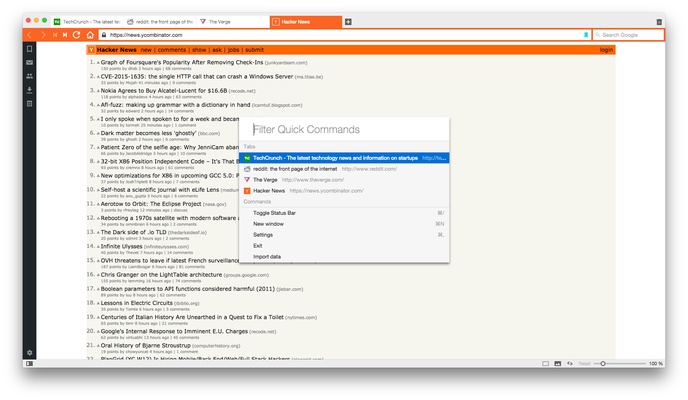
- Quick Commands
- Mouse gestures
- Command Chains
These features help improve browsing efficiency.
User Interface
Vivaldi features a flexible interface that can be adjusted according to user preferences.
Highlights include:
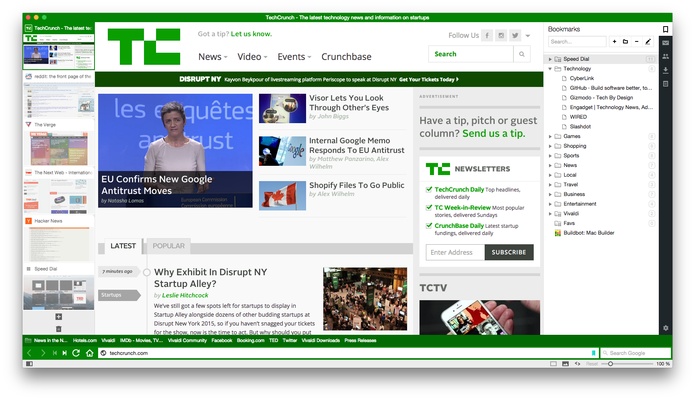
- Customizable Speed Dial homepage
- Sidebar panels
- Multiple themes
- Compact or spacious layouts
- Adjustable toolbar placement
The interface is designed for users who prefer control over a standard one-size-fits-all browser experience.
What's New
- Improved Workspaces and Tab Stacks for better organization
- Enhanced built-in Mail, Calendar, and Feed features
- Updated Chromium engine for improved compatibility and security
- Faster startup and smoother tab switching
- Improved tracker and ad blocking
- More theme and interface customization options
- Better synchronization reliability
- Refined privacy settings and permissions
FAQ
Is Vivaldi based on Chromium?
Yes. Vivaldi uses the Chromium engine and supports most Chrome extensions.
Is Vivaldi free?
Yes. Vivaldi Browser is completely free to download and use.
Does Vivaldi protect privacy?
Yes. Vivaldi includes built-in privacy features such as tracker blocking and customizable security settings.
Is Vivaldi available for Windows 11?
Yes. Vivaldi supports Windows 11, Windows 10, and older Windows versions.
Can Vivaldi sync bookmarks and passwords?
Yes. Users can securely synchronize bookmarks, passwords, history, settings, and other browser data across devices.
Alternatives
Google Chrome – Fast and widely supported Chromium-based browser.
Mozilla Firefox – Privacy-focused browser with strong extension support.
Opera Browser – Feature-rich browser from the same original Opera team background.
Brave Browser – Privacy-focused Chromium browser with built-in blocking features.
System Requirements
- Operating System:
- Windows 11
- Windows 10
- Windows 8
- Windows 7
- Processor: Intel or AMD processor
- RAM: 2GB minimum recommended
- Storage: Around 300MB free space
Pros
- Highly customizable interface
- Powerful tab management
- Built-in productivity tools
- Strong privacy features
- Supports Chrome extensions
- Free to use
Cons
- More complex than simple browsers
- Higher memory usage than lightweight browsers
- Too many features may overwhelm beginners
Conclusion
Vivaldi is one of the most customizable web browsers available for Windows users.
With advanced tab management, built-in productivity tools, Chrome extension compatibility, and a strong focus on privacy, Vivaldi provides a unique browsing experience for users who want more control over their browser.
While it may not be the best choice for users who prefer a simple and minimal browser, it is an excellent option for power users, developers, and anyone looking for a flexible alternative to mainstream browsers.