


Planet VPN is a VPN client for Windows that encrypts internet traffic and routes connections through remote VPN servers. It helps protect data on unsecured networks, hide the user's IP address, and access websites and online services that may be restricted by network or regional limitations.
The service offers a free plan with a selection of VPN locations, while the premium plan provides access to a larger server network and additional features.
Key Features
-
VPN Encryption: Encrypts network traffic between the device and the VPN server.
-
IP Address Protection: Replaces the user's visible IP address with the address of the connected VPN server.
-
Free VPN Access: Provides a selection of free server locations without requiring a premium subscription.
-
Global Servers: Premium users can access a larger network of servers across multiple countries.
-
No Registration for Free Use: The free service can be used without creating an account in supported configurations.
-
Multiple Platforms: Available for Windows, macOS, Android, iOS, and supported web browsers.
-
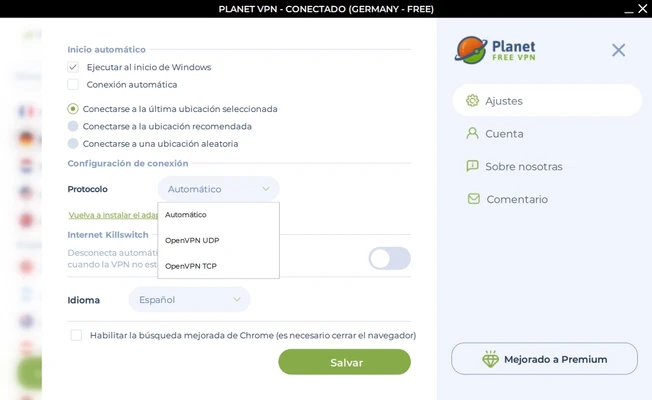
OpenVPN Support: Premium plans provide OpenVPN configuration options.
-
Dedicated IP: Dedicated IP servers are available with supported premium plans.
-
P2P Support: Premium servers support torrent and other P2P traffic where permitted.
-
Browser Protection: Browser extensions provide VPN connectivity and additional browsing protection.
-
Multi-Device Support: Premium accounts can be used on multiple devices.
User Interface
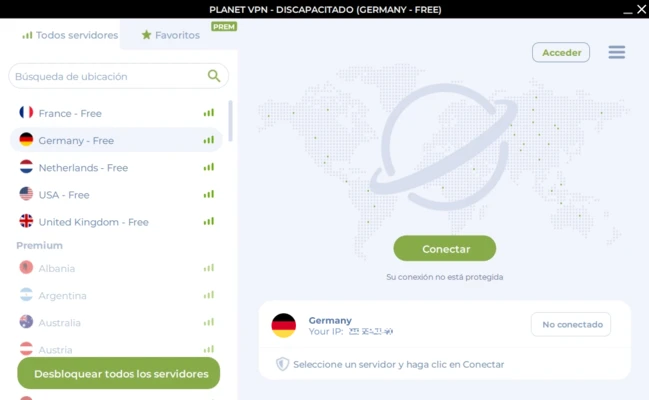
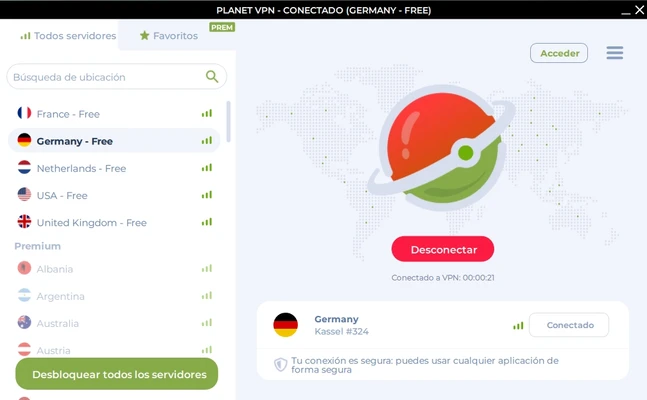
Planet VPN uses a simple desktop interface centered around server selection and connection status. Users can select an available location and connect or disconnect with minimal configuration.
The straightforward layout makes the application suitable for users who want basic VPN functionality without complicated network settings.
Installation and Setup
Install Planet VPN on a supported Windows PC and follow the on-screen instructions. After installation, launch the application and select an available VPN location.
Free users can connect to the locations included in the free plan, while premium users can access additional servers and configuration options.
How to Use
-
Launch Planet VPN on Windows.
-
Select a VPN server or location.
-
Click the Connect button.
-
Wait for the VPN connection to be established.
-
Browse the web or use supported applications through the VPN connection.
-
Disconnect from the VPN when it is no longer needed.
-
Premium users can access additional locations and advanced connection options.
For sensitive activities, users should still verify the privacy and security policies of the services they access, as a VPN does not provide complete anonymity or protection from every type of online threat.
System Requirements
-
Windows 10 or later
-
Compatible x86 or x64 processor
-
At least 1 GB RAM recommended
-
Sufficient free disk space for installation
-
Internet connection required
Pros
-
Simple and easy-to-use interface
-
Free VPN option available
-
Multiple server locations
-
Supports major desktop and mobile platforms
-
IP address masking and encrypted connections
-
Browser extensions available
-
Premium plans support additional VPN features
Cons
-
Free users have access to fewer locations than premium users
-
VPN performance depends on server distance and network conditions
-
Some advanced features require a paid subscription
-
A VPN does not guarantee complete anonymity or security
Conclusion
Planet VPN is a straightforward VPN application for Windows users who want to encrypt their internet connection, mask their IP address, and connect through remote VPN servers. Its free plan provides basic VPN access, while premium plans add more locations, P2P support, dedicated IP options, and other advanced features.
It is a practical choice for users looking for a simple VPN client, although connection speed and available features depend on the selected server and subscription plan.