

PrivaZer is a free Windows privacy and cleaning utility designed to remove unnecessary files and traces of user activity from a computer. It can clean browser history, temporary files, leftover system data, registry entries, and other privacy-related traces.
In addition to standard cleaning, PrivaZer provides secure deletion tools that overwrite data to make recovery more difficult. It also includes customizable scans, free-space cleaning, scheduling options, and a portable version.
What's New
Recent versions of PrivaZer focus on improving cleaning performance, Windows compatibility, privacy scanning, secure deletion, and overall stability. Updates may also include support for newer applications and Windows components.
Key Features
Deep Cleaning: Scan and remove temporary files, browser traces, leftover system data, and other unnecessary files.
Privacy Cleaning: Remove traces such as browsing history, cookies, temporary internet files, and other activity records.
Secure Deletion: Permanently erase selected files and privacy-related data using various overwriting methods to make recovery more difficult.
Free Space Cleaning: Scan unused disk space for remnants of previously deleted files and securely remove recoverable traces.
Customizable Scans: Select specific areas to scan, including browsers, registry entries, file fragments, and other system locations.
Scheduled Cleaning: Configure automatic scans and cleaning tasks to maintain the system without having to run them manually.
External Drive Support: Scan and clean supported external storage devices such as USB drives and other removable media.
Portable Version: Run PrivaZer without a traditional installation, making it convenient for use on multiple computers.
User Interface
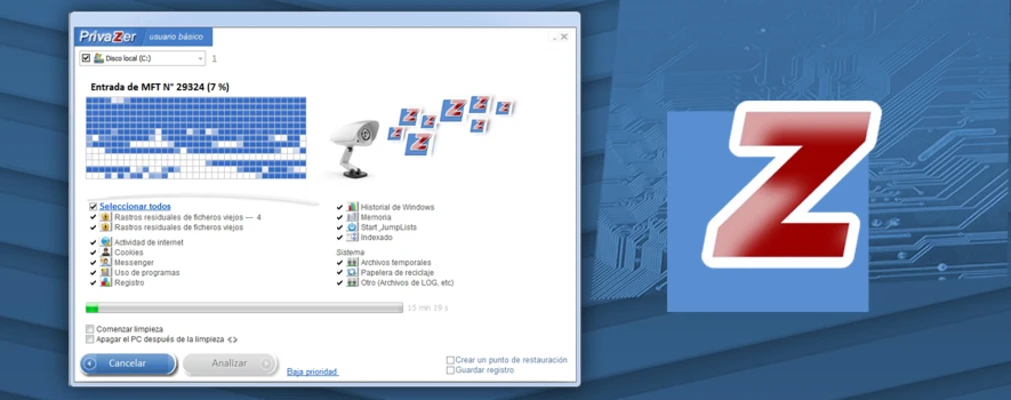
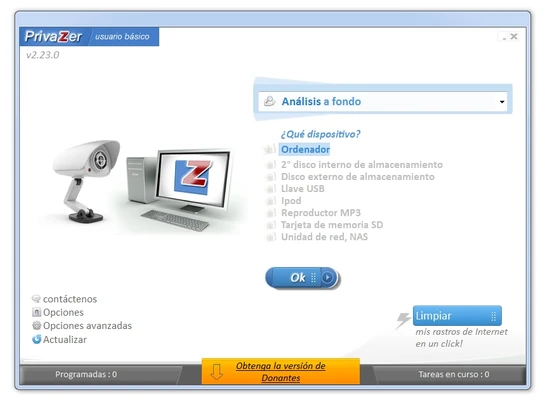
PrivaZer uses a straightforward Windows interface that organizes its cleaning and privacy tools into clearly defined sections.
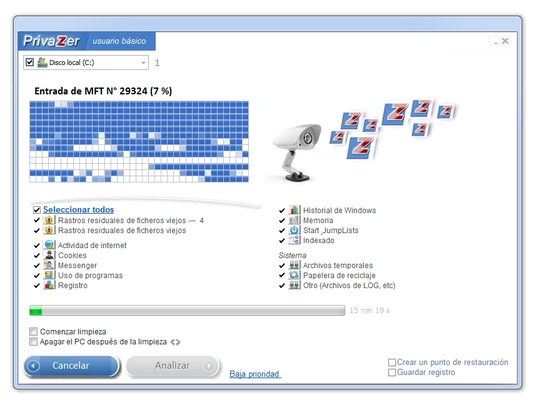
The main interface provides access to scanning, cleaning, secure deletion, free-space cleaning, scheduling, and configuration options. During a scan, users can select specific areas and review the detected items before starting the cleanup process.
The application provides detailed controls for users who want to customize the depth of a scan while still offering guided options for less experienced users.
Installation and Setup
Download the PrivaZer installer and run it to begin the setup process.
Depending on the version, users can choose between a standard installation and a portable version. After launching the program for the first time, PrivaZer provides configuration options that allow users to select their preferred cleaning and privacy settings.
The initial setup can be customized according to whether you want basic cleaning, deeper privacy scanning, or secure deletion.
How to Use
Choose a Scan Type: Select the type of scan you want to perform, such as a full system scan, targeted privacy scan, or free-space cleanup.
Select Cleaning Areas: Choose specific areas such as web browsers, temporary files, registry entries, or deleted-file traces.
Review the Results: After scanning, review the detected items and check which data should be removed.
Start the Cleanup: Confirm the selected items and start the cleaning process.
Use Secure Deletion: When permanently removing sensitive files or traces, select an appropriate secure deletion method.
Clean Free Space: Run the free-space cleaning function when you want to remove remnants of previously deleted files.
Schedule Maintenance: Configure scheduled cleaning tasks if you want PrivaZer to perform regular maintenance automatically.
FAQ
Is PrivaZer free?
Yes. PrivaZer provides a free version with a wide range of cleaning and privacy features. Paid options provide additional functionality and support.
Can PrivaZer permanently delete files?
PrivaZer includes secure deletion functions designed to overwrite data and make recovery significantly more difficult than normal file deletion.
Can PrivaZer clean external drives?
Yes. It can work with supported removable storage devices, including USB drives and other external media.
Does PrivaZer work on Windows 10 and Windows 11?
Yes. PrivaZer supports Windows 10 and Windows 11, as well as some earlier Windows versions.
Can I use PrivaZer without installing it?
Yes. A portable version is available, allowing the program to run without a conventional installation.
How often should I use PrivaZer?
The appropriate frequency depends on your usage. Occasional cleaning may be sufficient for typical users, while users who frequently handle sensitive information may choose to perform privacy scans more regularly.
Alternatives
CCleaner: A popular Windows cleaning utility that provides tools for removing temporary files, managing applications, and cleaning various system and browser traces.
Advanced SystemCare Free: A broader Windows optimization suite that combines junk-file cleaning, system optimization, privacy tools, and other maintenance features.
BleachBit: A free and open-source cleaning utility focused on removing unnecessary files and privacy-related traces.
Glary Utilities: An all-in-one Windows maintenance suite that includes disk cleaning, privacy protection, system optimization, and other utilities.
Wise Disk Cleaner: A lightweight utility designed to find and remove unnecessary files and free up disk space.
Pricing
Free Version
The free version provides the core cleaning and privacy features needed for general use.
Pro Version
The Pro version adds additional features such as automatic cleanup of internet traces, automatic updates for a limited period, command-line functionality, and priority support.
Donor Edition
PrivaZer also offers a Donor Edition for users who choose to support the project. Depending on the current offering, donors may receive additional features, updates, or support options.
System Requirements
-
OS: Windows 7, Windows 8, Windows 10, or Windows 11
-
Processor: 1 GHz or faster
-
RAM: 1 GB or more
-
Disk Space: Approximately 200 MB
-
Internet Connection: Required for certain online features and updates
Pros
-
Extensive privacy and junk-file cleaning tools
-
Secure deletion and free-space cleaning
-
Highly customizable scans
-
Supports external storage devices
-
Portable version available
-
Supports scheduled cleaning
-
Free version provides many useful features
Cons
-
Advanced features are limited in some editions
-
Deep scans can take considerable time
-
The large number of options may be overwhelming for beginners
-
Secure deletion and free-space cleaning can be time-consuming
Conclusion
PrivaZer is a comprehensive Windows privacy and cleaning utility that goes beyond basic junk-file removal. It provides tools for cleaning browser and system traces, securely deleting sensitive data, scanning unused disk space, and maintaining privacy-related information.
Its customizable scanning options and portable version make it suitable for both occasional system maintenance and more detailed privacy management. The free version covers most basic cleaning needs, while paid editions provide additional features and support for users who require more advanced functionality.