

ReaConverter Pro for Windows Download – The Advanced Image Conversion and Editing Solution
ReaConverter Pro for Windows is the professional version of the powerful image conversion tool, offering advanced features for managing and processing your image files with ease. Whether you're a photographer, graphic designer, or simply someone who works with large batches of images, ReaConverter Pro provides all the tools you need to convert, edit, and enhance your images quickly and efficiently. With support for over 500 file formats and powerful batch-processing capabilities, ReaConverter Pro is the perfect solution for handling complex image conversion tasks.
Designed for professionals who require precision and flexibility, ReaConverter Pro delivers a robust set of features to ensure your images are optimized for any project.
Batch Image Conversion and Processing
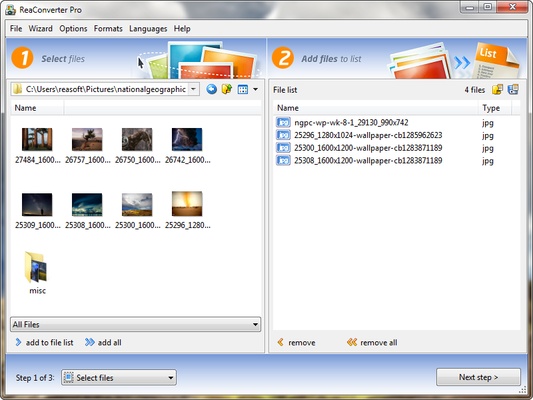
ReaConverter Pro allows you to convert large volumes of images in one go, making it the ideal tool for professionals who need to handle hundreds or thousands of files at once. With support for over 500 file formats, including JPEG, PNG, TIFF, GIF, and RAW, you can convert your images into the exact format you need for your project. The batch processing feature ensures that you save time while maintaining high quality, whether you’re preparing images for web use, printing, or graphic design.
Advanced Image Editing Features
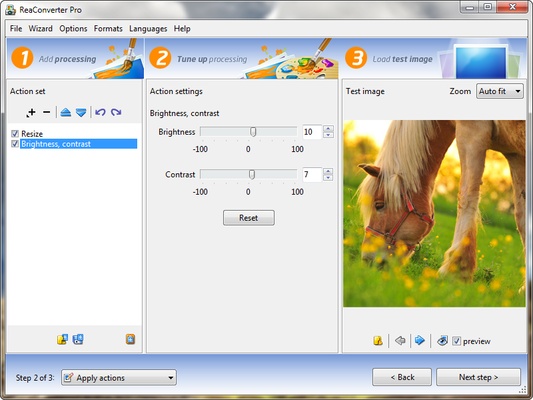
ReaConverter Pro is equipped with a variety of advanced editing tools that allow you to fine-tune your images before or after conversion. You can crop, rotate, adjust brightness and contrast, apply filters, correct color balance, and even add custom watermarks to protect your work. The software also supports advanced image enhancements, such as reducing noise and sharpening details, to ensure your images look their best.
Support for Multiple Image Formats and Types
One of the standout features of ReaConverter Pro is its ability to support a wide range of image types, including bitmap images, vector graphics, and raw photo files. The software can convert between different vector formats, including SVG, EPS, and PDF, and also supports complex RAW files from digital cameras. Whether you’re working with basic JPG files or high-resolution images, ReaConverter Pro ensures that your conversion process is smooth and accurate.
Customizable Conversion and Automation
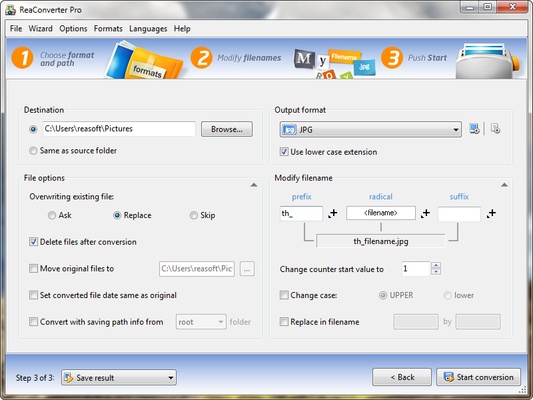
ReaConverter Pro gives you full control over your image conversion process. You can customize the conversion settings for each project, adjusting the quality, size, resolution, and color settings to suit your needs. For professionals looking to streamline their workflows, the software offers automation options, allowing you to create custom scripts to automatically process images based on predefined rules. This feature is especially useful for handling large volumes of images with minimal intervention.
Enhanced Image Resizing and Compression
ReaConverter Pro includes advanced tools for resizing and compressing your images, allowing you to adjust file sizes without sacrificing quality. Whether you need to resize images for web optimization, print, or social media, ReaConverter Pro provides flexible options. You can also compress images to reduce storage space or make them suitable for quick online uploads, all while maintaining excellent image quality.
Efficient File Management and Organization
ReaConverter Pro is designed to make file management easier. The software allows you to organize your image files into folders, add metadata to images, and even rename files in bulk, saving you time and effort. You can sort your files by date, size, or format, and keep your collection organized for easy access.
Professional-Grade Performance with User-Friendly Interface
ReaConverter Pro combines professional-grade performance with a user-friendly interface. The software is designed to handle complex image conversion and editing tasks without overwhelming you with complicated settings. Its simple, intuitive interface ensures that both novice and expert users can easily navigate through the various tools and options. With ReaConverter Pro, you can focus on your creative work while the software takes care of the technical details.
Final Overview
ReaConverter Pro for Windows is an all-in-one solution for advanced image conversion, editing, and batch processing. With its robust features for supporting over 500 formats, enhanced editing tools, customizable conversion settings, and automation capabilities, ReaConverter Pro is the perfect tool for professionals who need to efficiently handle large batches of image files. Whether you're converting for web use, creating graphics, or editing high-quality photos, ReaConverter Pro gives you complete control over your image tasks. Download ReaConverter Pro today and elevate your image conversion process to the next level!