Vivaldi is a feature-rich web browser for Windows designed for users who want extensive customization, advanced tab management, built-in productivity tools, and strong privacy controls.
Based on the Chromium engine, Vivaldi supports Chrome extensions while providing its own interface and workflow features. Users can customize the browser layout, toolbars, keyboard shortcuts, mouse gestures, tabs, themes, and other aspects of the browsing experience.
What's New
Recent Vivaldi updates focus on improving performance, privacy, tab management, synchronization, and the browser's built-in productivity tools.
-
Updated Chromium engine for improved compatibility and security.
-
Improved Workspaces and Tab Stacks for better tab organization.
-
Refinements to Vivaldi Mail, Calendar, and Feeds.
-
Updated tracker and ad-blocking filter lists.
-
Improved startup performance and tab switching.
-
Additional customization options for themes and toolbars.
-
Improved address bar search and suggestions.
-
Better synchronization between supported devices.
-
Refined site permissions and privacy controls.
Key Features
Extensive Customization – Customize the browser's appearance, layout, toolbars, themes, menus, shortcuts, and other interface elements.
Advanced Tab Management – Group tabs with Tab Stacks, arrange them using Tab Tiling, and organize browsing sessions with Workspaces.
Built-In Productivity Tools – Includes Notes, Web Panels, screen capture, translation, and other tools directly within the browser.
Vivaldi Mail and Calendar – Desktop users can manage email, calendars, and feeds without relying entirely on separate applications.
Keyboard Shortcuts and Mouse Gestures – Create custom shortcuts and gestures for frequently used browser actions.
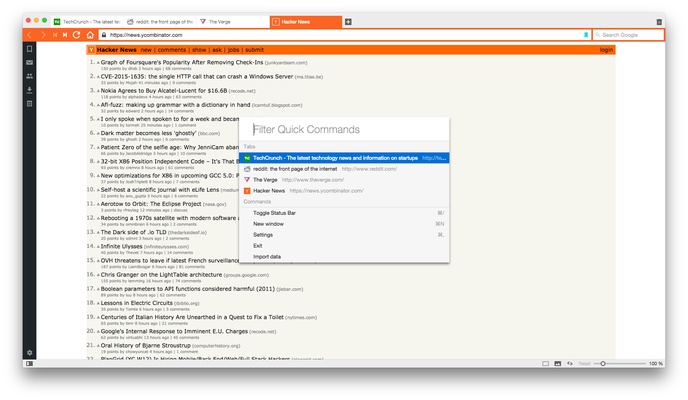
Quick Commands – Search tabs, bookmarks, history, settings, and browser functions from a centralized command interface.
Privacy Protection – Includes built-in tracker and ad blocking along with detailed privacy and permission controls.
Web Panels – Open frequently used websites in the browser sidebar without switching to a separate tab.
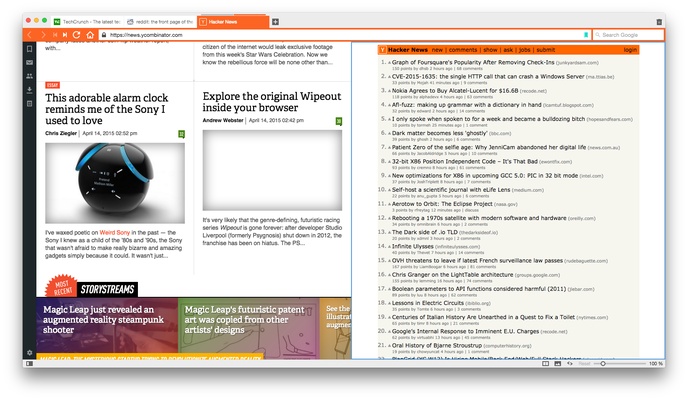
Split-Screen Browsing – Display multiple web pages side by side for research, comparison, and multitasking.
Reader View – Removes unnecessary page elements to provide a cleaner reading experience.
Chrome Extension Support – Chromium compatibility allows users to install many extensions designed for Google Chrome.
Sync – Synchronize supported browsing data across compatible Vivaldi installations.
User Interface
Vivaldi provides a highly configurable interface rather than following the minimalist design used by many modern browsers.
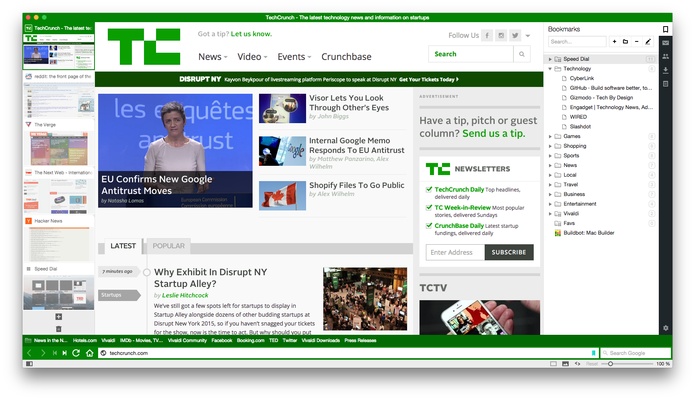
The tab bar can be positioned on different sides of the window, while the address bar, toolbars, menus, and sidebar can also be customized. The Start Page includes Speed Dials for quick access to frequently visited websites.
The sidebar provides access to bookmarks, downloads, notes, history, settings, and Web Panels. Users can also adjust the interface density and choose from different themes and color configurations.
Installation and Setup
-
Download the appropriate Vivaldi installer for your operating system.
-
Run the installer and follow the setup instructions.
-
Launch Vivaldi after installation.
-
Import bookmarks and other supported browser data if needed.
-
Choose a theme and configure the interface layout.
-
Sign in to Vivaldi Sync if you want to synchronize supported data between devices.
-
Customize tabs, shortcuts, privacy settings, and other features according to your preferences.
How to Use
Customize the Interface – Open Settings to change themes, tab positions, toolbars, menus, and other interface options.
Organize Tabs – Drag tabs together to create Tab Stacks or use Tab Tiling to display multiple pages simultaneously.
Use Workspaces – Separate tabs into different workspaces for projects, research, work, or personal browsing.
Use Web Panels – Add frequently accessed websites to the sidebar for quick access.
Take Notes and Screenshots – Use the built-in Notes and Capture tools while browsing.
Use Quick Commands – Open Quick Commands to quickly search browser features, tabs, bookmarks, and history.
Customize Shortcuts – Configure keyboard shortcuts and mouse gestures for frequently performed actions.
FAQ
Is Vivaldi compatible with Chrome extensions?
Yes. Vivaldi is based on Chromium and supports many extensions available through the Chrome Web Store.
Is Vivaldi free?
Yes. The Vivaldi browser is free to download and use.
Does Vivaldi collect user data?
Vivaldi is designed with a strong focus on privacy and states that it does not build user profiles for advertising. Some technical data may still be processed as necessary to provide services and updates.
Is Vivaldi available on mobile devices?
Yes. Vivaldi is also available for Android and iOS devices, although available features can differ between desktop and mobile versions.
Can Vivaldi synchronize data between devices?
Yes. Vivaldi Sync can synchronize supported data such as bookmarks, passwords, settings, and other browser information between compatible installations.
Is Vivaldi based on Chromium?
Yes. Vivaldi uses Chromium as its browser engine, which provides compatibility with modern websites and many Chrome extensions.
Alternatives
Google Chrome – A simple and widely supported Chromium-based browser with a large extension ecosystem.
Mozilla Firefox – An independent browser with strong privacy controls and extensive customization options.
Opera – A Chromium-based browser with built-in productivity and media-related features.
Brave – Focuses heavily on privacy, tracker blocking, and built-in advertising protection.
Pricing
Vivaldi is free to use. There is no standard subscription required for the desktop browser or its core browsing features.
System Requirements
-
Operating System: Windows 10 or later
-
Processor: Modern 64-bit processor recommended
-
RAM: 2GB minimum; 4GB or more recommended
-
Storage: Sufficient free space for the browser and user data
-
Internet connection: Required for downloading, updates, synchronization, and online browsing
Actual resource usage depends on the number of open tabs, extensions, and built-in features being used.
Pros
-
Extremely customizable interface
-
Advanced tab management
-
Built-in productivity features
-
Chrome extension compatibility
-
Strong privacy controls
-
Useful keyboard shortcuts and mouse gestures
-
Free to use
Cons
-
Can feel complicated for users who prefer a minimal browser
-
Large feature set may require time to configure
-
Resource usage can increase with many tabs and extensions
-
Some built-in features may be unnecessary for basic browsing
Conclusion
Vivaldi is a powerful Chromium-based browser aimed at users who want more control over how their browser looks and works. Its combination of advanced tab management, extensive customization, privacy features, Web Panels, Notes, Workspaces, and other built-in tools makes it particularly suitable for power users and multitasking.
It may be excessive for users who simply want a lightweight browser with a minimal interface, but for users who value flexibility and control, Vivaldi offers one of the most customizable desktop browsing experiences available.