


KeepSolid VPN Unlimited is a VPN application designed to protect internet traffic, hide the user's IP address, and provide access to servers in different locations around the world. It uses encryption and privacy-focused features to help users secure their internet connections on Windows and other supported platforms.
The software can be used for everyday browsing, public Wi-Fi protection, accessing region-restricted content, and securing online activities across multiple devices.
What's New
The latest version includes improvements to performance, connection stability, security, and compatibility with supported operating systems and devices.
-
Improved connection stability and performance.
-
Updated VPN protocols and security components.
-
Improved server selection and connection handling.
-
Enhanced application interface and usability.
-
Improved compatibility with modern Windows versions.
-
Various bug fixes and general performance improvements.
Key Features
Secure Encryption – Uses AES-256 encryption to protect internet traffic and help prevent unauthorized access to transmitted data.
Global Server Network – Provides access to thousands of VPN servers across numerous locations, allowing users to connect through different IP addresses.
IP Address Protection – Hides the user's real IP address by routing internet traffic through a VPN server.
Kill Switch – Automatically blocks internet access if the VPN connection unexpectedly drops, helping prevent unprotected traffic from being transmitted.
DNS Firewall – Helps block malicious or unwanted websites and provides an additional layer of protection while browsing.
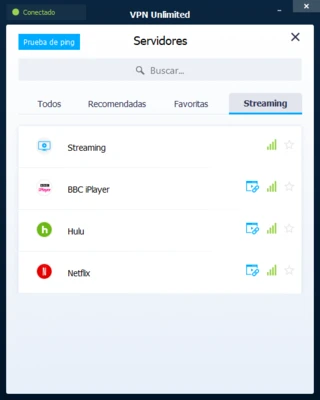
Streaming Support – Supports connections to servers designed for accessing streaming services and region-restricted content.
Torrenting Support – Can be used for P2P and torrent traffic on supported servers.
Multiple Device Support – A single subscription can be used across multiple supported devices, depending on the selected plan.
Personal IP Address – A dedicated personal IP address is available as an additional option for users who need a consistent IP address.
User Interface
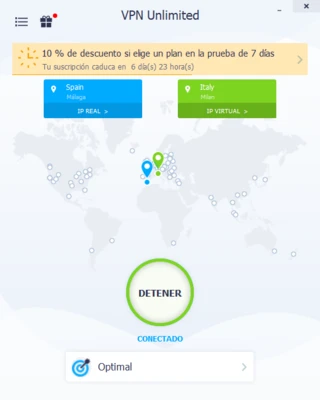
VPN Unlimited features a straightforward desktop interface with a central connection button, server selection, connection status, and access to application settings.
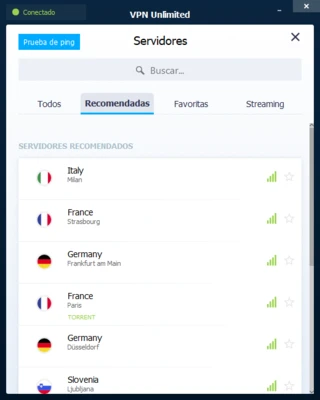
Users can select a server from the available locations and connect with a single click. The interface is relatively easy to understand, making the software suitable for users with limited VPN experience.
Installation and Setup
Download and install VPN Unlimited for your operating system and follow the installation wizard.
After installation:
-
Launch the application.
-
Sign in to an existing account or create a new one.
-
Select a VPN server location.
-
Review the available connection and privacy settings.
-
Connect to the VPN.
Users should also verify their preferred VPN protocol and enable the Kill Switch if they want additional protection against accidental VPN disconnections.
How to Use
Connect to a VPN Server
Open VPN Unlimited, select a server location, and click the Connect button.
Change Server Location
Open the server list and select another location to connect through a different VPN server and IP address.
Protect Your Connection
Keep the VPN connection active while using public Wi-Fi or when you want your internet traffic routed through the VPN.
Enable Kill Switch
Open the application settings and enable Kill Switch to block internet access if the VPN connection is interrupted.
Disconnect
Click the Disconnect button when you no longer need the VPN connection.
FAQ
Is VPN Unlimited free?
VPN Unlimited is primarily a paid VPN service. Availability of trials or promotional offers may vary depending on the current subscription options.
Does VPN Unlimited support Windows?
Yes. VPN Unlimited provides a Windows application and also supports other major platforms.
Can VPN Unlimited hide my IP address?
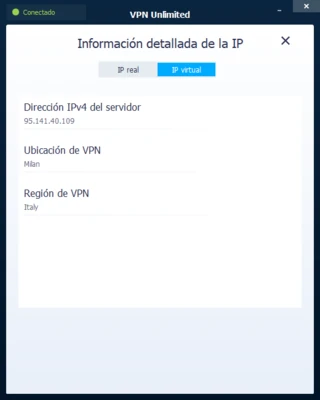
Yes. When connected to a VPN server, your internet traffic is routed through that server and websites generally see the VPN server's IP address instead of your original public IP address.
Does VPN Unlimited have a Kill Switch?
Yes. The Kill Switch can block internet access if the VPN connection unexpectedly drops.
Can I use VPN Unlimited on multiple devices?
Yes. The service supports multiple devices, with the exact number depending on the subscription plan.
Does VPN Unlimited support streaming and torrenting?
Yes. The service supports streaming and P2P traffic, although availability and performance can vary depending on the server and service being accessed.
Does VPN Unlimited offer a money-back guarantee?
The service has offered a 30-day money-back guarantee for eligible subscriptions. Current terms may vary by plan and purchase method.
Alternatives
ExpressVPN – A VPN service focused on connection speed, privacy, and ease of use.
NordVPN – Offers a large server network and a broad range of security and privacy features.
CyberGhost VPN – Provides an easy-to-use interface and specialized servers for different online activities.
PrivadoVPN – A VPN service offering both free and paid plans with support for multiple platforms.
Pricing
VPN Unlimited offers different subscription options, including monthly, yearly, and longer-term plans. Pricing and available plans may change over time.
A dedicated personal IP address and some additional features may require a separate fee.
System Requirements
Operating System: Windows, macOS, Linux, iOS, and Android
Internet Connection: Required
Storage: Sufficient free space for installation and application updates
The exact system requirements may vary depending on the operating system and application version.
Pros
-
AES-256 encryption
-
Large global server network
-
Kill Switch support
-
DNS protection features
-
Supports multiple platforms
-
Multiple-device support
-
Streaming and P2P support
-
Simple user interface
-
Dedicated IP option available
Cons
-
Some features require a paid subscription
-
Dedicated IP requires an additional fee
-
Connection speed can vary depending on the server location
-
Performance may differ between VPN protocols and locations
Conclusion
VPN Unlimited is a feature-rich VPN application that provides encrypted connections, IP address protection, a global server network, and additional security features such as Kill Switch and DNS protection.
Its simple interface makes it relatively easy to use, while support for multiple platforms and devices makes it suitable for users who want to protect their internet connections across different devices. However, users should compare current pricing, server performance, and available features before choosing a subscription.
Note: A trial period may be available depending on the current plan or promotion.