

dBpowerAMP Music Converter is a Windows audio conversion application that supports a wide range of formats and provides batch conversion, metadata handling, and DSP processing tools.
It is designed for users who need to convert large numbers of audio files while preserving tags and album artwork. It can also work alongside dBpoweramp CD Ripper for CD extraction workflows.
What's New
Recent versions have focused on improved format support, conversion performance, metadata handling, and compatibility with newer versions of Windows.
Key Features
Wide Format Support: Convert audio between formats such as MP3, WAV, FLAC, AAC, OGG, AIFF, and WMA.
Batch Conversion: Convert multiple audio files in a single operation.
Multi-Core Processing: Uses available CPU cores to improve conversion speed.
Metadata Preservation: Retains track information, tags, and album artwork when supported by the target format.
DSP Effects: Apply processing such as volume normalization, equalization, fading, and other audio effects.
CD Ripping Integration: Works with dBpoweramp CD Ripper for extracting audio from CDs.
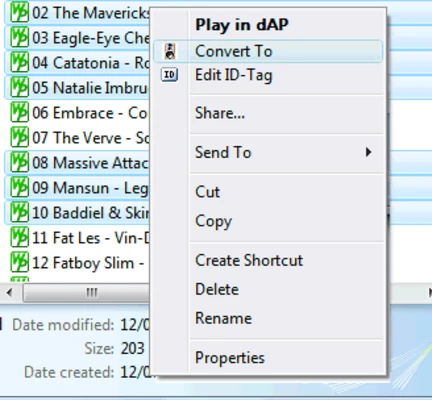
Windows Explorer Integration: Start conversions directly from the Windows context menu.
User Interface
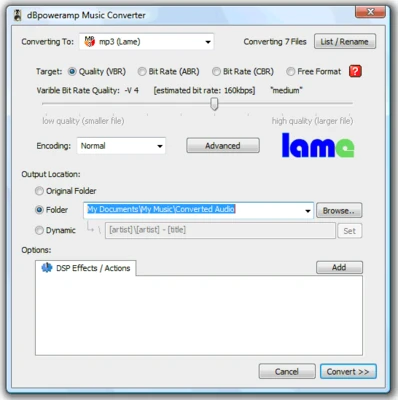
dBpowerAMP Music Converter uses a straightforward interface with conversion settings presented when selecting files. Its Windows Explorer integration makes basic conversions quick to start, while advanced users can adjust codecs, quality settings, DSP effects, and other options.
Installation and Setup
-
Download and install dBpowerAMP Music Converter.
-
Launch the application or select an audio file in Windows Explorer.
-
Choose the desired output codec and configure its settings.
-
Adjust DSP options if required.
-
Select the destination folder and complete the conversion.
How to Use
Select Files: Choose one or more audio files in the application or through Windows Explorer.
Choose a Format: Select the required output codec, such as MP3, FLAC, or WAV.
Adjust Settings: Configure quality, bitrate, sample rate, DSP effects, and other available options.
Start Conversion: Click the conversion command to process the selected files.
Check the Output: Open the destination folder and verify the converted files and metadata.
FAQ
What audio formats does dBpowerAMP Music Converter support?
It supports many common audio formats, including MP3, WAV, FLAC, AAC, OGG, AIFF, and WMA. Available formats depend on the installed codecs.
Can it convert multiple files at once?
Yes. Batch conversion allows multiple files to be processed in one operation.
Does it preserve metadata?
Yes. The converter can preserve supported tags and album artwork during conversion.
Can it convert CDs?
CD ripping is handled by the separate dBpoweramp CD Ripper application, which can be used alongside the converter.
Does it support DSP effects?
Yes. Available DSP options include normalization, equalization, fading, and other processing functions.
Alternatives
XRECODE – A multi-format audio converter with batch processing and metadata support.
Format Factory – A general media conversion tool that also supports many audio formats.
MediaHuman Audio Converter – A simple audio converter with batch processing and support for common formats.
Pricing
dBpowerAMP Music Converter is commercial software with a 21-day free trial. A license is required after the trial period.
Different editions and additional components may have different prices and features.
System Requirements
-
Operating System: Windows 10 or Windows 11
-
Processor: Dual-core processor recommended
-
Memory: 2 GB RAM or more
-
Storage: Approximately 100 MB for the application, plus additional space for audio files
Pros
-
Supports many audio formats
-
Fast multi-core conversion
-
Batch processing
-
Preserves metadata and album artwork
-
Windows Explorer integration
-
Includes useful DSP processing options
-
Works well with CD ripping workflows
Cons
-
Paid software after the trial period
-
Some advanced features require additional components or higher-tier licenses
-
Windows-only
Conclusion
dBpowerAMP Music Converter is a capable audio conversion tool for Windows users who need reliable format conversion, batch processing, metadata preservation, and audio processing features.
Its combination of fast conversion, broad format support, and Windows Explorer integration makes it particularly suitable for users who regularly manage and convert large audio collections.