


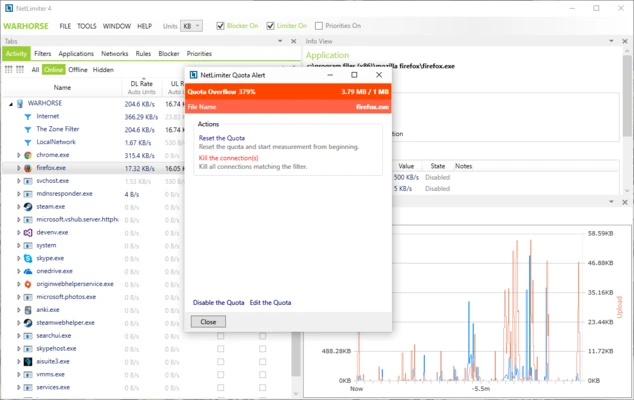
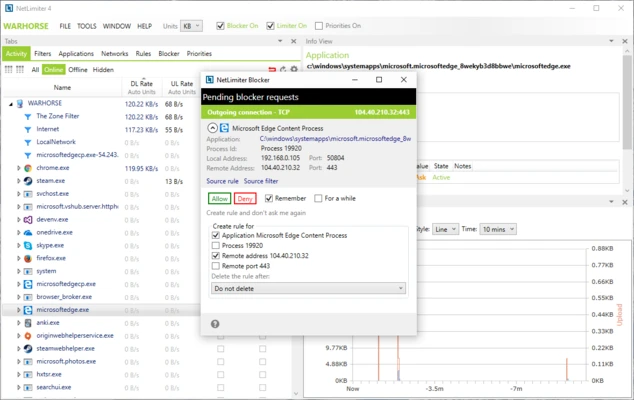
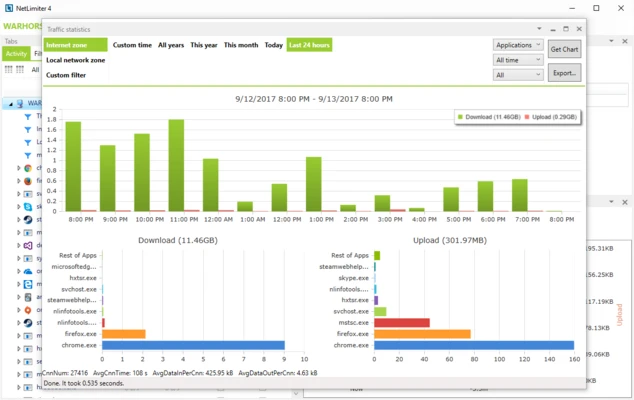
NetLimiter is a Windows internet traffic monitoring and control tool that lets you monitor network activity and manage the bandwidth used by individual applications or connections. It can set download and upload speed limits, block connections, and provide both real-time and historical traffic statistics.
Key Features
-
Network Monitor: View applications communicating over the network, connection details, and current transfer rates.
-
Bandwidth Limiter: Set download and upload speed limits for individual applications, connections, or groups.
-
Traffic Statistics: Track network usage over time with detailed application-level traffic statistics.
-
Connection Blocker: Create rules to allow or block selected applications and connections.
-
Rule Scheduler: Automatically apply bandwidth or connection rules at specified times.
-
Traffic Charts: Visualize network activity and bandwidth usage in real time.
-
Advanced Rules: Create customized traffic management rules for different applications and connections.
-
Network Tools: Provides additional information such as WHOIS and traceroute.
-
Remote Administration: Manage NetLimiter settings remotely when configured for supported environments.
User Interface
NetLimiter uses a straightforward Windows interface that lists applications and their network activity. Transfer rates, limits, rules, and traffic statistics can be viewed from the main window, while additional tools provide charts and detailed connection information.
The large amount of network data and available rule options may take some time for new users to understand.
Installation and Setup
Install NetLimiter on a supported Windows system and launch the application with the required permissions. After startup, it automatically detects applications using network connections.
You can then configure bandwidth limits, connection rules, blocking options, and scheduled rules according to your needs. The software is available as a trial, with some features requiring a paid license.
How to Use
-
Launch NetLimiter and allow it to detect network activity.
-
Review applications and their current download and upload traffic.
-
Select an application or connection and create a bandwidth limit.
-
Set separate download and upload limits when necessary.
-
Use Connection Blocker to prevent selected applications from accessing the network.
-
Create scheduled rules when limits should only apply during specific periods.
-
Review traffic charts and historical statistics to analyze bandwidth usage.
-
Adjust or remove rules as your network requirements change.
System Requirements
-
Windows 10 or later recommended
-
64-bit Windows system recommended
-
2 GB RAM or more
-
Approximately 100 MB of free disk space
-
Internet connection for activation and updates
Pros
-
Easy bandwidth control for individual applications
-
Real-time network monitoring
-
Detailed traffic statistics
-
Flexible connection and blocking rules
-
Rule scheduling
-
Useful network diagnostic information
-
Clear application-level traffic overview
Cons
-
Advanced rule configuration can take time to learn
-
Some features require a paid license
-
Continuous monitoring may use additional system resources
-
Windows-only
-
Can be excessive for users who only need basic bandwidth monitoring
Conclusion
NetLimiter is a practical Windows utility for users who need more control over their internet traffic. Its combination of real-time monitoring, bandwidth limits, connection blocking, scheduling, and historical statistics makes it useful for managing applications that consume excessive bandwidth or controlling network access. It is particularly suited to advanced home users, developers, and network administrators who need application-level traffic control.