

Trillian is a messaging and instant communication application for Windows developed by Cerulean Studios. Originally known as a multi-protocol instant messaging client, Trillian has evolved into its own messaging platform while retaining compatibility with selected legacy messaging services.
The application provides text messaging, contact management, synchronized conversations, searchable message history, file sharing, and cross-platform access. Trillian is also available for macOS, Android, iOS, and the web, making it possible to continue conversations across multiple devices.
In addition to personal messaging, Trillian provides business-oriented communication features designed for organizations that require centralized administration, security controls, and compliance-related functionality.
What's New
Recent versions of Trillian focus on improving messaging, synchronization, account management, security, performance, and cross-platform functionality.
Business-oriented releases may also include improvements to administration tools, user management, compliance features, and organizational messaging.
Because Trillian's supported services and features can change over time, users should check the current release information for the latest compatibility and functionality.
Key Features
Trillian Messaging: Send and receive instant messages through the Trillian messaging network.
Cross-Platform Sync: Access conversations and account information across supported Windows, macOS, Android, iOS, and web clients.
Message History: Store and search conversation history through supported cloud-based services.
File Sharing: Send files and other supported content through conversations.
Group Messaging: Communicate with multiple contacts through group conversations.
Contact Management: Organize contacts and manage communication from a centralized contact list.
Secure Communication: Uses encrypted connections to protect communications between supported clients and services.
Business Messaging: Provides tools for organizations that need centralized communication and user management.
Administration Tools: Business deployments can provide administrative controls for managing users, teams, and communication policies.
Compliance Features: Trillian offers business-oriented features designed to support organizations with specific regulatory and compliance requirements.
Themes and Customization: Customize supported aspects of the interface, including themes and appearance settings.
Legacy Protocol Support: Some legacy messaging services may be supported depending on the current version and service availability.
User Interface
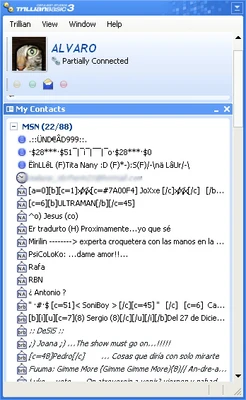
Trillian uses a clean and relatively lightweight interface centered around contacts and conversations.
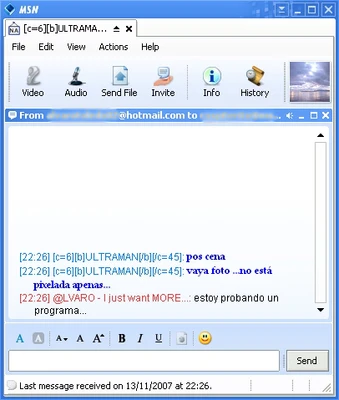
The main window provides access to contacts and active conversations, while individual chat windows display messages, timestamps, and available communication tools.
The interface also provides access to account settings, notifications, appearance options, and other configuration features. Users who prefer a more personalized experience can customize supported themes and interface settings.
Installation and Setup
Download the appropriate Trillian installer for Windows and run the setup program.
Follow the on-screen instructions to complete the installation. After launching Trillian, sign in with an existing Trillian account or create a new account if required.
Once signed in, contacts and supported account data can be synchronized across compatible devices. Business users may need additional configuration through the organization's administration tools.
How to Use
-
Launch Trillian after completing the installation.
-
Sign in with your Trillian account or create a new account.
-
Add contacts or invite other users to communicate with you.
-
Select a contact to start a conversation.
-
Send text messages and supported files through the chat window.
-
Use group messaging when communicating with multiple contacts.
-
Access previous conversations through the message history features.
-
Sign in on supported devices to access synchronized conversations.
-
Customize notifications, themes, and other available preferences.
-
Business administrators can use the appropriate management tools to configure users and organizational settings.
FAQ
Is Trillian still available?
Yes. Trillian continues to provide messaging applications and services for individual and business users. The exact features and supported platforms may change between releases.
Is Trillian a multi-protocol messenger?
Trillian originally became popular as a multi-protocol instant messaging client. Its current focus is primarily on the Trillian messaging platform, while support for legacy services may be limited or subject to changes in third-party platforms.
Can I use Trillian on multiple devices?
Yes. Trillian supports multiple platforms, allowing users to access their account and supported synchronized data across compatible devices.
Does Trillian support voice and video calls?
Trillian is primarily focused on text-based messaging and communication. Voice and video functionality is not its main focus and may not be available in the same way as dedicated calling platforms.
Does Trillian save message history?
Trillian provides searchable message history through supported account and cloud features. Availability can depend on the account type and current service configuration.
Is Trillian secure?
Trillian uses encrypted connections and provides security-focused features for its messaging services. Business editions may provide additional security, administration, and compliance controls.
Can Trillian be used for business?
Yes. Trillian provides business-oriented messaging solutions with administrative controls, centralized user management, and features designed for organizations.
Does Trillian support Slack or Microsoft Teams?
Trillian is primarily its own messaging platform and does not function as a direct replacement for Slack or Microsoft Teams integrations. Support for third-party services depends on the current version and available integrations.
Alternatives
Pidgin: A lightweight, open-source instant messaging client that supports multiple communication protocols through plugins.
Slack: A team communication and collaboration platform designed for workplace messaging, file sharing, and integrations.
Telegram Desktop: A cross-platform messaging application with cloud synchronization, group chats, file sharing, and support for multiple devices.
Signal Desktop: A privacy-focused messaging application that provides end-to-end encrypted communication when used with a compatible mobile account.
Pricing
Trillian offers different plans and service options for individual and business users. Basic messaging functionality may be available at no cost, while additional features such as expanded history, support, or business administration tools may require a paid plan.
Pricing and included features can change, so users should check the current plan information before purchasing.
System Requirements
Trillian is designed for modern Windows computers.
-
OS: Windows 10 or later
-
Processor: 1 GHz or faster
-
RAM: 2 GB or more recommended
-
Disk Space: Approximately 100 MB or more
-
Internet Connection: Required for messaging and synchronization
Exact requirements may vary depending on the current Trillian version.
Pros
-
Lightweight messaging application
-
Cross-platform support
-
Conversation synchronization
-
Searchable message history
-
File sharing and group messaging
-
Customizable interface
-
Business-oriented administration features
-
Security and compliance options for organizations
Cons
-
Less relevant as a universal multi-protocol messenger than older versions
-
Limited support for some legacy messaging platforms
-
Voice and video communication is not a primary feature
-
Some advanced features may require a paid plan
-
Smaller user base than major messaging platforms
Conclusion
Trillian is a lightweight messaging platform that has evolved considerably from its original role as a multi-protocol instant messaging client. It now focuses primarily on its own messaging ecosystem while providing cross-platform synchronization, message history, file sharing, group communication, and business-oriented administration features.
For personal users, Trillian offers a straightforward desktop messaging experience with access across multiple devices. For organizations, its centralized administration and security-related features provide additional functionality beyond basic instant messaging.
While users looking specifically for a modern multi-protocol messenger may find its legacy service support more limited than in the past, Trillian remains a practical option for users who want a dedicated messaging platform with cross-device support.