


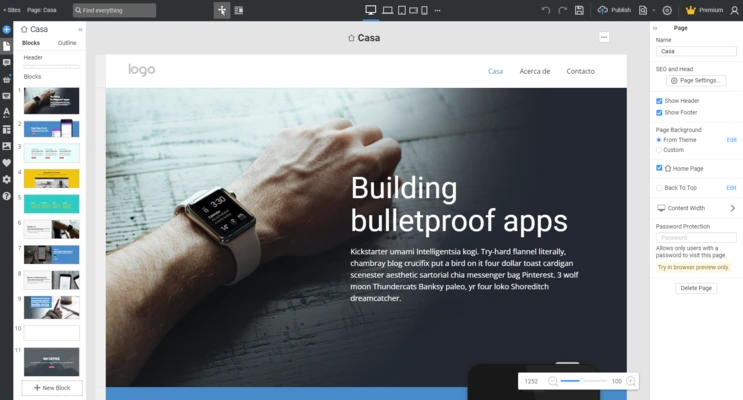
Nicepage is a powerful drag-and-drop website builder that allows users to create modern websites, landing pages, and WordPress themes without writing any code.
Designed for beginners, designers, and professional developers, Nicepage provides a visual website editing experience similar to graphic design software. Users can freely place, customize, and modify website elements using an intuitive interface.
With thousands of professionally designed templates, responsive layouts, animations, and export options for HTML, WordPress, and Joomla, Nicepage makes it easy to build attractive websites for businesses, portfolios, blogs, and online stores.
Unlike traditional website builders that rely on fixed layouts, Nicepage offers flexible freehand positioning, giving users more control over page design and visual customization.
Key Features
Drag-and-Drop Website Builder
Create websites visually by adding, moving, resizing, and editing elements without coding.
1000+ Professional Templates
Choose from a large collection of modern, mobile-friendly website templates for different industries.
Responsive Web Design
Automatically optimize websites for desktops, tablets, and smartphones.
HTML, WordPress, and Joomla Export
Export completed projects as HTML websites or themes for popular CMS platforms.
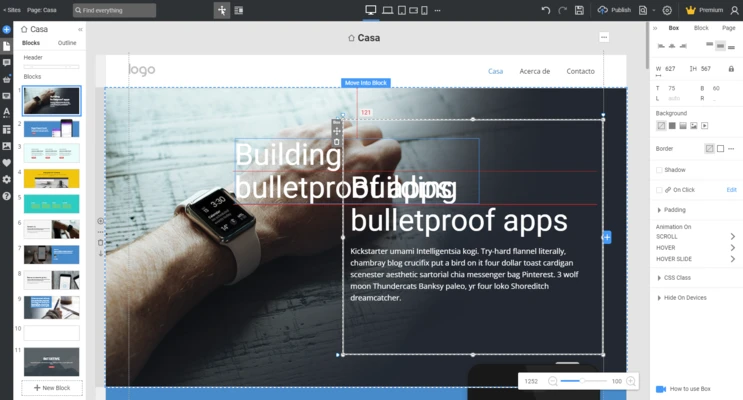
Freehand Positioning Editor
Place objects anywhere on the page with flexible design control.
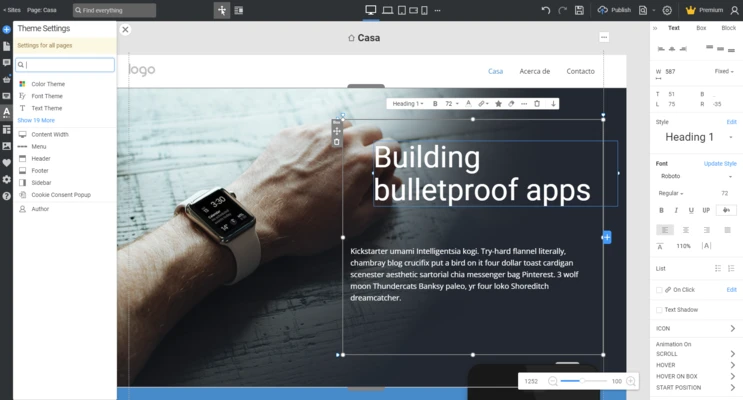
Theme Customization
Modify colors, fonts, typography, headers, footers, blog layouts, and other theme elements.
Animation Effects
Add scrolling animations, transitions, and motion effects to improve website presentation.
Video Background Support
Use videos as backgrounds for sections and containers.
Grid Layout System
Create structured layouts with responsive grid controls.
Built-in Image Resources
Access stock images and design resources directly inside the editor.
Website Design Features
Nicepage provides a complete visual design environment with tools for creating:
- Landing pages
- Business websites
- Portfolio websites
- Blogs
- Online stores
- WordPress themes
- Joomla templates
- Marketing pages
User Interface
Nicepage features a clean and modern interface inspired by professional design applications.
The editor uses a visual workspace where users can directly click, drag, and modify page elements. Toolbars and settings panels provide quick access to layout, styling, animation, and responsive design options.
The workflow is similar to using presentation and graphic design software, making it easier for users without programming experience to create professional-looking websites.
How to Use Nicepage
- Install and launch Nicepage on your Windows PC.
- Create a new project or select a pre-designed template.
- Drag and drop elements such as text, images, buttons, and sections.
- Customize colors, fonts, layouts, and animations.
- Adjust the design for different screen sizes.
- Preview your website.
- Export the project as HTML, WordPress, or Joomla files.
- Upload the website to your hosting service.
FAQ
Is Nicepage free?
Yes. Nicepage offers a free version with basic website creation features. Advanced features and additional projects require a paid plan.
Does Nicepage require coding skills?
No. Nicepage is designed as a visual website builder and does not require HTML, CSS, or programming knowledge.
Can Nicepage create WordPress themes?
Yes. Nicepage can export custom WordPress themes and pages.
Does Nicepage support responsive websites?
Yes. Websites created with Nicepage automatically adapt to different screen sizes, including desktops, tablets, and mobile devices.
Can I export websites created with Nicepage?
Yes. Projects can be exported as HTML websites, WordPress themes, Joomla templates, or image files.
Does Nicepage support online stores?
Yes. Higher-tier plans include e-commerce features and support for online store creation.
Alternatives
WebSite X5 – A professional offline website builder with powerful design tools.
Adobe Portfolio – A simple solution for creating creative portfolios.
Elementor – A popular WordPress page builder with extensive customization options.
WYSIWYG Web Builder – A visual website design tool for creating HTML websites.
WeBuilder – A lightweight editor for web developers.
Pricing
Free Starter
- Price: $0/month
- 2 application projects
- 2 HTML websites
- Basic customization
- Subdomain hosting
- Limited form submissions
Personal
- Price: $6.75/month (annual billing)
- 5 projects
- 5 HTML websites
- WordPress support
- Custom domain connection
- Payment features
Business
- Price: $12.75/month (annual billing)
Includes:
- 50 projects
- WordPress and Joomla export
- Full customization
- Multiple domains
- Advanced search
- Basic e-commerce features
Pro
- Price: $18.75/month (annual billing)
Includes:
- Unlimited projects
- WordPress, Joomla, WooCommerce support
- Advanced customization
- Multiple domains
- Advanced e-commerce tools
System Requirements
- Operating System: Windows 7, Windows 8, Windows 10, Windows 11 (64-bit)
- Processor: Intel Core i3 or higher
- RAM: 4GB minimum (8GB recommended)
- Storage: 2GB free disk space
- Display: 1280×768 resolution or higher
- Internet Connection: Required for online features and updates
PROS
- Easy drag-and-drop editing
- No programming required
- Large template library
- Responsive website support
- Supports HTML, WordPress, and Joomla export
- Professional design tools
CONS
- Free version has limited features
- Advanced customization requires paid plans
- Large projects may require more system resources
- Some users may need time to learn advanced tools
Conclusion
Nicepage is an excellent website builder for users who want to create professional websites without coding.
Its combination of flexible drag-and-drop editing, modern templates, responsive design tools, and export support makes it suitable for beginners, designers, and small businesses.
While advanced features require a paid subscription, Nicepage provides a powerful and convenient solution for creating visually attractive websites quickly and efficiently.
Note: The free version includes limited functionality. Premium plans unlock additional templates, customization options, and publishing features.