SoftEther VPN Gate Client Plugin is a free and open-source extension for the SoftEther VPN Client that allows Windows users to connect to public VPN Gate relay servers operated by volunteers around the world.
The plugin provides access to a large, constantly changing list of public VPN servers. Users can select servers by country, latency, uptime, and other available information, then route their Internet traffic through the selected server without creating a VPN Gate account.
Because the servers are volunteer-operated, connection speed, availability, and reliability can vary considerably. Users should also avoid sending highly sensitive information through untrusted public VPN servers.
What's New
Recent updates focus on improving compatibility, connection handling, stability, and the overall VPN Gate client experience.
The available public server list is also dynamic, with servers appearing and disappearing as volunteers start or stop their VPN Gate relay services.
Key Features
Free Public VPN Servers: Connect to VPN Gate relay servers provided by volunteers around the world without paying for a subscription.
Global Server Selection: Browse available servers in different countries and select one based on location, latency, uptime, and connection speed.
No Registration Required: VPN Gate does not require users to create an account before connecting to public relay servers.
Multiple VPN Protocols: VPN Gate supports SoftEther VPN and can work with OpenVPN, L2TP/IPsec, and SSTP-compatible connections depending on the client and server configuration.
Encrypted VPN Connections: VPN connections use encryption to protect traffic between your device and the selected VPN server.
IP Address Masking: Internet services generally see the public IP address of the VPN server instead of your original public IP address.
Firewall and NAT Traversal: SoftEther VPN is designed to establish VPN connections through many NAT environments and restrictive network configurations.
Dynamic Server Network: Public VPN Gate servers are operated independently, so server availability and performance can change over time.
Open Source: The underlying SoftEther VPN software is open source and developed as an academic research project at the University of Tsukuba.
User Interface
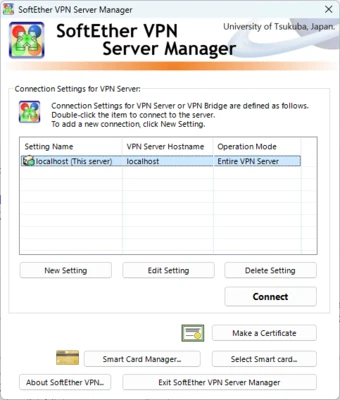
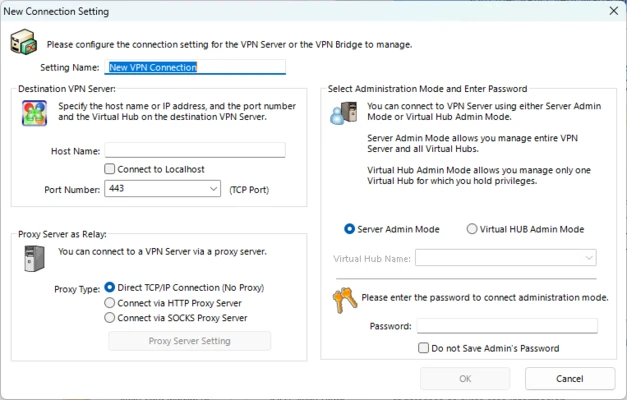
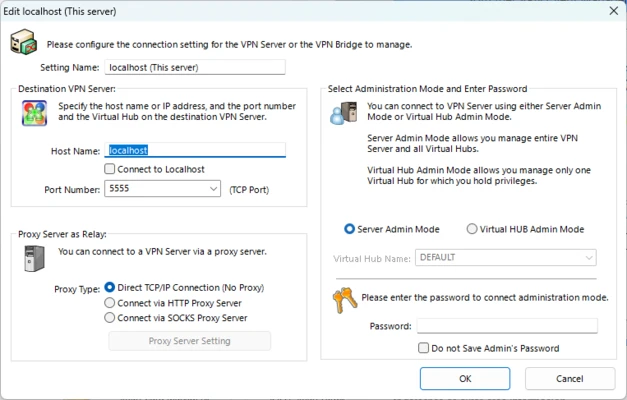
The VPN Gate Client Plugin integrates with the SoftEther VPN Client Manager rather than functioning as a completely separate VPN application.
The VPN Gate server list displays available public relay servers along with information such as country, connection speed, ping, and uptime. Users can select a server and initiate a connection directly from the client interface.
The interface is relatively technical but straightforward once the VPN Client Manager is installed.
Installation and Setup
First install the SoftEther VPN Client on a compatible Windows computer and then install the VPN Gate Client Plugin.
After installation:
-
Launch SoftEther VPN Client Manager.
-
Open the VPN Gate Public VPN Relay Servers section.
-
Wait for the public server list to load.
-
Select a VPN server based on location, ping, and current performance.
-
Double-click the selected server.
-
Accept the connection terms if prompted.
-
Wait for the VPN connection to be established.
Because VPN Gate servers are operated by volunteers, a server that is available today may be offline later.
How to Use
Choose a Server: Open the VPN Gate public server list and review the available servers.
Check Performance: Compare the displayed ping, speed, uptime, and user information before selecting a server.
Connect: Double-click a server and follow the connection prompts.
Verify the Connection: After connecting, your Internet traffic should be routed through the selected VPN server.
Disconnect: Return to the SoftEther VPN Client Manager and disconnect the active VPN connection when you no longer need it.
For better performance, try another server if the current connection is slow or unstable.
FAQ
Is SoftEther VPN Gate Client Plugin free?
Yes. VPN Gate is provided as a free public VPN relay service, and no subscription is required to connect to its public servers.
Does VPN Gate require registration?
No. Users can connect to available public VPN Gate servers without creating an account.
Does VPN Gate work on Windows 11?
Yes. The VPN Gate Client Plugin is designed to work with the SoftEther VPN Client on supported Windows versions, including Windows 11.
Are VPN Gate servers safe?
VPN Gate provides encrypted connections, but its public relay servers are operated by independent volunteers. Users should therefore avoid transmitting highly sensitive information through an unfamiliar public VPN server.
Can I select a VPN server in a specific country?
Yes. The public relay server list provides servers from many different countries and regions. Availability depends on which volunteers are currently operating servers.
Why does a VPN Gate server sometimes disappear?
VPN Gate servers are operated by volunteers. They can go offline, change their IP addresses, or stop participating at any time.
Does VPN Gate provide a mobile app?
The VPN Gate Client Plugin itself is primarily intended for use with the SoftEther VPN Client on Windows. Other devices can connect to compatible VPN Gate servers using supported VPN protocols and appropriate VPN clients.
Alternatives
NordVPN – A commercial VPN service offering dedicated infrastructure, centralized management, and applications for multiple platforms.
ExpressVPN – A paid VPN service focused on ease of use, broad platform support, and a large network of VPN servers.
Proton VPN – A privacy-focused VPN service that offers both free and paid plans.
Windscribe – A VPN service with free and paid options, supporting multiple platforms and VPN configurations.
Pricing
SoftEther VPN Gate Client Plugin is free to use. VPN Gate's public relay network does not require a paid subscription or mandatory user account.
System Requirements
-
Operating System: Windows 7, 8, 10, 11, or compatible versions
-
CPU: 1 GHz or faster recommended
-
RAM: 512 MB or more
-
Storage: Approximately 100 MB of available disk space
-
Internet Connection: Required
Actual requirements may vary depending on the SoftEther VPN Client version and Windows configuration.
Pros
-
Free to use
-
Open-source underlying VPN software
-
No registration required for public VPN Gate servers
-
Servers available in many countries
-
Multiple VPN protocol options
-
Simple server selection through SoftEther VPN Client Manager
Cons
-
Public servers are operated by volunteers
-
Server availability and performance can change frequently
-
Connection speeds may be inconsistent
-
Public VPN servers require more trust than a dedicated commercial VPN service
-
Primarily designed for Windows through the SoftEther VPN Client
-
Not ideal for users who need guaranteed server performance or dedicated infrastructure
Conclusion
SoftEther VPN Gate Client Plugin provides a free way to access VPN Gate's worldwide network of volunteer-operated public VPN servers through the SoftEther VPN Client. Its main advantages are the large server network, lack of registration requirements, multiple protocol options, and open-source foundation.
However, VPN Gate should not be treated as equivalent to a premium commercial VPN service. Since individual servers are operated by volunteers, their speed, availability, and trustworthiness can vary. For casual browsing and testing different VPN locations, it can be a useful option, while users handling highly sensitive information may prefer a reputable VPN provider with dedicated infrastructure and clearly defined security policies.