Vivaldi is a free and highly customizable web browser for Windows 11 and Windows 10 designed for users who want more control over their browsing experience.
Based on the Chromium engine, Vivaldi combines compatibility with Chrome extensions with advanced tab management, extensive interface customization, built-in productivity tools, and privacy-focused features. Users can customize the browser layout, toolbars, keyboard shortcuts, mouse gestures, tabs, themes, and many other aspects of the interface.
What’s New
Recent versions of Vivaldi include improvements to tab management, Workspaces, built-in Mail, Calendar, and Feeds, privacy features, synchronization, performance, and Chromium compatibility. Updates also bring refinements to the user interface, themes, toolbars, address bar, and built-in content blocking.
Key Features
-
Highly customizable browser interface.
-
Built on the Chromium engine.
-
Supports Chrome Web Store extensions.
-
Advanced tab stacking and tab tiling.
-
Workspaces for organizing different browsing sessions.
-
Quick Commands for keyboard-driven navigation.
-
Custom keyboard shortcuts and mouse gestures.
-
Built-in ad and tracker blocking.
-
Web Panels for accessing websites from the sidebar.
-
Built-in Notes for saving text and web content.
-
Screenshot and page capture tools.
-
Built-in translation tool.
-
Pop-out video for watching videos in a floating window.
-
Built-in Mail, Calendar, and Feed Reader.
-
Synchronization across supported devices.
-
Customizable Speed Dial and Start Page.
-
Reader View for distraction-free reading.
-
Command Chains for creating custom browser workflows.
-
Periodic tab reload for automatically refreshing web pages.
-
Extensive theme and appearance customization.
-
Detailed browsing history management.
User Interface
Vivaldi provides an interface designed around customization and productivity. Users can choose the position of tabs, address bars, toolbars, and other interface elements.
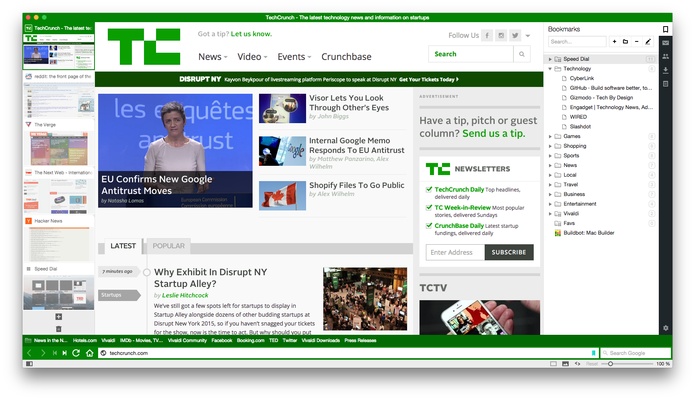
The sidebar provides quick access to bookmarks, downloads, notes, history, settings, and Web Panels. The Start Page includes a customizable Speed Dial for frequently visited websites.
Users can also customize themes, icons, toolbars, menus, keyboard shortcuts, and mouse gestures. This makes the browser suitable for users who prefer to configure their browsing environment in detail.
Installation and Setup
Download the Vivaldi installer for Windows and run the setup file.
Follow the on-screen instructions to complete the installation. During the initial setup, you can select a theme, configure the interface, import bookmarks and browsing data, and adjust privacy and browser settings.
After setup is complete, additional features and interface elements can be configured from the Settings menu.
How to Use
Customize the Browser
Open Settings to customize the appearance, toolbar layout, tab position, themes, menus, and other interface elements.
Organize Tabs
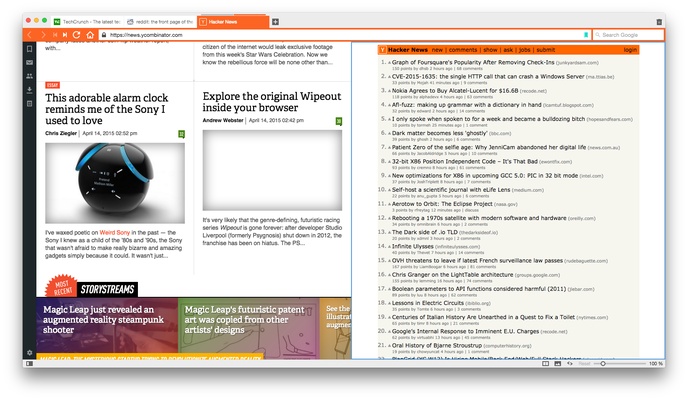
Drag tabs together to create Tab Stacks. You can also use Tab Tiling to display multiple web pages side by side.
Create Workspaces
Create separate Workspaces for different activities, such as work, research, personal browsing, or entertainment.
Use Quick Commands
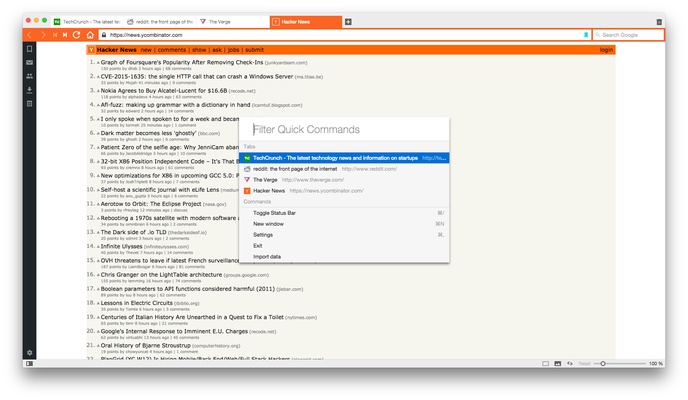
Press the Quick Commands shortcut to search through open tabs, bookmarks, history, settings, and other browser functions without navigating through multiple menus.
Use Web Panels
Add frequently visited websites to the sidebar as Web Panels. This allows you to access services without opening a separate full-size browser tab.
Take Notes and Screenshots
Use the built-in Notes and Capture tools to save information or capture portions of web pages while browsing.
Use Built-In Productivity Tools
Use Vivaldi Mail, Calendar, and Feed Reader to manage supported email, scheduling, and content feeds directly within the browser.
Synchronize Data
Sign in to a Vivaldi account and enable synchronization to keep supported browser data available across compatible devices.
FAQ
Is Vivaldi free?
Yes. Vivaldi is free to download and use.
Is Vivaldi based on Chromium?
Yes. Vivaldi is built on the Chromium browser engine, providing compatibility with modern web standards and many Chrome extensions.
Can Vivaldi use Chrome extensions?
Yes. Vivaldi supports Chrome extensions, allowing users to install many extensions from the Chrome Web Store.
Is Vivaldi good for privacy?
Vivaldi includes built-in tracker and ad blocking and provides various privacy and security controls. The company also emphasizes minimizing unnecessary user tracking and data collection.
Does Vivaldi have a built-in ad blocker?
Yes. Vivaldi includes built-in ad and tracker blocking that can be configured through the browser settings.
Can I synchronize Vivaldi across devices?
Yes. Vivaldi Sync can synchronize supported browser data, including bookmarks, passwords, settings, and other information between compatible devices.
Does Vivaldi have built-in email and calendar tools?
Yes. Vivaldi includes integrated Mail and Calendar features, along with a Feed Reader.
Can Vivaldi manage multiple tabs?
Yes. Vivaldi provides Tab Stacks, Tab Tiling, Workspaces, and other tools designed for managing large numbers of tabs.
Is Vivaldi available on mobile devices?
Yes. Vivaldi also provides mobile browser versions for supported Android and iOS devices.
Alternatives
Google Chrome: A widely used Chromium-based browser focused on compatibility, performance, and a large extension ecosystem.
Mozilla Firefox: A customizable browser with a strong focus on privacy, security, and open web technologies.
Opera: A feature-rich Chromium-based browser with built-in privacy, productivity, and media tools.
Brave: A privacy-focused Chromium-based browser with built-in ad and tracker blocking.
System Requirements
-
Operating System: Windows 10 or Windows 11 (64-bit)
-
Processor: Intel or AMD processor compatible with the supported Windows version
-
Memory: 1 GB RAM or more recommended
-
Storage: Sufficient free disk space for installation and browser data
-
Internet connection: Required for downloading, synchronization, and online browsing
Pros
-
Highly customizable interface.
-
Advanced tab management.
-
Supports Chrome extensions.
-
Built-in ad and tracker blocking.
-
Workspaces and Tab Stacks are useful for multitasking.
-
Includes Mail, Calendar, Notes, and Feed Reader tools.
-
Extensive keyboard shortcut and mouse gesture support.
-
Built-in screenshot and translation tools.
-
Strong privacy controls.
Cons
-
The large number of features can feel overwhelming.
-
Requires some time to configure and learn.
-
Uses more system resources than some minimalist browsers.
-
Built-in tools may be unnecessary for users who prefer a simple browser.
Conclusion
Vivaldi is a powerful and highly customizable web browser designed for users who want more control over their browsing environment. Its Chromium foundation provides compatibility with modern websites and Chrome extensions, while features such as Tab Stacks, Workspaces, Web Panels, Quick Commands, and built-in productivity tools provide additional flexibility.
For users who value customization, multitasking, and privacy controls, Vivaldi is a strong alternative to more minimalist browsers.