

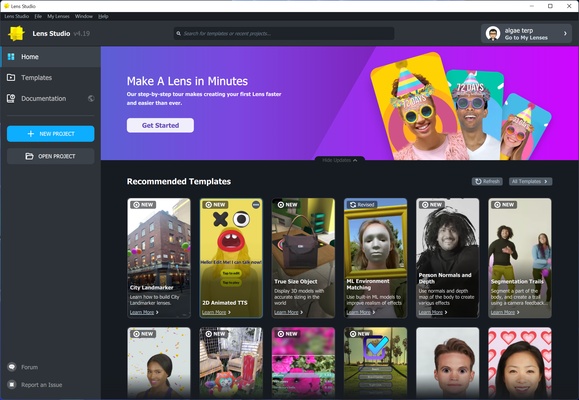
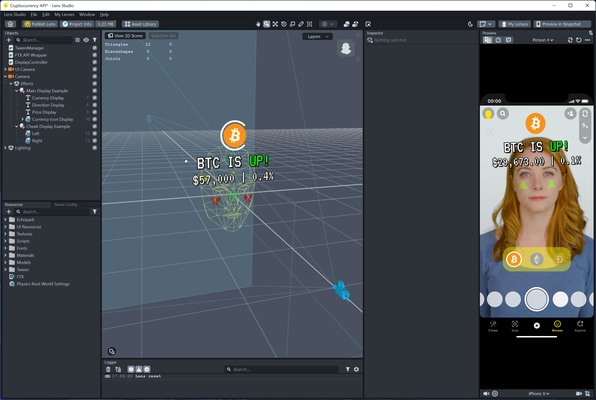
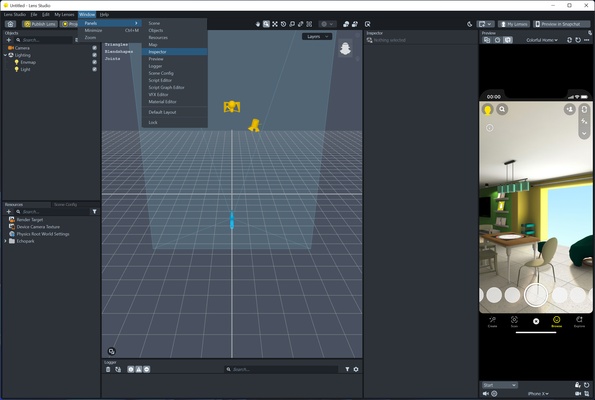
Lens Studio is a powerful augmented reality development platform designed for artists, designers, and developers to create interactive AR experiences. Developed by Snap, it provides a comprehensive set of tools for building everything from simple selfie effects to advanced interactive environments.
The software combines visual development tools with scripting, 2D and 3D asset support, advanced tracking, machine learning, and real-time preview capabilities. Creators can develop AR experiences for Snapchat and supported Snap platforms while testing their work directly during development.
Key Highlights
Generative AI Tools
Lens Studio includes AI-powered tools that can help creators generate assets and experiment with machine learning-based effects using text or image prompts.
Developer-Friendly Workflow
The platform supports JavaScript and TypeScript, allowing developers to create more advanced interactions and custom functionality. Its modular architecture also makes it possible to extend projects with additional packages and plugins.
Spatial Development
Creators can develop interactive AR experiences for Spectacles and other supported spatial platforms, with tools for shared experiences, multiple preview windows, and synchronized interactions.
AI Assistant
An integrated AI assistant can help creators find information, understand features, and troubleshoot development problems using Lens Studio's learning resources.
Features
Augmented Reality Creation
Lens Studio provides a wide range of tools for creating AR experiences that can be used for entertainment, communication, education, marketing, shopping, and other applications.
Creators can build experiences for mobile devices and supported Snap platforms while taking advantage of real-time camera tracking and interactive effects.
Custom Materials and Shaders
The Material Editor allows creators to customize the visual appearance of objects and effects.
Users can create custom materials and shaders or start with predefined materials to build distinctive visual styles without having to develop every graphical component from scratch.
Interactive Experiences
Lens Studio provides visual tools for creating interactive behavior without requiring extensive programming knowledge.
Beginners can use templates and behavior components to quickly build basic experiences, while experienced developers can use JavaScript or TypeScript for more sophisticated interactions.
Advanced Tracking
The platform includes multiple tracking technologies for connecting virtual content with the physical environment.
Depending on the project, creators can work with features such as:
- Face tracking
- Body tracking
- Hand tracking
- Segmentation
- Object tracking
- Landmarker tracking
- World and surface tracking
These capabilities allow digital objects and effects to respond naturally to people and their surroundings.
SnapML
SnapML brings machine learning capabilities into AR projects.
Creators can use compatible machine learning models for tasks such as image processing, segmentation, object recognition, artistic effects, and other computer vision applications.
This allows developers to create more intelligent AR experiences that respond dynamically to what the camera sees.
2D and 3D Assets
Lens Studio supports both 2D and 3D content, allowing creators to combine images, animations, models, materials, sounds, and interactive elements in the same project.
Assets can be customized and arranged within the scene editor to create complex AR environments.
Real-Time Preview
The built-in preview tools allow creators to test their projects while developing them.
Projects can be previewed directly within Lens Studio, while compatible mobile devices can also be used for testing AR effects in a more realistic environment.
Why Choose Lens Studio?
AR for Multiple Platforms
Lens Studio is closely integrated with the Snap ecosystem, allowing creators to build experiences for Snapchat and supported Spectacles platforms.
Its development tools are designed to accommodate both simple social effects and more sophisticated AR applications.
Tools for Different Skill Levels
Beginners can start with templates and visual tools, while experienced developers can combine scripting, custom shaders, machine learning, and advanced tracking technologies.
This makes Lens Studio suitable for both artists who prefer visual development and programmers who want deeper control over their projects.
Creative Possibilities
The combination of 2D graphics, 3D models, materials, tracking, machine learning, and interactive scripting provides considerable flexibility.
Creators can develop everything from simple face effects to interactive AR environments that respond to users and their surroundings.
How to Use
- Download and install Lens Studio on your Windows PC.
- Launch the application and sign in with your Snap account if required.
- Start a new project or select an available template.
- Add 2D images, 3D models, materials, animations, and other assets.
- Configure tracking and interactive behaviors.
- Use the preview tools to test your AR experience.
- Connect a compatible mobile device when additional testing is required.
- Optimize the project for performance.
- Publish the finished Lens through the supported Snap platform.
- Continue updating and managing the project as needed.
System Requirements
- Operating System: Windows 10 or Windows 11, 64-bit
- Processor: Intel Core i5 7th generation or equivalent
- RAM: 8 GB minimum, 16 GB recommended
- Graphics: NVIDIA GeForce GTX 1050 or equivalent
- Storage: At least 2 GB of available disk space
- Additional: Internet connection and compatible camera recommended
Actual requirements can vary depending on project complexity, 3D assets, effects, and machine learning features.
PROS
- Powerful tools for AR creation
- Suitable for both beginners and experienced developers
- Extensive tracking capabilities
- Supports 2D and 3D content
- JavaScript and TypeScript support
- Real-time preview capabilities
- Machine learning integration
- Regular feature updates
- Strong integration with Snapchat
CONS
- Advanced features have a relatively steep learning curve
- Complex projects can require substantial GPU resources
- Some features are closely tied to the Snap ecosystem
- Large AR projects can be demanding on lower-end computers
- Occasional bugs or stability issues may occur
Conclusion
Lens Studio is a comprehensive AR creation platform that gives artists and developers extensive control over augmented reality experiences. Its combination of visual development tools, scripting, 3D content, advanced tracking, machine learning, and real-time preview makes it suitable for creating both simple social effects and sophisticated interactive AR projects.
For creators working within the Snapchat and Snap AR ecosystem, Lens Studio provides one of the most capable toolsets for designing, testing, and publishing interactive augmented reality experiences.
Note: Some features and publishing capabilities may depend on the current Lens Studio version and supported Snap platforms.